
pjdebagiddckajlbjdpmcdadllgalhhh
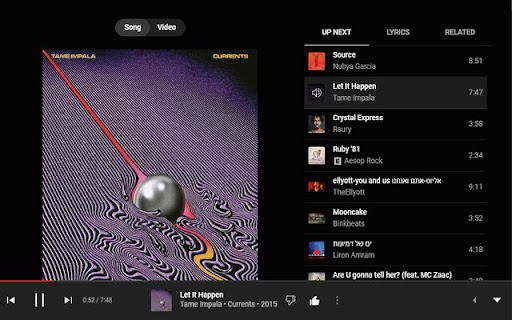
An extension that ensures the dislike button is always visible on YouTube Music, even in smaller windows. An extension that ensures the dislike button is always visible on YouTube Music, even in smaller windows.

Adblock for YouTube Block Ads Skip Video Sponsored
YouTube ad blocker – blocks banners and pop-ups. Enjoy ad-free, faster browsing and protect your privacy effortlessly! Annoying ads interrupting your favorite YouTube videos? Block them with Adblock for YouTube — a fast and lightweight Chrome extension designed to give you back your viewing time. Block All Types of YouTube Ads: Instantly remove video ads, banners, pop-ups, and overlays. Enjoy Faster Browsing: Reduce data usage and load videos faster by preventing heavy ad scripts from running. Protect Your Privacy: Block trackers and malicious scripts to safeguard your information. Lightweight and Efficient: Works in the background without slowing down your browser. Customizable Settings: Adjust blocking preferences easily via the extension popup. Why Choose Adblock for YouTube: Seamless Experience: Save bandwidth and enjoy smooth, uninterrupted streaming. How It Works: The extension detects and filters ad-related requests and cleans the page layout using optimized CSS rules. It is designed to be a "set and forget" solution, ensuring a clean interface every time you open a video. Affiliate Program Disclosure: To support the ongoing development and maintenance of this extension, Adblock for YouTube uses affiliate programs. This means that some links on the websites you visit may be automatically replaced with affiliate links. This process does not collect or share any of your personal data. It does not add any extra cost to your purchases. You can easily disable all affiliate redirects at any time using the ON/OFF switch in the extension's popup menu. We aim to offer a premium ad-free experience while providing a transparent way to support the project.

Permanent Progress Bar for YouTube
Always display a tiny progress bar with buffer loading on YouTube's player even in the fullscreen mode This extension brings a small, persistent progress bar to the YouTube player, enhancing your viewing experience. You can customize the extension to adjust the bar's height and color on the options page. The beauty of this feature lies in its adaptability ? it remains hidden until the default YouTube progress bar disappears, even in fullscreen mode! The primary goal is to offer a constant visual cue of the player's progress status. If the bar appears too slim for your screen, head to the options page and tweak the height setting. Exciting Features: 1. Keep track of the loaded percentage (buffered video progress). 2. Monitor the current position of the player. 3. Updates of these percentages every 2 seconds (adaptive). 4. Almost all features are fully customizable through the options page. 5. Compatible with the YouTube website and embedded YouTube players on any website. 6. Hides the permanent progress bar on live streams Recent Changes: Version 0.2.0: 1. The extension has been upgraded to manifest v3, ensuring improved functionality and performance.

Video AdBlock for YouTube™ Extension
Removes all YouTube™ video and text ads. Lightweight and safe, with minimal required permissions. Also works with YouTube™ Music. * Removes YouTube™ video and text ads. * Works on all websites that contain a YouTube™ video. * Also works with YouTube™ Music.

Music Mode for YouTube™
Hides the video and thumbnails on YouTube. Blocks the video keeping only the audio on YouTube Music. Reduce distractions and hide NSFW content on YouTube and YouTube Music with Music Mode for YouTube™, perfect for uninterrupted music listening. A browser extension that hides the video and thumbnails on YouTube, YouTube Music and embedded YouTube videos on third-party sites. On YouTube Music, the video is completely blocked. It is the only extension that not only disables the video but also blocks it on YouTube Music, reducing CPU and GPU usage and saving bandwidth. FEATURES (ALL OPTIONAL): 1. Hides the video on YouTube and blocks the video, playing only the audio on YouTube Music 2. Hides the video thumbnails 3. Hides the images of channel/user avatars 4. Hides various other images 5. Disables the "Video paused. Continue watching?" message 6. Skips the ads Separate options for YouTube, YouTube Music and YouTube videos embedded on other sites. You can enable/disable the extension for all tabs or for specific tabs. Extra options: 1. Quick access buttons: two extra buttons on YouTube in order to hide the thumbnails and hide the video quickly without using the popup window Notes: i. If you have enabled the features 1, 2, 3, 4 and 6 the images are not only hidden but also blocked saving more bandwidth ii. The message "Video paused. Continue watching?" is disabled only when you block the video iii. If you want to hide Shorts use the new No Shorts Mode for YouTube™ extension: https://chromewebstore.google.com/detail/no-shorts-mode-for-youtub/ilkcgpioigbhepilmhljihldmpgldpme Available for mobiles using the Kiwi or Firefox browsers that support extensions. Available for Firefox: https://addons.mozilla.org/en/firefox/addon/music-mode-for-youtube/ The source code of the extension is now available on GitHub: https://github.com/Thunderarea/music-mode-for-youtube The extension does not collect any kind of data. The user options are stored locally in the user's browser. Donate to support the development of the extension: https://www.paypal.com/donate?hosted_button_id=V2EHRNX8RBTX2
