
oghkljobbhapacbahlneolfclkniiami

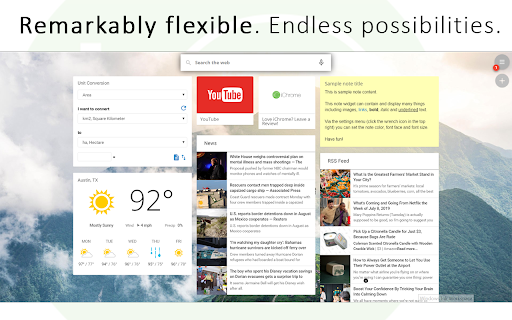


A remarkably customizable personal homepage featuring 50+ widgets, breathtaking backgrounds and much more. A lightning fast homepage dashboard with stunning backgrounds, news, weather, HTML, Bookmarks, sports, RSS feed, stocks, todo, custom iFrames and much more! Make your homepage the way you want it to be: Fast, customizable, beautiful and productive! ProductivityTab includes dozens of widgets, hundreds of stunning backgrounds, and powerful features including: ✔ Embed your favorite sites or web assets using custom HTML and iFrame widgets, and stay up to date with multi-tab RSS feeds. ✔ Increase your productivity with Todo, Notes, Clock, Google Analytics and System Statistics ✔ Stay up to date with Weather, Sports, News, Stocks, Feedly, Reddit, YouTube, and Pocket ✔ Manager your browser using Bookmarks, Top Sites and Recently Closed Tabs widgets ✔ Quick access to your Google Drive, Gmail, Calendar, Tasks, Keep, Voice and Classroom services ✔ Dictionary, Quotes, Translation, Currency and Unit Conversion utilities are always on hand to help you out. ✔ Fully featured voice search and "OK Google" hotword detection ✔ Drag and drop customization on 1-5 columns or a freeform grid! ✔ Navigate between an unlimited number of customizable tabs, each with their own widgets and settings. ✔ Automatic backups of your settings and data, and Google authenticated login so you can take your dashboard anywhere! ✔ Upgrade to Pro and get dark and transparent themes, live backgrounds, maximizable widgets, hourly weather forecasts, and much more ✔ Limitless customization - your imagination is the limit! Plus hundreds more features! Install ProductivityTab now and check them out! Sick of new tab extensions that lock you in? Looking for a beautiful start page that keeps getting better? ProductivityTab is for you! -- Only want ProductivityTab to show when you open a new tab? Try the main extension: https://ichro.me Feedback and suggestions are welcome anytime at: http://ichrome.uservoice.com

Popup my Bookmarks
A more efficient way to view and manage your bookmarks menu. - Search bookmarks when you type - Do what Bookmark manager can do and more (e.g., Sort bookmarks by name, Add separator) - Save 24px of your vertical workspace (Rock on Chromebook!) - Take as few permissions as possible, we never put your privacy at risk - No background running application, save computer memory and your privacy!

App Launcher in Popup
Allows you to access the Google App Launcher right from the Chrome toolbar This app has been replaced with G App Launcher, see: https://chromewebstore.google.com/detail/g-app-launcher-shortcuts/ponjkmladgjfjgllmhnkhgbgocdigcjm This extension allows you to access Google's App Launcher right from the chrome toolbar. This way, you don't need to open a new tab or browse to a google website to access it.

Minimal Bookmarks Tree
Display a tree of bookmarks under a toolbar button, and search your bookmarks in the omnibox using the keyword 'bm'. This extension adds a button to Chrome in the top right corner (next to the "three-dot" settings button). When you click the button you get a tree of your bookmarks with folders that you can open and close by clicking them. A simple -non obtrusive- sliding animation is applied to the opening and closing of folders. You can open bookmarks in the following ways: - click: open in current tab - middle-click (scrollwheel): open in new tab and close minimal bookmarks tree - ctrl+click: open in new tab and keep minimal bookmarks tree open You can also right click a folder and click "Open all" to open all bookmarks in that folder in tabs. Right click also let's you edit/delete bookmarks and folders. The tree uses simple folder icons that show their state (open/close) and also shows the favicons for the websites you've bookmarked. The extension remembers which folders were open, so you can leave your favorite folders open at all times. Additionally the extension enables you to search through your bookmarks and bookmark folders easily by entering 'bm' into the URL bar (or "omnibox" as chrome calls it) and then type your search terms. It is not and will not be possible to search in the popup window itself because this wouldn't add anything to the extension; it would just duplicate behaviour. The extension needs permission to view and edit your bookmarks, but will only ever edit bookmarks if you instruct it to, it will never change bookmarks on its own. Minimal bookmarks tree is completely open source and available on github: https://github.com/rpkamp/chrome-minimal-bookmarks-tree Any and all suggestions are welcome!

Shortcuts for Google™
For the latest features, install G App Launcher: https://chrome.google.com/webstore/detail/ponjkmladgjfjgllmhnkhgbgocdigcjm Display all Google™ services as buttons in a space-saving popup next to your address bar. Reach services like Gmail, Google Drive, Google Keep, Google Maps, Google Calendar, and many more in just two clicks from your browser. The extension includes more than 1000 Google services and websites. Main features =================================== ✓ More than 1000 Google™ shortcuts, continuously updated ✓ shortcuts can be sorted and rearranged according to your needs (take a look at the screenshots) ✓ Support for different icon sizes ✓ Add your own custom URL button like a link to Facebook ✓ Change names of services ✓ Integration of GMail this!, Map this!, etc. Support =================================== Please report bugs and requests using the following link and not the comments: https://apps.jeurissen.co/shortcuts-for-google/contact The developer of this extension is not affiliated in any way with Google Inc. All Google icons and names are a trademark of Google Inc. Use of this trademark is subject to Google Permissions. Notice: All referenced brands, product names, service names and trademarks are property of their respective owner(s). The extension is free at the moment, you can buy me a coffee here: https://apps.jeurissen.co/shortcuts-for-google/donate
