
ogakgacjkoojmdahpelppalilhhplnbe
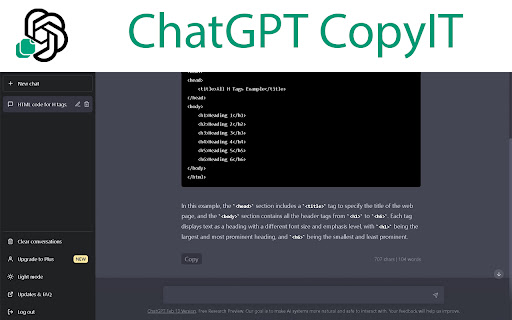


ChatGPT CopyIt adds a copy to clipboard button end of each answer. Also it shows word and character counter. This extension is designed specifically for the ChatGPT website, and it adds a "Copy" button to the answers on the website. When you click on this button, the text of the answer will be copied to your clipboard. The extension also displays the number of characters and words in the answer, and it updates the action buttons and counters when new messages are added to the chat. To use this extension, simply install it from the Chrome Web Store and navigate to the ChatGPT website. When you see an answer in the chat, you will notice a "Copy" button next to it. Click on this button to copy the text of the answer to your clipboard. Please note that this extension will not work on other websites or web applications, as it is specifically designed for use with ChatGPT.

ChatGPT Bottom Copy Code Button & Statistics
Adds an additional 'Copy Code' button and code statistics at the bottom of code snippets in ChatGPT. This tool adds a 'Copy Code' button below code snippets, making it easier to copy and use code examples without scrolling to the top. This feature saves time and helps avoid website performance issues that occur when generating long messages and trying to scroll to the top simultaneously. Additionally, it can display code statistics, showing the number of lines & characters in each snippet. Useful for recognizing changes in code length. 📋 Effortless Code Copying: Adds a 'Copy Code' button at the bottom of each code snippet, so you don't have to scroll to the top. 🔢 Live Code Statistics: Continuously displays the number of lines and characters in the code snippet as it’s being generated. 🎨 Seamless Integration: Blends perfectly with the website’s design, matching the original 'Copy Code' button style. ⚡ Smooth Performance: Works flawlessly even during message generation. 💻 Language Detection: Automatically identifies and displays the programming language of the code. 🔧 Customizable Options: Easily toggle the additional bar and code statistics through the extension popup. 📅 Up-to-Date: Fully compatible with the latest version of ChatGPT as of Q3 2024. ✅ Perfect for developers and programmers who need efficient code snippet copying and quick access to line and character counts. 🔴 Official extension website: https://strona.plus/project/3 ⚙️ Popup Settings ➊ Enable additional 'Copy code' button ➋ Display code's programming language ➌ Show line and character count ⭐ If you find this extension helpful, please rate it. Consider buying me a coffee ☕ https://buymeacoffee.com/kgniewek 🛠️ For any questions or feedback, contact me at contact@kgniewek.com or visit kgniewek.com/project/3 🔒 This extension does not collect any data. Your settings are stored locally. Details: kgniewek.com/project/3 🔲 Image by Freepik

CopyGPT
Share your ChatGPT chat logs with friends or save them to your computer. Introducing CopyGPT - the ultimate Chrome extension for ChatGPT users who want to easily share and save their chat logs! With our seamless integration into the ChatGPT chat window, copying conversations has never been simpler. Compatible with the ChatGPT chat interface, our user-friendly design ensures that you can effortlessly capture and preserve your AI-generated discussions. CopyGPT adds two handy buttons right next to the message input box in the chat interface, giving you full control over the chat log copying process. Button 1: Copy Conversation Capture your entire chat log in a neatly formatted conversation style. Perfect for sharing with friends or archiving for future reference, the output is structured as follows: You: You: Button 2: Copy Chat Messages Only If you prefer to focus on the AI-generated content, use this button to copy only the ChatGPT messages. This option is ideal for those who want to incorporate the chat responses into another document without the conversation format. 1. Easy integration: Effortlessly blends into the ChatGPT chat window for seamless user experience. 2. Simple to use: Two clearly labeled buttons make it a breeze to copy your chat logs. 3. Versatile: Choose between copying the entire conversation or just the ChatGPT messages. 4. Shareable: Perfect for sharing AI-generated content with friends or colleagues. 5. Archivable: Save your valuable chat logs to your computer for future reference. Don't miss out on the chance to enhance your ChatGPT experience with CopyGPT - the ultimate browser extension for capturing, sharing, and preserving your AI-generated conversations. Install it now and unlock the full potential of your ChatGPT chats! v1.1: - Add support to lists (ordered and unordered) - Add support to code blocks - Copy buttons work in the different chat conversations history v1.3: - Add support to new domain for ChatGPT

Copy for Chat GPT
This extension allows you to copy chat GPT responses with a click of a button or CMD+K and runs it through plagiarism detectors 📋 Simple Buttons: Copy ChatGPT responses by just clicking on the "Copy" button. It's as easy as it gets! 🚨 Automatically runs copied text through plagiarism detectors such as GPTZero to check if the generated text gets flagged and warns you about it! 🐙 100% Open Source! The source code for CopyGPT is free and available on GitHub ✨ Get CopyGPT (Copy for ChatGPT) today to elevate your ChatGPT experience! ✨ 🐛 If you have any issues please report them at: https://copygpt.sethusenthil.com/issues 🐛 Reporting there will help us get the information we need in order to fix the issue or bug! Thank you! CopyGPT might break when ChatGPT updates their web application, I will try my best to keep it up to date but there might be a day or two when CopyGPT might not function as its supposed to. But I can assure you I will be working on a fix!

Copy Button for ChatGPT
Adds a native looking copy button for ChatGPT messages. 🌟 Introducing Copy Button for ChatGPT 🌟 📌 What is it? 'Copy Button for ChatGPT' is a sleek, modern, and native-looking chrome extension designed specifically to enhance your ChatGPT experience. This extension seamlessly integrates with ChatGPT messages, allowing you to copy copy text, tables, lists, code blocks, and all markdown elements while maintaining their original formatting. 🚀 Boost your ChatGPT experience Tired of struggling with copying messages from ChatGPT? Say goodbye to those tedious copy-pasting issues! With the 'Copy Button for ChatGPT' extension, a simple click is all it takes to duplicate messages without losing any formatting. Enjoy a hassle-free and more productive ChatGPT session! 🎨 Easy to Use and Visually Appealing The 'Copy Button for ChatGPT' extension is incredibly user-friendly and requires no technical expertise. With just one click, the message is copied to your clipboard, complete with all formatting intact. Moreover, the button's design is carefully crafted to blend seamlessly with the ChatGPT interface, ensuring a consistent and unobtrusive appearance. 🌍 Multi-Language Support: This extension works flawlessly with ChatGPT messages in various languages, making it a versatile tool for users around the globe. 🔒 Privacy and security Your privacy matters. We do not collect any personal information or data under any circumstances. It's focused solely on improving your ChatGPT experience while keeping your data safe and secure. ✅ Free to Use This extension is completely free to use. Enhance your ChatGPT experience without any pesky ads, fees, or subscriptions. 📣 Spread the Word 📣 Love this extension? Don't keep it to yourself! Share it with your friends, colleagues, and fellow ChatGPT enthusiasts. Give them the opportunity to enjoy a seamless, hassle-free ChatGPT experience too! 🔓 Open Source and Community Driven 🔓 The extension is fully open source and available on GitHub. Feel free to contribute! 🔗 Access the GitHub repository here: https://github.com/tuffstuff9/Copy-Button-for-ChatGPT 💡 Got Feedback or Ideas? 💡 We're always looking for ways to improve our extension and make it even more useful for you. If you have any feedback, suggestions, or ideas, feel free to reach out to out. We endeavor to respond to all requests within 24 hours.
