
aaijojmbigpbeplhpjfmebpebcaabbjp
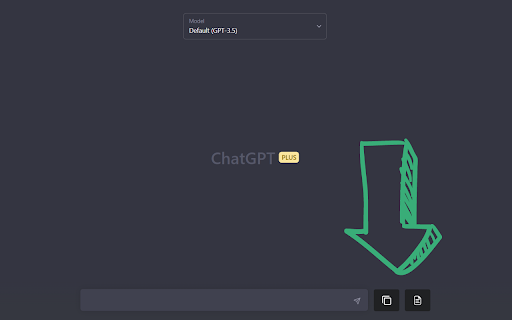


Share your ChatGPT chat logs with friends or save them to your computer. Introducing CopyGPT - the ultimate Chrome extension for ChatGPT users who want to easily share and save their chat logs! With our seamless integration into the ChatGPT chat window, copying conversations has never been simpler. Compatible with the ChatGPT chat interface, our user-friendly design ensures that you can effortlessly capture and preserve your AI-generated discussions. CopyGPT adds two handy buttons right next to the message input box in the chat interface, giving you full control over the chat log copying process. Button 1: Copy Conversation Capture your entire chat log in a neatly formatted conversation style. Perfect for sharing with friends or archiving for future reference, the output is structured as follows: You: You: Button 2: Copy Chat Messages Only If you prefer to focus on the AI-generated content, use this button to copy only the ChatGPT messages. This option is ideal for those who want to incorporate the chat responses into another document without the conversation format. 1. Easy integration: Effortlessly blends into the ChatGPT chat window for seamless user experience. 2. Simple to use: Two clearly labeled buttons make it a breeze to copy your chat logs. 3. Versatile: Choose between copying the entire conversation or just the ChatGPT messages. 4. Shareable: Perfect for sharing AI-generated content with friends or colleagues. 5. Archivable: Save your valuable chat logs to your computer for future reference. Don't miss out on the chance to enhance your ChatGPT experience with CopyGPT - the ultimate browser extension for capturing, sharing, and preserving your AI-generated conversations. Install it now and unlock the full potential of your ChatGPT chats! v1.1: - Add support to lists (ordered and unordered) - Add support to code blocks - Copy buttons work in the different chat conversations history v1.3: - Add support to new domain for ChatGPT

GPTCopy
Copies equations in ChatGPT into the format the Word uses for the equation editor.

ChatGPT Pro Tools
Chat manager with AI auto-tags, search, bulk actions, filters, export pdf/docx/md/png, chat navigator, prompt manager and more 🧩 ChatGPT Pro Tools — extension that brings order to your ChatGPT chats. AI auto-tags organize your chats by topics, so finding anything in your history takes seconds. Plus a whole set of features inside to help you get more out of ChatGPT: 🗂️ Chat Manager — a full-screen panel for all your chats in one place. Search and filter by date or tag, multi-select to bulk delete, archive, move, pin or export, and switch between list and card views with snippet previews 🏷️ AI Auto-Tags — one click to auto-tag your entire chat history with on-device AI (Gemini Nano). Once trained, every new chat is automatically tagged on the fly. Filter by tag in Chat Manager and the sidebar 🔍 Full-text search — find any message across your entire chat history, with highlighted snippet previews so you can spot the right chat at a glance 📅 Date filter — narrow your history by date or date range with a calendar picker 📄 Export chat to file — save the whole chat or selected messages as .pdf, .docx, .md or .txt, with code-block syntax highlighting and LaTeX math 🖼️ Download images — save all images from a conversation as a zip file 📋 Copy full conversation — copy the entire chat thread to your clipboard in one click, with formatting preserved 📌 Pin conversations — pin chats and group chats; pin badge syncs with the native sidebar instantly 🚀 AI Prompt Optimizer — improve your prompts (tone, length, context) with on-device Chrome Built-in AI Rewriter 📝 Prompt Manager — save, organize, and reuse prompt templates with {{variables}} 🔢 Input counter — see character and word count as you type ✂️ Message tools — collapse long messages, view per-message stats and timestamps 🔊 Audio download — save any assistant message as an audio file with voice selection 🧭 Chat Navigator — side panel with Q/A markers; hover to preview any message, click to jump 🗓️ Sidebar enhancements — chat dates, date and tag filters, and bulk actions right in the native sidebar ⚡ Works instantly after install — no setup, no accounts, no servers 🌐 Available in 7 languages: English, Ukrainian, Russian, German, Spanish, French, Hindi 🔒 Privacy-first: 100% local. No data leaves your browser. AI features run on-device via Chrome Built-in AI 💬 Feel free to drop a comment if you have any feature requests or ideas for improvement

ChromeGPT
Transform your ChatGPT and Wikipedia experience with ChromeGPT - your all-in-one solution for equation management and prompt organization! 🔢 EQUATION MANAGEMENT Never struggle with copying mathematical equations again! With just a right-click: • Copy equations directly to Word (MathML format) • Convert to LaTeX for academic papers • Transform complex math into Excel formulas • Works seamlessly across ChatGPT, Wikipedia, and other educational websites 📝 PROMPT MANAGEMENT Supercharge your ChatGPT workflow with intelligent prompt organization: • Save your best prompts with a simple right-click • Organize prompts with custom titles • Search through your prompt library instantly • Sort by date or alphabetically • Access prompts quickly with a floating button • Sync across all your Chrome instances 🎨 THOUGHTFUL DESIGN • Intuitive context menus • Clean, modern interface • Automatic dark/light mode support • Responsive design for both desktop and Android • Non-intrusive floating controls 💡 PERFECT FOR: • Students working on math assignments • Researchers preparing academic papers • Data analysts using Excel • Teachers preparing educational materials • Anyone who regularly uses ChatGPT • Wikipedia power users 🚀 PRODUCTIVITY FEATURES: • Zero-configuration setup • Works instantly after installation • No account required • Completely free • Regular updates and improvements • Open-source code Stop copying and pasting equations manually or losing your best ChatGPT prompts! Install ChromeGPT now and experience a more efficient way to work with mathematical content and AI conversations. 🔒 Privacy Focused: Works entirely in your browser - no data collection, no servers, no tracking. 💪 Actively maintained and regularly updated with new features based on user feedback. Try ChromeGPT today and join thousands of users who've transformed their ChatGPT and mathematical workflow!

ChatGPT to Word or PDF
Convert the ChatGPT content into a Word or a PDF format in a single click. Save your ChatGPT conversations as Word or PDF documents with ChatGPT to Word or PDF Chrome extension. With a single click, you can convert ChatGPT responses into a well-formatted Word or PDF file, ensuring easy access, sharing, and reference. Also, the ChatGPT to Word or PDF Chrome extension lets you export ChatGPT Deep research into Word or PDF files in a single click without loosing formatting. This extension preserves formatting, ensuring your content appears just as it does on ChatGPT, including: - Supports exporting the complete conversation as a Word or PDF file. - Supports exporting only ChatGPT responses as a Word or PDF file from the entire conversation, excluding user prompts. - Ideal for research, content creation, brainstorming, and archiving purposes. Whether you need a ChatGPT to Word converter, a ChatGPT table to Word converter or to copy chatGPT equations into Word without loosing formatting, this extension makes it effortless.
