
offehabbjkpgdgkfgcmhabkepmoaednl

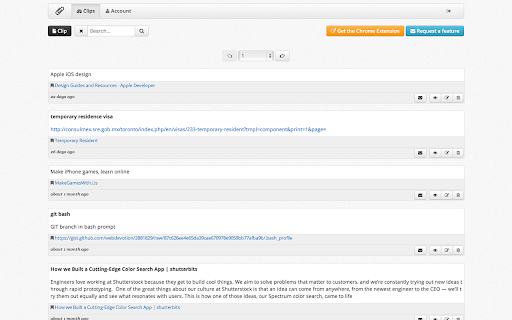

Easy click to copy & pase text clips from extension, dedicated 'Email' button. Create notes, bookmarks, email templates, etc. * Save and access your text clips from anywhere on the web. * Automate copy & paste templates for emails/messaging. * Save any text from websites you want to keep. * Bookmark sites you visit with relevant content. * Quickly copy & paste clips into your emails, or use dedicated button to launch your email client with a text clip filled in! * Search your clips by title and content. * Automatically save the page link & title when you create a clip using the extension while viewing a web page. * Select text on a page and right-click to reveal the "Save Clip" menu; click to save your selection. With Clipper, from TheClipping.co, you can definitely do that!

Clipboard Manager and Text Expander - Clipboard History Pro
Clipboard History Pro saves everything you copy and lets you reuse it instantly. No setup required — it works the moment you install it. Your clipboard history is searchable, organized, and always one click away. Star important clips, tag them for quick access, or search through weeks of history to find exactly what you need. Create text shortcuts that expand as you type. Define a short keyword like ;sig and it instantly becomes your full email signature — on any webpage, in any text field. • Unlimited clipboard history — every copied text, link, and image is saved automatically • Text expander — create shortcuts that expand into full sentences, code blocks, or templates • Smart search — find any clip instantly, even from weeks ago • Favorites and tags — organize your most-used clips for quick access • Cloud sync — sync clips and shortcuts across Chrome, Android, and iOS • Floating mode — keep your clipboard in a separate always-on-top window • Clipboard widget — paste from your history on any webpage without opening the extension • Keyboard shortcuts — customize quick-paste keys for your favorite clips • Context menu — right-click any text field to paste from history • Password lock — secure your clipboard with an optional passcode Free and Pro Plans The free plan includes clipboard history and basic text expansion. Pro unlocks unlimited history, cloud sync, floating mode, the clipboard widget, password lock, and advanced shortcuts. How does it save my copied items? The extension runs in the background and automatically logs everything you copy. Your history is stored locally in your browser. How does the text expander work? Define a short keyword (like ;sig) and when you type it in any text field, it expands into your full pre-set text automatically. Is my data secure? Your data is stored locally. The Pro plan adds an optional password lock for sensitive information. Does it work on all websites? Yes, the clipboard manager works everywhere. The text expander works on virtually all web pages — some sites with custom editors may need the additional tab permission, which you can enable in settings.

PR.co Chrome Extension
Add the current webpage to your PR.co clippings collection. Add webpages to your clippings on PR.co with this convenient browser extension. Whenever on a webpage you'd like to add, just click the PR.co icon on your extension bar, choose which newsroom to save it to and click 'Save Clipping'. We'll be adding more functionalities in the future to help make people working in PR more productive. Stay tuned!

Sniplets
- Want to speed up your work with saved text templates? - Want to throw some info over from one of your computers to another? - Moving from Firefox to Chrome and miss your Clippings extension? This extension 'snips' text from pages you visit (or you can create them manually) and saves them in your browser, allowing you to quickly insert them into forms and editors. Fully backup compatible with the Clippings extension for Firefox. MAIN FEATURES - Snip/clip text from a webpage using the context menu or Alt+Shift+C - Insert saved text automatically using the context menu or the insert button - Back up and restore from Clippings ADDITIONAL FEATURES - Easily organize your sniplets with folder management, drag & drop and colour highlighting - Use placeholders and counters to dynamically update sniplets each time they're pasted or sent to the clipboard - Work locally, synchronize across logged in browsers or do both depending on your needs - Quickly access sniplets through the side panel option - Automatic dark mode to help with eye strain (follows OS setting)

Insert Blurb
Insert a pre-written text blurb to any textbox on the webpage. This tool allows you to easily & quickly insert any pre-written text blurbs such as Email address, webpage URL, and message with one click from the context menu on any text-box. To protect your privacy, please note that all the text blurbs you created are stored only on your computer inside the Chrome local storage, and not uploaded to any servers or synced across Chrome browsers on other computers. You can always export the blurbs as a text file. Limitation: The insert function may not work on certain website, e.g. Facebook when create a post. Please let me know the website you would like the extension to work, and I will see what I can do to support it. Thank you for using this tool!
