
kmeolnchaljelapdmejemiimcnhkigem
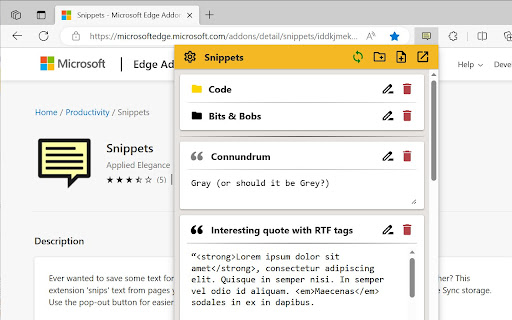

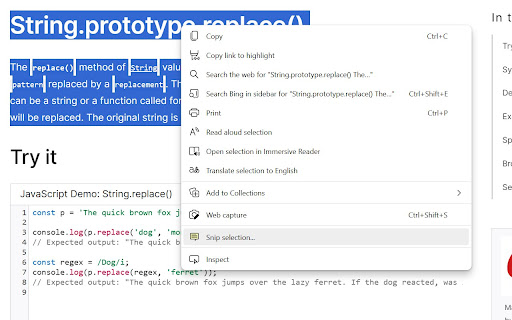

- Want to speed up your work with saved text templates? - Want to throw some info over from one of your computers to another? - Moving from Firefox to Chrome and miss your Clippings extension? This extension 'snips' text from pages you visit (or you can create them manually) and saves them in your browser, allowing you to quickly insert them into forms and editors. Fully backup compatible with the Clippings extension for Firefox. MAIN FEATURES - Snip/clip text from a webpage using the context menu or Alt+Shift+C - Insert saved text automatically using the context menu or the insert button - Back up and restore from Clippings ADDITIONAL FEATURES - Easily organize your sniplets with folder management, drag & drop and colour highlighting - Use placeholders and counters to dynamically update sniplets each time they're pasted or sent to the clipboard - Work locally, synchronize across logged in browsers or do both depending on your needs - Quickly access sniplets through the side panel option - Automatic dark mode to help with eye strain (follows OS setting)

Paragon Banner Alert
🚨 Paragon Banner Alert - Stay in the Loop! Never miss important updates on Paragon! This lightweight extension displays a sleek banner at the top of your Paragon pages (NA, EU, and FE) to keep you informed about critical announcements, system updates, and important notifications. Key Features: • Clean, unobtrusive yellow banner that matches Amazon's design • Automatic updates with real-time notifications • Simple one-click dismiss option • Smart display logic - banner reappears after 2 hours of dismissal • Works seamlessly across all Paragon environments • Zero configuration needed - install and you're good to go! Power User Features: • Keyboard shortcut (Ctrl + Alt + B) to reset banner state • Intelligent tab management - updates when tab becomes active • Smooth animations and transitions • Visual feedback for actions with status notifications • Memory efficient - cleans up resources automatically Perfect for: • Paragon users who want to stay updated • Teams who need to track system changes • Anyone who wants to ensure they don't miss crucial announcements • Developers and testers who need quick banner state reset Pro Tips: • Use Ctrl + Alt + B to force refresh the banner state • Banner automatically reappears after 2 hours if there are new updates • Notifications appear when banner state is reset • Works across multiple tabs while maintaining state Note: This extension is for internal Amazon use only and requires standard Amazon authentication.

PR.co Chrome Extension
Add the current webpage to your PR.co clippings collection. Add webpages to your clippings on PR.co with this convenient browser extension. Whenever on a webpage you'd like to add, just click the PR.co icon on your extension bar, choose which newsroom to save it to and click 'Save Clipping'. We'll be adding more functionalities in the future to help make people working in PR more productive. Stay tuned!

Snippets Manager
A simple Chrome extension that allows you to add text from webpages and manage text snippets. 1. Highlight the text, then right click, select "Add to Snippets". 2. Click the extension icon to manage your snippets.

Insert Blurb
Insert a pre-written text blurb to any textbox on the webpage. This tool allows you to easily & quickly insert any pre-written text blurbs such as Email address, webpage URL, and message with one click from the context menu on any text-box. To protect your privacy, please note that all the text blurbs you created are stored only on your computer inside the Chrome local storage, and not uploaded to any servers or synced across Chrome browsers on other computers. You can always export the blurbs as a text file. Limitation: The insert function may not work on certain website, e.g. Facebook when create a post. Please let me know the website you would like the extension to work, and I will see what I can do to support it. Thank you for using this tool!
