
ofcbaogakobldnkeaabmfndopboipmih

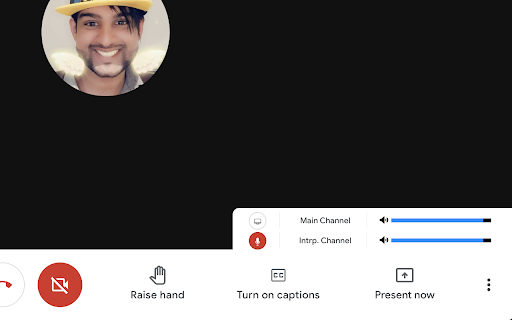

A tool to make simultaneous interpretation between two languages easier, for listeners and interpreters. This tool allows listeners and interpreters to open a secondary interpretation meeting within the Google Meet and provides them with controls to make listening and interpreting easier. Currently, it only works in Google Meet and not Live Streams. Without this extension, users have to open Google Meet in two different windows, both meetings at 100% volume. - Interpreter or Organizer creates a separate Google Meet link for interpretation and share's the link to the people who will be listening in. - Users (both interpreters and listeners) join the main meeting, and then activate the extension, paste the provided link and begin. - Users will gain access to volume controls for both channels, as well as a mini-view of the interpreting meeting (in case there is content shared specifically in their language). - All users joining the interpreting channel will be automatically muted and have their videos turned off. Only the interpreter get's an additional control to toggle their mic. However, uses can still use keyboard shortcuts within the mini-view to access their mic, video and chat functions. Search "Google Meet Keyboard Shortcuts" for more details. - Interpreters / Organizers can also still share their screens from within the interpreting channel. This project is open source, so if you'd like to add anything, request features, or more, please consult me at the project repository on Github:

Udemy Dual Subtitles - Subtitle Translator
Dual subtitle translator for Udemy. Bilingual subtitles in 50+ languages. Supports Udemy Business, course preview & fullscreen. Udemy Dual Subtitles — the most popular Chrome extension for bilingual subtitle translation on Udemy. Translate Udemy course subtitles into your native language and display two languages at the same time. Over 30,000 learners worldwide use this tool to watch Udemy online courses with dual language captions. Actively maintained for 4+ years with 40+ releases. Udemy Dual Subtitles is a subtitle translator that turns any Udemy course into a bilingual learning experience. It takes the original Udemy captions and adds a real-time translated subtitle underneath — so you can read both languages simultaneously while watching the video. No more pausing to look up words. No more switching between tabs to use a dictionary. Just press play and learn in two languages at once. ✅ Dual Bilingual Subtitles Display translated subtitles alongside the original Udemy captions. See both your native language and the course language on screen at the same time. The original text and translated text appear as two lines — easy to compare and follow. ✅ 50+ Languages Supported Translate subtitles into over 50 languages — one of the widest language selections among all Udemy subtitle tools. Covers European, Asian, Middle Eastern, African, and South Asian languages. See the full list below. ✅ Real-Time Subtitle Translation Translated captions appear instantly as the video plays. No delay, no buffering — just seamless bilingual subtitles synced perfectly with the course content. ✅ Customizable Subtitle Styles Full control over subtitle appearance: font size, text color, background color, font weight, and opacity. Make the dual subtitles comfortable for your eyes. You can even hide the original subtitles and show only the translation. ✅ Download & Export Subtitles Export subtitles in SRT (with timestamps) or TXT (plain text) format. Choose from three export modes: original only, translated only, or bilingual side-by-side. Great for offline review, note-taking, or building a vocabulary list from course content. ✅ Udemy Business Compatible Works perfectly with Udemy Business (corporate/enterprise) accounts. If your company provides Udemy Business for employee training, this extension works the same way. ✅ All Udemy Page Types Supported Compatible with all Udemy page layouts — the classic version, the new Beta version, and course preview pages. We continuously adapt to Udemy's platform updates so you never lose access to dual subtitles. ✅ Fullscreen Support Dual subtitles remain visible in fullscreen mode. No compromise between an immersive viewing experience and bilingual captions. ✅ Smart Language Detection On first install, the extension automatically detects your browser language and sets it as the translation target — no manual configuration needed. It also intelligently detects which subtitle language is currently active on the video player. ✅ Auto-Save Settings Your language preferences and subtitle styles are saved locally and persist across lectures and sessions. Open any new lecture and your dual subtitles appear automatically — set it once and forget. 🎯 WHO IS THIS FOR? 👨🎓 International Students Studying on Udemy but the courses are in English (or another language you're not fluent in)? Dual subtitles let you follow along in your native language while still seeing the original text — perfect for technical courses in programming, data science, web development, design, and more. 👩💼 Working Professionals Taking Udemy courses to upskill but the content is in a foreign language? Don't let language be a barrier. Translate course subtitles in real time so you can focus on the subject matter, not on deciphering every word. 🌍 Language Learners Learning a new language through immersion? Dual subtitles are one of the best tools for language acquisition. Watch real-world course content with both your target language and native language captions, and pick up vocabulary and expressions naturally. 🏢 Udemy Business Teams If your organization uses Udemy Business for employee training, Udemy Dual Subtitles helps multinational and multilingual teams get the most out of every course — no matter what language they speak. 📱 Casual Learners Just want to enjoy Udemy courses without the language struggle? One click and you have bilingual subtitles on any course that has captions enabled. Step 1: Install the extension from Chrome Web Store Step 2: Open any Udemy course and start playing a lecture Step 3: Make sure the official Udemy subtitles (closed captions) are turned on Step 4: Click the Udemy Dual Subtitles extension icon in your browser toolbar Step 5: Select the language you want to translate subtitles into Step 6: Toggle the translation switch ON That's it! Bilingual dual subtitles will appear on the video immediately. Your settings are remembered, so next time you open any lecture, dual subtitles activate automatically. Udemy Dual Subtitles supports translation into over 50 languages, covering European, Asian, Middle Eastern, African, and South Asian language families. Popular choices include: ...and 40+ more languages. The extension interface itself is also localized in 31 languages, so you can use it in your preferred language. Q: Do I need a Udemy Pro or paid account? A: No. Udemy Dual Subtitles works with any Udemy account — free or paid — as long as the course has subtitles available. Q: Does it work with Udemy Business? A: Yes! Fully compatible with Udemy Business (corporate/enterprise) accounts. Q: Why don't I see the dual subtitles? A: Make sure the official Udemy subtitles (closed captions) are turned on first. Udemy Dual Subtitles translates the existing captions — it cannot generate subtitles for courses that have no captions. Q: Can I translate from any language to any language? A: The extension translates whichever subtitle language is currently active on the Udemy player into your chosen target language. So yes — any available source language to any of the 50+ target languages. Q: Can I customize how the subtitles look? A: Yes. You can adjust font size, text color, background color, font weight, and opacity. You can also hide the original subtitle and show only the translation. Q: Can I download the translated subtitles? A: Yes. You can export subtitles in SRT or TXT format — original, translated, or bilingual. Q: Does it slow down the video or cause lag? A: No. The extension uses smart incremental translation — it only translates subtitles near your current playback position, not the entire course at once. This keeps performance smooth. Q: Does it work on Edge or other Chromium browsers? A: Yes. Any Chromium-based browser (Chrome, Edge, Brave, Arc, Opera, Vivaldi) can install and run this extension. Q: Is my data safe? A: Yes. Udemy Dual Subtitles does not collect or sell your personal data. Your subtitle preferences and settings are stored locally on your device. Q: Does it work on the Udemy course preview page? A: Yes. The extension supports course preview pages as well as full lecture pages. Q: What happens when Udemy updates their website? A: We actively track Udemy's platform changes and release updates promptly. The extension has been maintained for over 4 years through multiple Udemy redesigns. • 4+ years of continuous development since January 2022 • 40+ version releases — actively maintained and updated • Compatible with every Udemy page version (Classic, Beta, Preview) • Featured on Chrome Web Store • 50+ translation languages — one of the widest selections available • Fast response to Udemy platform changes — we ship fixes within days • Manifest V3 — built on the latest Chrome extension architecture • Privacy-first — no personal data collection, no tracking Version 4.3.0: • Support for Udemy's new preview page layout • Improved caption language detection accuracy Version 4.2.0: • Adapted to Udemy's new page style changes Version 4.0.0: • Full support for Udemy's new Beta version We actively maintain this extension to keep up with every Udemy platform change — so your dual subtitles always work. 💡 TIPS FOR THE BEST EXPERIENCE 🔹 Always enable official Udemy subtitles first — the extension translates existing captions, it does not generate new ones. 🔹 If a course offers multiple subtitle languages, choose the one closest to your translation target for best accuracy. 🔹 Use the options page (right-click the icon → Options) for advanced subtitle style customization. 🔹 The extension remembers your settings per device — just set it once and forget. 🔹 Works great for building vocabulary: download the bilingual subtitle file after watching a lecture and review it offline. Have a question, found a bug, or want to suggest a feature? We'd love to hear from you! If you find Udemy Dual Subtitles helpful, please leave a rating and review on the Chrome Web Store. Your support helps other learners discover this tool and motivates us to keep improving. Thank you!

Needyu.ai Meeting Copilot
Needyu.ai: More than just an assistant. Your copilot and lifetime mentor for meetings and continuous improvement Experience enhanced productivity with Needyu, your AI-driven assistant for managing meetings across Google Meet, Zoom, and Microsoft Teams. No more scrambling for notes or missing key information—Needyu captures and organizes it all for you! From team meetings to sales calls, online classes to medical consultations, Needyu ensures that no detail is overlooked. Harness the power of our state-of-the-art AI to make every meeting more productive and insightful. 🔍 ➜ Intelligent Assistance: Real-time support during meetings with voice-to-text transcription, sentiment analysis, and proactive suggestions. ➜ Robust Integration: Seamless operation with Chrome, Edge, Safari, and major platforms like Google Meet, Zoom, and Teams. ➜ Advanced Meeting Management: Tools for decision-making support, document handling, and comprehensive access to meeting transcripts and analytics. ➜ Performance Analysis: Evaluate both soft and hard skills, monitor well-being, and receive customized engagement summaries. ➜ Knowledge Expansion: Connects with extensive databases to provide crucial insights and quick information access. Needyu is not just a tool; it’s your partner in growth and learning, adapting to your unique needs and processes. Our aim is to liberate your time, allowing you to concentrate on what truly matters—be it family, personal development, or relaxation. 📌 WHO IS NEEDYU FOR? Perfect for anyone eager to enhance productivity and streamline their daily routines. Whether you’re a student, healthcare professional, lawyer, or mentor, Needyu is your gateway to greater efficiency. ➜ Seamless Compatibility: Plug into Chrome, Edge, and Safari. ➜ Multiple Login Options: Google (for Google Drive storage) and Microsoft (for One Drive storage). ➜ Enhanced Meeting Capabilities: Speech-to-text functionality. In-depth decision-making support. Easy access to and management of meeting transcripts. Stress and conflict metrics with "Needyu Congratulations!" for positive moments. ➜ Skill Set Enhancement: Advanced sentiment analysis. Daily engagement tracking. Identification of personality traits. Long-term trend analysis in skills and participation. ➜ Meeting Backoffice (🔗 https://user.needyu.ai): a ChatGPT like for all captured meetings! Look forward to proactive reminders, meeting avatars, simultaneous translation features, mobile platform support, and more in our next version!

Lingocloud - AI Translate Web, PDF & Subtitles
Web bilingual, PDF link, YouTube ; Lingocloud V4 + multi-model with glossary for fluent, accurate translation 1. Personalization: Customize translation styles to better match your linguistic habits. 2. Floating Ball Upgrade: Redesigned floating interactions and menu for a lighter, more intuitive experience. 3. Seamless Experience: Switch models, glossaries, or styles without refreshing the page—translations update dynamically. 4. Glossary Enhancement: No need to set translation directions; multi-language entries can now be used together. 5. Performance Improvements and Bug Fixes. More than just a translator—it's your all-in-one AI reading assistant. Lingocloud integrates a matrix of world-class AI models to provide an intelligent bilingual experience for web pages, documents, videos, and social media. V4 Model: Our proprietary model optimized for nuanced context, delivering natural and fluent translations. AI Aggregation: One-click toggle between DeepSeek V3, GPT, Qwen, GLM4, and more for multi-perspective references. 🧠 AI Bilingual Web Translation: Automatically recognizes web content for side-by-side reading. Supports AI bilingual subtitles on YouTube, Netflix, and more. 📂 AI Document Parsing: Smartly translate PDF, Word, PPT, and arXiv papers while perfectly preserving the original layout. ⚡ Real-time AI Lookup: Select text on Reddit, Discord, or X (Twitter) for instant AI-powered explanations and translations. 🌟 Core Features 1. Bilingual Webpage Translation 🌐 Click the “Lingocloud icon,” and the webpage instantly displays in bilingual parallel view! Source and translation are aligned top-to-bottom for easy comparison. The innovative layout makes reading smoother and more natural. 2. Text Selection Translation 🖱️ Highlight any text to get accurate translations instantly—no page switching needed. Stay immersed in your reading while exploring foreign content effortlessly. 3. Professional Terminology Library 📚 Built-in database of 100,000+ professional terms across multiple fields, with support for custom glossaries. Ensures precise domain-specific translations while meeting personalized expression needs. 4. PDF Translation 📄 Translate PDF documents with one click while perfectly preserving formatting and layout. Supports recognition of complex formulas—ideal for research papers and technical documents. 5. Video Subtitle Translation 🎬 Supports bilingual subtitle translation on YouTube and other major platforms. Learn while watching, enhance your language skills, and easily understand foreign-language videos. 6.Image and Manga Translation Supports one-click translation of images or comics on web pages. 👥 Who It’s For • 🔬 Researchers: Accurate translations of journals and reports • 📖 Novel Lovers: Immersive reading of AO3 and foreign fiction • 📚 Students Abroad: Easily access textbooks, papers, and academic resources • 💻 Programmers: Quick access to technical documentation and developer communities • 🌐 Trade Professionals: Accurate translation of contracts, emails, and business files • 🎓 Language Learners: Improve comprehension with bilingual parallel texts • 🧳 Global Travelers: Real-time multilingual communication and information access ℹ️ Usage Notes • 🔒 Permissions: To enable text selection, auto-translation, and video subtitle features, please allow the extension to read and modify webpage data. Video translation requires access to the current tab’s audio. • 🎁 Free vs. Paid: Register to enjoy free daily usage with a quota limit. The quota refreshes automatically each day. Upgrade to membership for unlimited access. • 💌 Feedback: For questions or suggestions, visit our website at https://fanyi.caiyunapp.com and click “Feedback” to share your thoughts! 🌈 Break down language barriers with Lingocloud and explore a bigger world! 🚀🌟

Felo Subtitles: ChatGPT Live Translation
Felo real-time captions for Meeting &YouTube Live. Transcribe and translate Zoom& Google Meet& MSTeams& YouTube& Using ChatGPT. 🔑 Key Features: • Real-time transcription & translation for browser videos • YouTube Live real-time transcription & translation • Google Meet web version real-time notes & translation (No meeting participant bot required, activate anytime, no disruption) • Save subtitles as txt document Felo browser subtitles provide real-time translation, enhancing your web meetings and live streams with AI technology. Using the latest AI, it delivers the most accurate and reliable transcription & translation results. Whether communicating with colleagues or clients, Felo solves cross-language issues and eliminates meeting note-taking hassles~ Felo live subtitles real-time translation supports subtitles & translation for various live video sites: YouTube Live, Twitch Live, Facebook Live, etc. - zero difficulty watching foreign live streams! Felo YouTube Live real-time translation adds subtitles to any YouTube live stream, helping users with language barriers or hearing issues understand conversations. Once subtitles are enabled, the extension automatically recognizes speech and converts it to text. ⭐️ Perfect for these scenarios: Multi-language meetings, international conferences, seminars, cross-border trade fairs, multinational meetings English/Japanese/Chinese training sessions, cross-cultural business meetings (India, Japan, etc.) YouTube Live, Twitch Live 💻 Zoom / Teams desktop support is available in the Felo App (not the browser extension). https://subtitles.felo.me/ • Native Zoom/Google Meet/Teams support (no bots) • Windows/Mac full platform • Professional terminology + unlimited time Version 3.0.4 Update Log: 1. Expanded language support — translation targets increased to 20 languages, speech recognition to 23 languages 2. Improved transcription stability, reduced unresponsiveness during long sessions 3. Fixed login status being incorrectly lost during network fluctuations 4. Enhanced error handling for Bing translation service 5. Fixed memory leak issues, improved overall performance Install now for seamless real-time translation! 🚀 #YouTubeLive #LiveTranslation #MeetingCaptions
