
oepknidjdghgapjdlmpffcpcloiaonhb
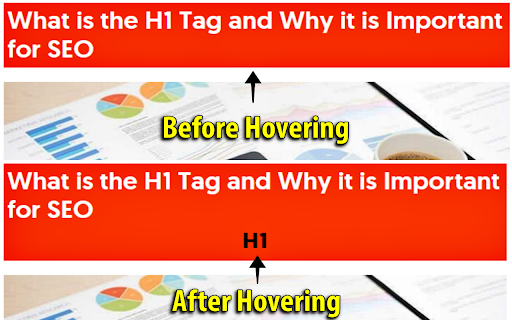


Heading Tag Checker is a free header tag checker tool, which could be very useful if you want to check a page and know what kind of heading tags it is using, and how many of them are on the page. Heading tag checker is a wonderful tool that every blogger must use, because it gives a great look on how competitors are organizing their content, and this will help you to super pass them. Header Checker is very easy to use, you do not have to check every head tag manually from "Inspect Element" or by using a web application to show how many head tag or what are their types, just by adding the Heading tag checker to your browser you could know the type of Heading tags as simple as just hovering over the element. The tool will check HTML heading tags from H1 to H6, after that it will give each element a unique background color, so, it will be clear to you which elements in the page are heading tags. At the time you hover on the colored element, you will see the type of the header tag. Heading tag checker free tool is very handy and works with all kinds of websites either with HTTP or HTTPS and checks tags from H1 to H6.

Highlight H1 and nofollow, sponsored & ugc
Highlights header tags (Hx) with distinct colored borders: red for H1, green for H2, and others. Highlight H1, H2 and H3 using border color and highlight nofollow, sponsored & ugc links using style border

Detailed SEO Extension
Get SEO insights at the click of a button to any website you're currently on. Built by full-time SEO's for daily analysis. Get SEO-related insights at the click of a button to any website you're currently on. Pull back their title tag, meta description, meta robots tag and much more. Save hours of time looking through the source code of this page with our SEO analysis extension.

AI SEO AEO Optimizer
Key Features of the AI SEO AEO Optimizer Meta-Title Checker- Meta title is a very important element of any website because it conveys the primary topic and purpose of the website or a webpage. That is why it is crucial to optimize the meta-title. With our extension you can easily find out the meta-title of any website in one click only. Meta-description Checker- The Meta description tag of a page is included as the search snippet on a search engine result page (SERP). The Meta description gives users an idea of the content and how it is related to their search query. So just download our ads-free & simple to use extension to review and optimize Meta-description. H1-H2 Heading tag checker – Confused about which is the H1 heading tag on the webpage or want to check H1 tags for other websites? If yes then please save your time with our extension which gives the information of all the heading tags be it H1, H2, H3, H4, H5 or H6. Anchor Text Checker – Now with our extension, you can have a close look at anchor texts on any website to keep track of inbound and outbound links very easily. You can also use our tool to analyse competitor’s on-page anchor texts. Alt tag checker – Google Images are used by hundreds of millions of people every day to visually search for web content. According to the research, image search accounts for 27% of all queries across the top 10 US web search properties.

SEO Minion
SEO Minion helps you in your daily SEO tasks such as On-Page SEO analysis, Broken Link Checking, SERP Preview and more The tool helps you with the following tasks - (1) Analyze On-Page SEO - analyze the HTML of any webpage and view useful information that will help you optimize the On-Page SEO as well as alert you to any issues. (2) Highlight All Links - quickly see all the links (internal & external) for any webpage (3) Check Broken Links - check every link on a webpage and get a report of any links with issues (5) SERP Preview - preview your website on a real Google search result and update this in real time (6) Google search location simulator - view non-personalized google search results for one keyword on two different location/language combination. (8) HTML v/s DOM - analyze the differences between the HTML source code and the rendered DOM to check if your JS library is causing any SEO related issue (9) Analyze Structured Data - analyze the structured data on the webpage We add features based on user feedback. If you'd like us to add any new features, please email us at akash@seominion.com. You can view the change-log for every version update at https://seominion.com/news
