
oemenipieofchdkoddajnflpepbelfen

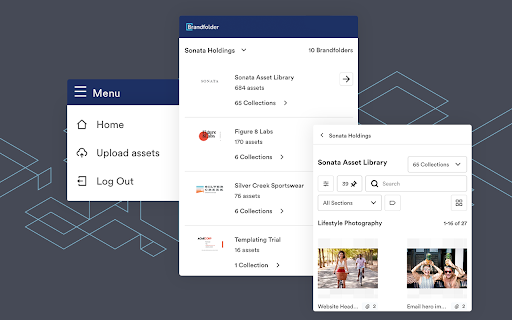


Copy Attachments and links from your Brandfolder Brandfolder now has a Chrome extension to make leveraging Brandfolder and all the content within it incredibly easy, even across web apps that don’t have a native integration. Use Brandfolder for Chrome to: - Navigate, search, and filter Brandfolder from the extension - Crop, resize assets to fit - Place assets from Brandfolder into any compatible website - Upload assets to Brandfolder from extension What is Digital Asset Management (DAM)? - Digital asset management (DAM) is a system of software designed to organize, distribute, and store digital assets. Most importantly, DAM provides a way to increase campaign productivity and ensure brand consistency. Who is Brandfolder? - An industry leader in Digital Asset Management software, Brandfolder delivers a platform that is as intuitive for users as it is powerful for admins to easily store, manage, share, manipulate, and analyze assets across hundreds of formats, including 8K video, documents, images, and 3D renderings. And with asset usage analytics powered by Brand IntelligenceⓇ, Brandfolder provides the tools to optimize creative strategy with data-driven precision. With best-in-class time-to-value, services, support, security, and scalability, Brandfolder enables brands worldwide like Slack, TripAdvisor, Lyft, and P.F. Changs to create compelling brand experiences with unparalleled efficiency and speed.

Outreach Everywhere
Maximize your sales potential, anywhere you go! The Outreach Everywhere Chrome extension lets the user communicate more effectively inside Gmail, and on top of Salesforce with calling and emailing. You must have an account on Outreach, and be signed in for the extension to work.

Smartsheet
Desktop App Redirect extension. Smartsheet Desktop App deep linking redirector (The Smartsheet Desktop App is required for this to work, please do not try to use it if you do not have the Smartsheet Desktop App installed).

Smartsheet Dashboard Overlay
Adds the ability to overlay shapes & guide-lines on Smartsheet's dashboard editor to assist with more consistent widget placement. NOTE: You may need to restart your browser after installing this extension for the menu to appear with all the correct icons. This extension will add an icon while using Smartsheet Dashboard Editor that will allow you to overlay shapes over the dashboard's grid. This can allow you to create gridlines or outlines for common item placement, and assist you with more easily placing your dashboard widgets in a consistent way. PLEASE NOTE: This extension is not officially developed by Smartsheet or maintained by them. Usage Instructions: The extension will add a new icon to the right sidebar of Smartsheet's dashboard editor. Clicking on it will open a panel that allows you to enable or disable different overlays for the dashboard's grid. Clicking the More ( ⋮ ) button at the top of the panel will open the extension's settings page, where you can add custom layouts - instructions for this are included on this page. Alternatively, you can click the extension icon in Chrome to immediately add the grid layout to the dashboard editor. This is included in case future changes to Smartsheet's dashboard editor break the functionality of the side panel.

SSFeatures
Add new features into Smartsheet to improve your productivity. Add new features into Smartsheet to improve your productivity. Add features such as automatic sorting, spell checking, and “grouped” Report PDF Generation. - Provides a “Sort Automatically” checkbox to automatically sort your sheet whenever it changes - Sorts your data after any data modification - Bypasses Smartsheet’s filter lock - allows you to sort your data with filters - Automatically sorts after new Form entries - Automatically saves your sort settings for each sheet - No rate limits - unlimited sheets, unlimited forms, unlimited sorts - Spell checks all of the cells in a sheet or report - the only spell checker in the world with this capability - More than 50x faster than Grammarly, LanguageTool, and ProWritingAid - Supports dictionary customization - Never sends your data to any servers, databases, or AI models - No rate limits - unlimited spell checks for unlimited sheets and reports ✅ Report PDF Generation ✅ - Supports normal reports, and "grouped" and "summarized" reports - Supports PDF generation, printing, and emailing - Customizable PDF options, such as page style, scaling, row numbers, page numbers, and time stamps - Generates PDFs that use the same exact dimensions and data as your Report, unlike Smartsheet's PDF generator which changes the format and skips groups and summarizations - No rate limits - unlimited report PDF generation for your whole team ✅ Privacy, Security, and Speed You Can Trust ✅ - SSFeatures never sends your Smartsheet data to our servers or database. Any data saved by the extension, such as your sort settings or spell checked words, are securely stored in your local browser storage. - The SSFeatures spell checker is more private, more secure, and more than 50x faster than Grammarly, LanguageTool, and ProWritingAid. These other competitors send all of your Smartsheet data to their servers, the server processes the data, sending it to their AI models, and then they send the results back to your browser. These tools are slower because they must send the data to their servers, which also leaks your data to their third party servers, databases, and AI models. SSFeatures spell checks your cells directly within your browser, without sending the data to any servers.
