
oejehpnnahhligpjchigifpcfcmehkgf
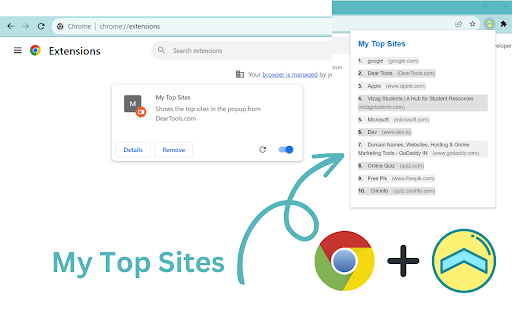
Shows the top sites in the popup window My Top Sites is a convenient Google Chrome extension that puts your favorite websites right at your fingertips! Say goodbye to endless bookmarks and tabs – with My Top Sites, access your most visited sites instantly from the popup window. Instant Access: Easily view and open your frequently visited websites directly from the popup window. Customizable List: Personalize your top sites list with the websites you use most, tailored to your preferences. Organized Interface: Enjoy a clean and organized interface that makes finding your top sites a breeze. Intelligent Sorting: Sites are intelligently sorted based on your usage, ensuring quick access to your most relevant sites. Effortless Navigation: Say goodbye to bookmark clutter and tab overload – My Top Sites streamlines your browsing experience.

Hono - Save and summarize everything
Use the latest AI models on any article, video or document: summarize, extract key points, translate, generate quizes, and more Do you want a short and concise version of a long article you're about to read or video you're about to watch? If yes, this is the extension to use! What it does: 💬 Chat: ask anything about the content 🍰 Summarize: shorten long content into a short paragraph or bullet points 🇪🇸 Translate: ask to translate in any language you want, even klingon! 🕵️ Works on: any article, any website, PDF files, images, audio files, YouTube videos 🗃️ Saves all links in the Hono app, so you can find them later 🆓 No account or api keys required 🙈 Private: unlike other extensions, this extension does not request access to all your browsing history Change log: - v1.11: UI updates & message streaming - v1.10: Persist chat messages between extension usage - v1.9: Bug fixes & performance improvements - v1.8: Improvements for Chat interface - v1.7: "Ask" tab, to have a chat with the content of the page

Tab History
View the recently visited tabs One of the features in Chrome that I really like is the ability to create and customize groups of tabs. It helps me in arranging the tabs based on different parameters. Despite this feature, lately I found myself drowning in sea of ‘tabs’ in Chrome. I used to open one tab and forget what were the last tabs I was working on opened. I’m sure you must have faced the same issue. To solve this pain-point, I have created this Chrome extension. It will show the 5 most recently (can be configured to 10) visited tabs for each window. You can directly open the tab from the extension screen itself as well as close them. How to use the extension ? It's actually very easy. 1. After installation, Pin the extension in the browser. 2. On clicking the extension icon or Keyboard Shortcut (Mac: Command+U, Windows: Ctrl+U), Popup will show top 5 (default) most recently visited tabs for each window. 3. The number of recent tabs to show can be configured to 5 or 10. 4. Select "All Windows" to view tabs from all windows. Window ID are identifiers. They will be same for a single window. 5. Select "Pinned" to view pinned tabs from all windows. Click on Pin icon to toggle between pin/unpin. 6. "Visit" action will make the Tab active (even if it's in a different window) and switch the user to that tab. 7. "Remove action" will close the tab. 8. Mute/Unmute tabs playing audio. Muted Tabs can be manually reloaded to unmute as well. 9. Privacy: No data (Username, password, email, etc) is collected or shared with external sources. The extension doesn’t work with ‘Incognito mode’. I intend to make it more user friendly and add more relevant features. Do give it a try and let me know your thoughts. Please share your reviews. :)

Most Visited Sites
It utilizes the chrome.topSites API to access and retrieve the list of sites most frequently visited by the user. Discover the Top Sites right within a convenient Google Chrome extension called "Most Visited Sites"! Wave goodbye to a sea of bookmarks and crowded tabs. This nifty tool places your favorite websites within reach, accessible instantly through its popup window. Instant Accessibility: Effortlessly view and open frequently visited websites directly from the popup window. Tailored Selection: Customize your list of top sites, curating it with the websites you use most frequently and aligning it with your preferences. Streamlined Interface: Navigate through a sleek and well-organized interface, simplifying the search for your favorite sites. Smart Organization: Sites are smartly arranged based on your usage patterns, ensuring speedy access to your most relevant and frequently visited sites. Simplified Browsing: Bid farewell to cluttered bookmarks and overloaded tabs – My Top Sites enhances your browsing by streamlining the experience.

Lindle: Save, Manage Web Links
Say goodbye to scattered links and hello to streamlined productivity. All-in-one web link saver and bookmark manager Lindle is your ultimate solution for managing and organizing your web links with ease. This versatile Chrome extension empowers you to save, categorize, and access your online resources like never before. Say goodbye to the chaos of scattered bookmarks and hello to streamlined productivity. 1. Effortless Link Saving: Save links from the web with a single click, and watch as they're neatly organized in one central hub. 2. Intelligent Auto-Sorting: automatically categorizes your saved links based on their source, whether it's from social media platforms like Facebook, Instagram, LinkedIn, or other websites. 3. Seamless Integration with URL Shorteners: Enjoy the convenience of integrated Bitly and other popular URL shorteners to keep your links clean and concise. 4. Intuitive Search Functionality: Easily find any link you've saved by using our powerful search feature. No more endless scrolling or digging through folders. 5. Folder Organization: Create custom folders to sort and manage your links. Keep everything neatly tucked away for quick access. 6. Access from Messenger Platforms: Our extension embeds directly into Facebook Messenger, Instagram, and LinkedIn. You can access your saved links right from these platforms whenever you need them. 7. Share with Ease: Share links with colleagues, friends, and family without leaving your preferred messenger platform. 8. Cross-Device Sync: Enjoy a seamless experience across multiple devices. Your links are always within reach, whether you're on your desktop or mobile. 9. Clean, User-Friendly Interface: The extension is designed for simplicity and ease of use, making link management a breeze.
