
necdeioggaohpigoghofcajbgcphdjak
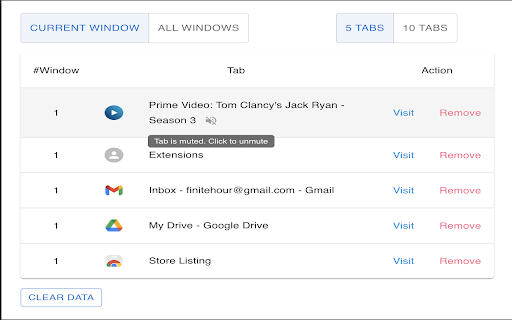


View the recently visited tabs One of the features in Chrome that I really like is the ability to create and customize groups of tabs. It helps me in arranging the tabs based on different parameters. Despite this feature, lately I found myself drowning in sea of ‘tabs’ in Chrome. I used to open one tab and forget what were the last tabs I was working on opened. I’m sure you must have faced the same issue. To solve this pain-point, I have created this Chrome extension. It will show the 5 most recently (can be configured to 10) visited tabs for each window. You can directly open the tab from the extension screen itself as well as close them. How to use the extension ? It's actually very easy. 1. After installation, Pin the extension in the browser. 2. On clicking the extension icon or Keyboard Shortcut (Mac: Command+U, Windows: Ctrl+U), Popup will show top 5 (default) most recently visited tabs for each window. 3. The number of recent tabs to show can be configured to 5 or 10. 4. Select "All Windows" to view tabs from all windows. Window ID are identifiers. They will be same for a single window. 5. Select "Pinned" to view pinned tabs from all windows. Click on Pin icon to toggle between pin/unpin. 6. "Visit" action will make the Tab active (even if it's in a different window) and switch the user to that tab. 7. "Remove action" will close the tab. 8. Mute/Unmute tabs playing audio. Muted Tabs can be manually reloaded to unmute as well. 9. Privacy: No data (Username, password, email, etc) is collected or shared with external sources. The extension doesn’t work with ‘Incognito mode’. I intend to make it more user friendly and add more relevant features. Do give it a try and let me know your thoughts. Please share your reviews. :)

Recent Tabs with your browsing history
Undo closed tabs with your browsing history Extension to restore recently closed tabs. The mechanism is similar to Chrome's built-in functions "Recent Tabs" (Ctrl-Shift-T). In the restored tab kept the entire history of browsing, ie, The buttons Back and Forward. ver 1.2 + Added navigation through the list of tabs using the keyboard ver 0.9 + Added support for OS dark theme ver 0.8 + Added permission request for finding closed tabs in History ver 0.7 + Search for closed tabs and History + Hot keys settings + The counter of the closed tabs is removed + Font size settings ver 0.6 + Also available Chrome tabs open on your other devices

Recent History
This extension displays your recent history, recently closed tabs, most visited pages and recent bookmarks in a one click pop-up. No more worrying about lost or accidentally closed tabs! A quick overview of your recent browser history with one click access. 🛠 FEATURES - Change the number of items - Change the width of the popup menu - Multilingual support - Order sections for the popup menu - Show most visited URLs - and much more... 🗒️ CHANGELOG - 3.0.5 - Fixing browser action bug. -3.0.4 - Fixed bug that prevented the extension's history page to be seen when clicking on "Show All History". Fixed a few styling issues. -3.0.3 - Fixed styling issues on PCs. -3.0.2 - The style of the history and options page have been tweaked. -3.0.1 - The calendar history page has been enabled again. -3.0 - Recent History is back and updated for the current version of Chrome. A few features have been removed/disabled for various reasons but the main popup feature still remains. Made with ❤️ by Browsecraft gang. Stand with Ukraine 💙💛.

TabStacks: tab and history search
View and search through open tabs and browser history. TabStacks is a vertical tab menu that helps you find the content you were looking for. Filter the tabs you have open and TabStacks will list the open tabs that match. If TabStacks can't find an open tab, it searches through your history to see if you had a tab open previously! TabStacks is designed to be keyboard and screen reader accessible. Press [CTRL]+[SHIFT]+[K] to open the menu, start typing to filter your tabs, and use the [DOWN] arrow key to navigate to the tab you want, and [ENTER] to open that tab. You can always use your mouse as well. You can search through your history during a tab search by pressing [CTRL+SHIFT+S]. You can close a tab by highlighting it in the list using the arrow keys or right-click and pressing [DELETE] or by clicking the close button on the tab. TabStacks is a high performance and secure extension for Chrome. TabStacks doesn't download external files, doesn't store any information about your activity. *** UPDATES *** Version 2.0.2 * Fixed bug where the popup doesn't close on tab change * Added a settings item to allow the option to hold the popup open Version 2.0.1 * The default keyboard shortcut for toggling the search is now CTRL+SHIFT+S due to the browser using nearly all possible combinations of CTRL+ a single key. * The keyboard shortcut key is now configurable, you can modify it in the settings page. Click the gear icon at upper right of the popup to access settings. * Minor cosmetic updates to the settings page. Version 2.0 * Tabs shown in the popup are synchronized with the state of the tabs in the browser: * Title updates are reflected in real-time. * New or deleted tabs are reflected in the tab list. * Close tabs using a button on the tab. Close buttons show on hover or focus. * Tabs display an audio icon if playing audio. * For audible tabs, clicking the icon will mute and unmute the tab. * Settings page has been added, click the gear icon top-right to access settings. Version 1.0.8 * Added lazy loading for site icons to speed up rendering * Reduced requested browser permissions Version 1.0.7 * Linux support for launching TabStacks from keyboard with [CTRL+SHIFT+K]. * PopupMenu now has a max-height instead of fixed height. * Fixed bug on Windows where the scroll bar was rendered even if the tabs would not scroll. Version 1.0.6 * Improved search algorithm for both tabs and history. * Searches much longer history time period. * Tabs in the current window always appear at top when popup is opened (User suggestion). * URLs for tabs appear on focus or mouseover (User suggestion). * Engineering improvements under the hood to use Web Components for rendering.

Tab Slider
Keep your tabs ordered by their most recent usage. 🔥 BOOST YOUR BROWSING EXPERIENCE! 🔥 This extension keeps your browser tabs sorted in Most Recently Used (MRU) order, from left to right — just like the way apps are organized on desktop operating systems when you use Cmd/Alt+Tab. Tab Slider brings this behavior to Chrome. Try it out! - If you stay on a tab for more than 1 second (by default), it will "slide" to the leftmost position; - This keeps your most recently used tabs ordered from left to right; - Thanks to this order, pressing Ctrl+Tab switches you to the next most recently used tab; - Pinned tabs slide in the opposite direction (left to right). This is intentional — it allows seamless switching between your most recently used pinned tabs and normal tabs using keyboard shortcuts: - Ctrl+Shift+Tab switches to the most recently used pinned tab; - Ctrl+Tab switches back to the most recently used normal tab; You can customize the reordering delay and the maximum number of reordered tabs in the extension’s settings; newly opened active tabs immediately appear on the left. Once you get used to it, this way of managing tabs will feel completely natural and intuitive 🪄
