
oehddljlmfdjododinkhenlkcopfbppl
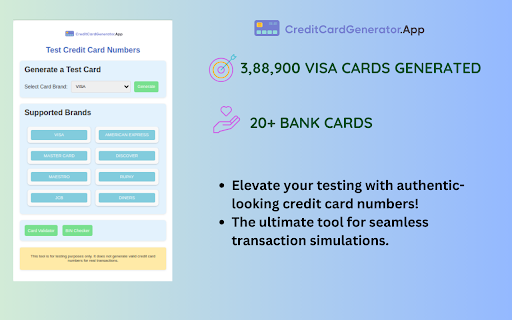
Generate valid test credit card numbers easily for secure trial payments and demos with our handy Chrome extension! Navigate your payment gateway trials flawlessly with Test Credit Card Numbers, the leading Chrome extension for generating free, random credit card numbers. Ideal for secure, realistic simulations in your development and testing phases. 💳🌐 Why Test Credit Card Numbers is a Must-Have: 🎉 Completely Free: Perfect for budget-friendly development and free trials. 🔄 Random & Realistic: Generates random credit card numbers mirroring real-world patterns. 💳 Broad Card Range: Including Visa, MasterCard, AmEx, and more for diverse test scenarios. 🔒 Safe Testing: Eliminate risks by using dummy data, safeguarding real financial information. 🌍 Global Compatibility: Equally effective for both international and domestic payment tests. Simple Steps for Powerful Results - Choose a Card Provider: Our range covers from Discover to JCB. - Hit Generate: Instantly get a random, simulated credit card number. - Implement in Trials: Ideal for testing e-commerce sites, fintech apps, and other payment gateways. Unique Features ⚙️ Effortless Operation: One-click is all it takes to produce a number. 🧪 Consistent Test Quality: Reliable for continuous and thorough QA processes. 🎯 Unlimited Access: Generate numerous numbers, tailored for extensive testing needs. Benefits That Stand Out 👌 No-Cost Trials: Test more, spend less. Ideal for startups and individual developers. 🔬 Precision in Testing: Increase the accuracy and reliability of your payment gateway tests. 🌟 Flexible Usage: A perfect fit for diverse testing environments, from small projects to large enterprises. Supported Credit Card Providers At Test Credit Card Numbers, we understand the importance of comprehensive testing. That's why our free credit card generator includes a wide array of card providers to match real-world scenarios accurately. Here's who we support: - Visa: 🌎 Globally recognized, perfect for international payment simulations. - MasterCard: 💳 Widely used for its reliability and acceptance worldwide. - American Express (AmEx): 💼 Preferred in corporate and high-end market simulations. - Discover: 🛒 Great for testing U.S.-centric payment models. - JCB (Japan Credit Bureau): 🇯🇵 Essential for testing transactions in Asian markets. - Diners Club: 🍴 Ideal for simulating niche market and hospitality sector payments. - Maestro: 🏦 Typically used for debit card simulations across Europe and Asia. - UnionPay: 🇨🇳 Key for testing in Chinese and several Asian markets. - RuPay: 🇮🇳 Crucial for simulating scenarios specific to the Indian subcontinent. With this range of providers, Test Credit Card Numbers ensures that you can generate random credit card numbers that are apt for a multitude of testing environments, from local startups to global e-commerce platforms. Whether it's for app development, fintech solutions, or online store setups, our generator prepares you for a variety of financial scenarios. 🎯💼 Ideal For 💻 Developers and Programmers 🔬 Quality Assurance Teams 💳 Fintech Enthusiasts and Startups 📈 Business Analysts in Digital Commerce 🛒 E-commerce Testing Groups Your Testing, Upgraded Grab Test Credit Card Numbers today! Elevate your payment testing with our free, random credit card generator – a smart choice for seamless, secure, and effective trial simulations. 🚀🔒 Note: This tool is intended exclusively for testing and educational purposes. Do not use these simulated numbers for actual transactions or unlawful activities.

Stripe Test Cards Helper
Floating button for selecting and copying Stripe test card numbers. Stripe Test Cards Helper is a powerful and efficient Chrome extension designed to simplify testing payment forms. It provides a floating, draggable button on any webpage, allowing developers, QA teams, and testers to quickly access and insert pre-configured Stripe test card details. This extension automates the paste sequence for test card inputs, reducing manual entry and speeding up your testing workflow. - **Floating Draggable Button:** A non-intrusive button that remains on the page and can be repositioned near Stripe input fields for quick access. - **Test Card Overlay:** Clicking the floating button opens a modal overlay displaying a searchable list of test cards, complete with names, descriptions, and card numbers. Users can also mark frequently used cards as favorites. - **Automated Paste Sequence:** When a test card is selected, the extension automatically pastes the details in sequence: 1. **First CTRL+V:** Pastes the card number. 2. **Second CTRL+V:** After a short 100ms delay, pastes the expiration date (MM/YY, e.g., **12/34**). 3. **Third CTRL+V:** After another 100ms delay, pastes the CVV code (e.g., **567**). - **User Guidance:** The overlay includes a brief guide explaining the paste sequence, ensuring users understand how the automation works. - **Web Development & Testing:** Quickly populate payment fields with test data, streamlining checkout flow and payment integration testing. - **Quality Assurance:** Automate repetitive input tasks and accelerate regression testing for various test scenarios. 1. **Activation:** The extension activates per domain. Once enabled, a floating button appears on the page. 2. **Floating Button:** The draggable button can be moved anywhere on the screen. A click opens the test card overlay. 3. **Selecting a Test Card:** Users can search for and select a test card from the overlay. Upon selection, the card number is immediately copied, and the automated paste sequence begins. 4. **Automated Paste Sequence:** - **First CTRL+V:** Pastes the card number. - **Second CTRL+V:** After a 100ms delay, pastes the expiration date (MM/YY, e.g., 12/34). - **Third CTRL+V:** After another 100ms delay, pastes the CVV code (e.g., 567). ## Privacy and Security - **Local Data Storage:** All settings (including favorite cards and button positions) are stored locally using Chrome's extension storage API. No sensitive data is transmitted externally. - **Test Environment Only:** This extension is strictly for development and testing purposes. It is not intended for use in production environments or with real payment data. ## Installation and Compatibility - **Easy Installation:** Install Stripe Test Cards Helper directly from the Chrome Web Store. - **Browser Compatibility:** Built using WebExtensions standards, this extension is fully compatible with Chrome. *Stripe Test Cards Helper is intended solely for testing and development environments. The automated paste sequence is designed to simulate test payment inputs. Do not use this extension in production or with real financial data.*

CCValidator - Credit Card Generator
Welcome to ccvalidator.org. tailored with precision and great knowledge for credit card validation and its numerous use. Welcome to ccvalidator.org's Google Chrome extension! Our tool offers various features to help you generate and validate credit card numbers for your online transactions. Here are some of the key features you can enjoy with our extension: Credit Card Generator: Our tool generates random credit card numbers based on your chosen card type and issuer. You can use these numbers for testing purposes or sign up for free trials without revealing your real credit card information. BIN Checker, Lookup, and Finder: Our tool helps you identify a credit card issuer by checking the first six digits of the card number, also known as the Bank Identification Number (BIN). You can use this feature to verify whether a credit card is valid. Credit Card Validator: Our tool validates the credit card number based on the Luhn algorithm and other checks to ensure that it's a valid and legitimate card. This feature helps you prevent fraudulent transactions and avoid chargebacks. Our Google extension is easy to use and convenient. Simply install it on your browser, and you'll have access to all these features right at your fingertips. Don't hesitate to try our credit card generator, BIN checker, and validator today!

Visa Card Number Generator
Generate valid Visa card numbers for testing and validation purposes using Visa Card Number Generator. Ensure secure simulations. Visa Card Number Generator: A vital tool tailored for developers and testers. If you're diving into the world of e-commerce platforms, payment gateways, or app development, you know the importance of testing credit card transactions accurately. Our Visa Card Number Generator is meticulously designed to produce numbers that align with real Visa card structures, ensuring your testing environment closely mirrors real-world scenarios. The reliable results it provides make it an indispensable asset for all digital development projects. But here's something crucial! 🚫 While these numbers mimic the real deal, they're entirely fictional. Crafted exclusively for testing and validation, they're not for real-world transactions or any shady purposes. Ethical use is our mantra. 🌐 Dive into a seamless testing experience with our generator. 🔮 Spot issues, refine them, and enhance user interactions, all while maintaining top-notch security. In today's tech-savvy era, flawless transactions are a game-changer, and our tool ensures you're always ahead of the curve. 🚀 Whether you're a budding developer with a dream or a seasoned tech enterprise, the "Visa Card Number Generator" is your trusty sidekick. 🛠️ In a competitive digital landscape, having the right tools can set you apart. 🎖️ Wrapping up, when the need arises for a dependable, user-friendly, and efficient tool to test Visa transactions, the "Visa Card Number Generator" should be your go-to. It's not just a tool; it's your pathway to digital success. 🌟

SubSaver
Unlock Trial Subscriptions with Ease SubSaver is a convenient Chrome and Firefox plugin/extension designed to simplify the process of activating trial subscriptions. Say goodbye to the hassle of providing your personal credit card information for free trials. With SubSaver, you can effortlessly access trial subscriptions without compromising your privacy or financial security. How does it work? SubSaver generates virtual credit card details that can be used to activate trial subscriptions. These virtual cards are specifically tailored for trial purposes and are not linked to your actual credit card or personal information. Installing the plugin/extension allows you to generate a unique credit card number, expiration date, and CVV code with a single click, enabling you to complete the trial subscription process quickly and securely. Seamless Integration: SubSaver seamlessly integrates into your Chrome or Firefox browser, providing a user-friendly interface for accessing trial subscriptions. Privacy Protection: By using virtual credit card information, SubSaver safeguards your personal credit card details, ensuring privacy and security. Time-Saving Convenience: Activate trial subscriptions effortlessly, without the need for manual credit card entry or providing sensitive information. Customized Trial Cards: SubSaver generates unique credit card details for each trial, increasing the chances of successful subscription activation. Legal and Ethical Compliance: SubSaver emphasizes adherence to applicable laws and regulations, promoting ethical usage of trial subscriptions. With SubSaver, enjoy the freedom to explore trial subscriptions without the hassle or concern of sharing your personal credit card information. Unlock the full potential of trial offers today! Disclaimer: The names used in the virtual credit card details generated by SubSaver are fictional and not associated with real individuals or the rightful owners of the virtual credit cards. They are solely provided for the purpose of trial activation.
