
oefooeopdahbeimdgamlblnpegijmdem

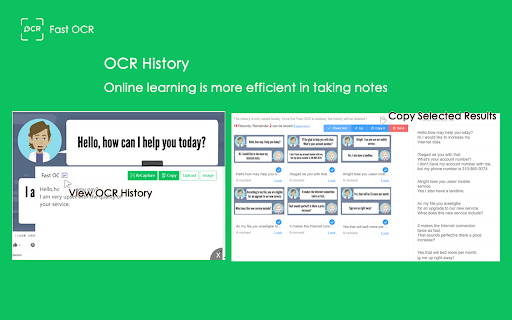
Free! Copy text with OCR from images, videos, PDF scanned and local images of your computer. Use intelligent OCR technology to circle the images, videos or PDF scanned files in the web page, and extract the text of the circle content for free, so as to easily break the ban on the web page. At the same time, it provides the image transfer OCR text extraction function: 1.Support OCR identification of pictures in any software at any location of the computer; 2. Support OCR identification by copying and pasting; 3. Support screenshot pasting OCR identification; 4.Support dragging image OCR recognition; 5.Support batch uploading pictures, OCR identification, batch proofreading, and one click copy of identification results; 6.Support extracting more than 200 pages of PDF scanned text. 7.Support viewing OCR recognition history: You can proofread the recent recognition results for the second time, and copy them to your notes with one click after selection.

Note It - Notes & OCR
A feature-packed note-taking extension with OCR support. With our note-taking app, you can take notes, convert images to text, download notes to PDF. You’ll be able to stay organized with a beautiful minimalist design. - ✍ Take notes in rich formatting. - 👀 Open the extension as a pop-up or re-sizable window. - 👀 Three different themes light, dark and dim - 📸 Take a screenshot of the active tab and: - ✂️ Copy the cropped image - 📜 Convert to text (OCR support) - ✔ Download the cropped image - 💾 Save notes on your local machine - 🗃 Notes folder - ⭐ Make notes as favorite - 📁 Download note in PDF format - 🗄 Convert your images to text (this feature works only when the extension is in window mode) This extension is open-source and does not store any user data on any server. All your data is on your local computer. Please get in touch with us if you find any bugs or have any features or recommendations. The GitHub link is available on the home page. Note It is a non-profit extension. We built and now maintain it during our free time, and we try our best to improve it and keep it up to date.

Cropp Ninja OCR
Capture and crop parts of the screen and extract its text! Cropp Ninja the audacious web browser extension that defies conformity and empowers you to conquer the digital landscape with rebellious flair! It's time to rise above the mundane and embrace a new era of screen cropping and text extraction. Cropp Ninja, a name that resonates with defiance and prowess, equips you with the tools to seize control over any text snippet within your screen's grasp. Unleash your inner ninja and cut through the noise as you effortlessly crop a portion of your screen and extract its textual essence with unrivaled precision. Why should you install Cropp Ninja? Because it's time to break free from the chains of mediocrity and unleash your rebellious spirit: Unleash Your Inner Ninja: Become a digital ninja, swiftly and stealthily cropping any section of your screen with surgical precision. Cropp Ninja empowers you to select and extract text like a true warrior, allowing you to reclaim your dominance over the digital realm. Defy the Conventional: Cropp Ninja is the embodiment of defiance. It challenges the norms, allowing you to extract text from unconventional sources, such as images, videos, or cryptic messages. Break the boundaries imposed upon you and unveil the hidden secrets that lie within. Embrace Effortless Efficiency: Wave goodbye to the days of tedious typing or endless copy-pasting. Cropp Ninja effortlessly extracts the text you desire, freeing up your valuable time and boosting your productivity. Embrace the efficiency of the rebel and redirect your energy towards more audacious endeavors. Liberate Multilingual Text: Language barriers crumble in the face of Cropp Ninja. Conquer foreign websites, decipher enigmatic messages, and overcome linguistic obstacles with ease. Empower yourself with the ability to extract text from diverse sources and let your rebellious spirit roam free across the global digital landscape. Ignite Creative Brilliance: Cropp Ninja is not just a tool; it's a catalyst for creativity. Extract captivating quotes, inspirational passages, or thought-provoking snippets to fuel your own artistic masterpieces. Merge the brilliance of others with your unique vision, and let your creative fire burn bright. Unleash your rebellious nature, install Cropp Ninja OCR today, and embark on a journey where boundaries are shattered, norms are challenged, and digital autonomy is restored. It's time to become the master of your digital destiny and forge a new path of defiance and empowerment.

Image to Text (OCR)
A Fast and simple document scanner app with high quality text output. Unlock the power of seamless text extraction with our Chrome extension! Transform images and PDFs into editable text effortlessly, right from your browser. ✅ Fast and Simple Scanner: Scan documents with high-quality PDF and Text output in a snap. ✅ Multilingual Support: Recognizes text in over 100 languages and variants from around the world. ✅ Context Menu Magic: Extract text from any image by simply right-clicking and selecting "Extract Text" from the context menu. ✅ Versatile OCR: Supports both PDF and Image to Text OCR for flexibility in document types. ✅ Screen Cropping: Crop your current screen to perform OCR on specific sections. ✅ Audio Playback: Play the extracted text as audio for a hands-free experience. ✅ Link Detection: Identify all the links present in the Image/PDF. ✅ Email Detection: Extract all email addresses from the Image/PDF. ✅ Internet Connection: Requires an active internet connection for optimal functionality. More Than a Hundred Languages Supported: Our extension is your global companion, supporting a diverse range of languages. Visit our homepage for the complete list: imagetext.xyz Open Source Project: We believe in collaboration! Check out the source code on GitHub: https://github.com/fxnoob/image-to-text-ocr Explore a world of possibilities with our Image to Text (OCR) Chrome extension. Download now and elevate your browsing experience!

Copyfish 🐟 Free OCR Software
Copy, paste and translate text from any image, video or PDF. Do you need to extract text from images, videos or PDF? If yes, then the Copyfish Screenshot Reader/Text Extractor is for you. Copyfish turns text within any image captured from your screen into an editable format without retyping – making it easy to reuse in digital documents, emails or reports. Common reasons to extract text from images are to google it, store it, email it or translate it. Until now, your only option was to retype the text. Copyfish is soooo much faster and more fun. “Images” come in many forms: photographs, charts, diagrams, screenshots, PDF documents, comics, error messages, memes, Flash – and Youtube movies. You can verify the results in one glance with the extracted text overlay. Do you need to switch between OCR languages often? You can define "Quick Switch" buttons for up to three languages on the settings page. For language learners: There are many translator addons available, but they only work with plain website text. Text inside images, in tricky Javascript/AJAX or, especially, in movie subtitles on Youtube or Youku is unreachable for them. But not for Copyfish. And if you want, Copyfish also translates the text for you. Especially for the subtitle translation use case, Copyfish has a repeat feature. Mark the area of the subtitle once and then use the "Do OCR" button to grab the latest text from the movie screen. For extension gurus: You might have heard of Project Naptha, a great addon that applies state-of-the-art computer vision algorithms on every image you see while browsing the web. Copyfish solves the same problem, but it takes a different user interface approach. It does not try to alter the website. Instead, it lets you mark the text in the image you want to extract. As a result Copyfish works with every website, even videos and PDF documents. For developers: Copyfish is published under the GPL open-source license. Full source code is available at https://github.com/A9T9/Copyfish As OCR software, it uses the free OCR API from https://ocr.space/ .
