
alimallfekmnmehadppjmhidodlpldpj
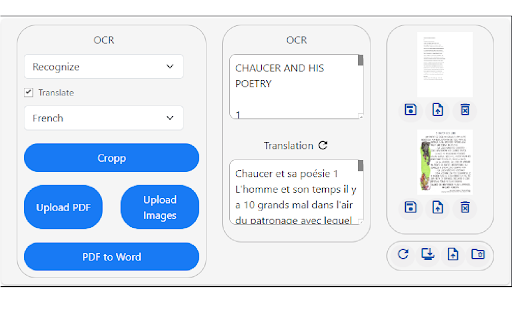
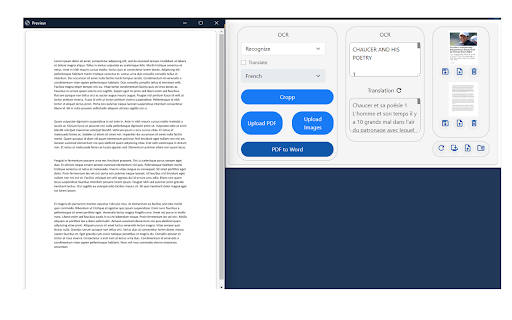
Capture and crop parts of the screen and extract its text! Cropp Ninja the audacious web browser extension that defies conformity and empowers you to conquer the digital landscape with rebellious flair! It's time to rise above the mundane and embrace a new era of screen cropping and text extraction. Cropp Ninja, a name that resonates with defiance and prowess, equips you with the tools to seize control over any text snippet within your screen's grasp. Unleash your inner ninja and cut through the noise as you effortlessly crop a portion of your screen and extract its textual essence with unrivaled precision. Why should you install Cropp Ninja? Because it's time to break free from the chains of mediocrity and unleash your rebellious spirit: Unleash Your Inner Ninja: Become a digital ninja, swiftly and stealthily cropping any section of your screen with surgical precision. Cropp Ninja empowers you to select and extract text like a true warrior, allowing you to reclaim your dominance over the digital realm. Defy the Conventional: Cropp Ninja is the embodiment of defiance. It challenges the norms, allowing you to extract text from unconventional sources, such as images, videos, or cryptic messages. Break the boundaries imposed upon you and unveil the hidden secrets that lie within. Embrace Effortless Efficiency: Wave goodbye to the days of tedious typing or endless copy-pasting. Cropp Ninja effortlessly extracts the text you desire, freeing up your valuable time and boosting your productivity. Embrace the efficiency of the rebel and redirect your energy towards more audacious endeavors. Liberate Multilingual Text: Language barriers crumble in the face of Cropp Ninja. Conquer foreign websites, decipher enigmatic messages, and overcome linguistic obstacles with ease. Empower yourself with the ability to extract text from diverse sources and let your rebellious spirit roam free across the global digital landscape. Ignite Creative Brilliance: Cropp Ninja is not just a tool; it's a catalyst for creativity. Extract captivating quotes, inspirational passages, or thought-provoking snippets to fuel your own artistic masterpieces. Merge the brilliance of others with your unique vision, and let your creative fire burn bright. Unleash your rebellious nature, install Cropp Ninja OCR today, and embark on a journey where boundaries are shattered, norms are challenged, and digital autonomy is restored. It's time to become the master of your digital destiny and forge a new path of defiance and empowerment.

Screenshot OCR
Screenshot and OCR for chrome plugin Custom intercept the area you want for OCR content extraction

OCR
图片识别文字,对于识别后的内容支持百度和谷歌搜索 一款ocr图片识别文字插件,能够截图并将图片识别成文字,同时支持对识别后的内容进行搜索

OCR Image to text - Image Reader
A powerful optical character recognition (OCR) extension to capture and convert images to text A powerful optical character recognition (OCR) extension to capture and convert images to text This extension adds a toolbar button to your browser to perform OCR. When this action button is pressed, it allows the user to select a region in the currently active window. The extension captures the area and tries to recognize text inside this region using the internal powerful OCR engine (Tesseract engine). This extension uses the "tesseract.js" library that supports more than 100 languages, automatic text orientation, and script detection. This extension loads the JS library on the page and removes it when you are done. This way, there is no long-term resource usage. Notes: 1. On the first run, the extension might take a few minutes to fetch the training data from the internet. Since this resource is cached, all subsequent calls are going to be fast. 2. Optical character recognition (OCR) is slow, so this extension displays a progress bar for each detection module. 3. This extension does the OCR process offline. There is no server-side interaction. It only fetches the language training database once. 4. This tool can be used to extract the text content out of images, PDF documents, Powerpoint slides, or extract the content of a web page when user-section is forbidden. 5. If the text extraction confidence is low, the extension inverts the image and retries (particularly useful on the dark theme) 6. If the text extraction is not accurate, you can modify the image and drop it into the interface to retry.

OCR Extract Text from Image
Right click any image and extract its text instantly with offline OCR in a side panel. When you work on the web—researching, studying, coding, or simply sharing memes—you constantly bump into information trapped inside images. A screenshot of a zoom-call slide, a social-media infographic, the label on a product photo: each holds text you’d rather copy-paste than re-type. After installation the extension registers a single context-menu entry that appears only when you right-click an image element. No clutter in normal menus, no toolbar buttons to remember—just “Extract text from image” exactly where you expect it. Click once and a Chrome side panel slides in, showing a friendly progress spinner followed by a textarea containing the recognised text. From that textarea you can: Copy the full result with one click. Software development – Snag cryptic compiler errors shown in an embedded screenshot on Stack Overflow so you can search them directly. Content creation – Extract quotes from Twitter images for alt-text or blog posts, preserving accessibility. Language learning – Grab foreign words on a signpost photo and drop them into your flash-card deck. In every scenario the side-panel model keeps the source page visible, so you can verify that the recognised text matches the image without juggling windows.
