
dplahamlefobblocfhnigfnfkalamnce
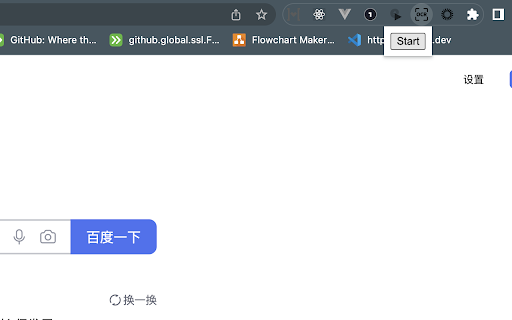

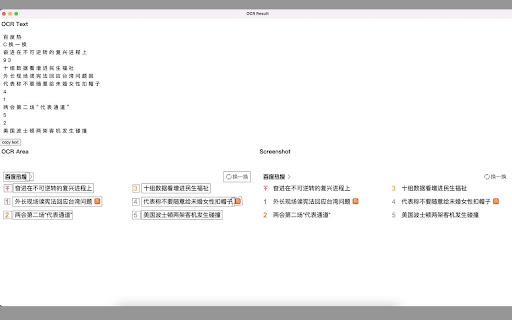

Screenshot and OCR for chrome plugin Custom intercept the area you want for OCR content extraction

Screen Recorder & Screenshot App for Chrome | Scrnli
Screen recorder for Chrome, take screenshots, record screen and video, capture, edit and share instantly Scrnli is a powerful screen recorder and screenshot tool for Chrome that lets you capture your screen, record video, take screenshots, and share content instantly. Use Scrnli to record your screen, capture full pages, edit screenshots, and create video recordings for work, study, or communication. Why Choose Scrnli screen recorder and screenshot app Screenshot Tool for Chrome - Capture full page, selected area, or visible screen Screen Recorder for Chrome - Record screen, browser tab, or desktop video Edit Screenshots - Annotate, draw, add text, arrows, and highlights Instant Capture - Take screenshots and record screen with one click Easy Sharing - Share screenshots and videos instantly via link Save and Download - Save screenshots and screen recordings locally Lightweight Extension - Works smoothly without slowing down Chrome Secure and Private - Your data stays safe and under your control What You Can Do with Scrnli Take Screenshots - Capture full page screenshots or selected areas Record Screen Video - Record tutorials, meetings, and presentations Create Tutorials - Record screen and explain processes visually Improve Communication - Share screenshots and videos instead of text Save Important Content - Capture and store useful information How to Use Screen Recorder & Screenshot Tool 1. Install Scrnli from the Chrome Web Store 2. Click the extension icon 3. Choose screenshot or screen recording mode 4. Capture your screen or record video 5. Edit, save, or share instantly Capture and record your screen in seconds with this easy-to-use screen recorder for Chrome. Full Page Screenshot - Capture entire web pages Visible Screen Capture - Capture what you see Area Screenshot - Select and capture specific areas Instant Editing - Add text, arrows, and highlights Screen Recorder Features Record Screen - Capture desktop, browser tab, or window Video Recording - Record video with smooth performance Quick Sharing - Share recordings instantly Save Video - Download recordings for offline use Why Users Install Scrnli Screen Recorder • Easy screenshot and screen recording tool • Fast capture and editing features • Share screenshots and videos instantly • Lightweight and simple to use • Perfect for work, study, and daily tasks Privacy and Security Scrnli Screen Recorder does not collect or store personal data. Your screenshots and recordings remain private.

Screen Capture
Use Chrome Screen Capture for fast screen capture Chrome extension, full web page screen capture Chrome, scrolling screenshot tool Use chrome screen capture for fast screen capture chrome extension, full web page screen capture chrome, scrolling screenshot tool 📸 Grab, record and save everything in your browser Screen capture is a powerful and easy-to-use extension designed for anyone who needs quick screenshots and video recording directly in the browser. This screen capture tool allows you to create a screenshot on google chrome browser in seconds without installing heavy software. With chrome screen capture you can grab visible areas, create a full browser screenshot chrome, or make a scrolling screenshot of an entire page. the extension also includes a built-in screen recorder so you can record browser video while browsing. 🌐 Smart capture utility for everyday browsing Modern work often requires saving visual information from websites. articles, product pages, analytics dashboards, documentation and tutorials may need to be stored or shared quickly. this is where a lightweight tool becomes useful. The extension simplifies how to screen capture chrome pages while keeping your workflow smooth. instead of complicated software, everything works directly inside the interface you already use every day. 📌 Practical situations where the tool helps 1️⃣ saving important information from long online articles 2️⃣ collecting research materials for reports or presentations 3️⃣ sharing visual instructions with teammates 4️⃣ documenting interface changes during development 5️⃣ storing references for creative projects Many users rely on a screenshot for browser while studying, managing projects, or collaborating remotely. 💡 Flexible capture modes for different needs ➤ full page screen grabber plugin for long reading materials ➤ scrolling screen capture chrome for pages that extend beyond the area ➤ full web page screen grabber for archiving information ➤ screen recorder when working with detailed layouts ➤ full screenshot to keep entire documents intact 📊 Comfortable workflow for visual documentation • save a screenshot chrome browser when reviewing content • create a browser screenshot for tutorials or reports • produce a screenshot on google chrome browser for quick notes • keep a screenshot for browser as visual reference • generate a full browser screenshot chrome for larger materials Such flexibility is useful for teams that frequently exchange visual context instead of long explanations. The extension also includes tools for recording on-screen activity. this feature helps create demonstrations, onboarding materials, and quick walkthrough videos. screen recorder chrome extension for simple recordings area recorder suitable for tutorials area recorder extension chrome that runs directly in the interface chrome extension screen recorder for capturing workflows record screen chrome extension sessions without complex setup Many educators, developers, and support specialists prefer record browser video features when explaining processes visually. open the website or article you want to save click the extension icon in the toolbar choose the capture type including full screen capture chrome extension save or share the result depending on your task These steps make it easy for anyone searching how to screen capture chrome content efficiently. ▸ students collecting references for research ▸ designers reviewing layouts and visual elements ▸ developers documenting interface updates ▸ marketers analyzing landing pages ▸ support teams preparing visual instructions Whether you need a chrome screen capture entire page for documentation or a chrome screen capture whole page example for analysis, the extension adapts to different workflows. choose the scrolling screen capture chrome mode the tool automatically performs scroll capture screenshot processing 📌 can i save a full page yes, full page video recorder and full web page screen capture chrome options are available yes, the screen recording chrome extension allows you to record browser video recordings can be used for tutorials, presentations, or feedback ⚡ a convenient helper for daily digital work chrome screen capture works as a practical screen capture software chrome users can keep installed without slowing down their workflow. it supports quick screenshots, long-form captures, and lightweight recording. Whether you want to save information, create documentation, or explain something visually, this chrome extension screen capture solution provides a simple and reliable way to capture what you see online.

Chrome Screenshot
Use Chrome Screenshot: smart screenshot chrome extension! Capture, edit, save any page. Explore how to screenshot on chrome browser Ultimate Webpage snapshot extension: Edit, save & screenshot in chrome Effortlessly 🚀 Struggling with how to screenshot on chrome? Capture content with chrome screenshot extension. Screengrab anything instantly - snippets, webpages, or dynamic elements. Perfect for professionals needing precision and simple users! 🔑 Core Advantages of full page screenshot chrome extension. Experience unmatched versatility: 1️⃣ Simple click screenshot snipping tool of selected area 2️⃣ Built-in easy to use tools (blur, arrows, etc.) 3️⃣ Access to chrome screenshot by URL for instant access 4️⃣ Lightweight and user friendly design avoids slowdown ⚡ Optimized Performance. This screen capture chrome extension works seamlessly on: ⭕ Media-heavy sites 📰 ⭕ E-commerce platforms ⭕ Google Docs/Atlassian 🎗️Simple 3-Step Workflow. Master screen grab plugin effortlessly: ➤ Click the toolbar icon 🖱️ ➤ Choose mode: area, visible, or chrome browser screenshot ➤ Annotate and export formats 🎯 Advanced screen capture extension. Transform snapshots with screenshot edit toolkit: - Highlight elements with shapes - Blur/hide sensitive data privately - Add text labels and mark with arrows - Crop/resize before saving in chrome screenshot 🧩 Instant Installation of screen capture extension. Start in 30 seconds: 🎨 Add chrome screenshot extension 🎨 Pin to toolbar, you will see the set of different tools you can use 🎨 Edit the webpage using several instruments at the same time 🎨 Picture now! Save as a file local on your PC. Or make a URL share it 📌 Aside from Basic Tools Unlike google snipping tool, our screen grab chrome plugin excels at: 🖍️ Infinite-scroll social media 🖼️ 🖍️ Hover menus and dropdowns 🖍️ HD snapshot web making 💼 Ideal For Diverse Users. This screen tool serves: 1. Designers: Visual UI feedback 2. snapshot extension archives 3. Marketers: Social visuals 4. Educators: Tutorial notes 🌐 Universal Compatibility. Works as: — screenshot snipping tool — screen grab plugin for academics — screenshot addon chrome for devs ◾Computer Science Student. During late-night coding sessions, our group project’s UI kept glitching. With chrome screenshot app I captured dynamic error states with one click, circled flaws in red, and shared annotated visuals over Slack. We fixed the React component before sunrise 🛠️. By the way, go full page chrome extension mode also helped a lot. ◾ IT Support Specialist. When finance reported a disappearing invoice button, I replicated the issue instantly. Instead of vague emails, I sent a visual with circled elements and workflow notes. Developers resolved it in one sprint cycle thanks to chrome screenshot extension ⏱️. ◾ DevOps Engineer. During a major outage, our team needed real-time evidence. Due to screenshot google chrome I grabbed live monitoring dashboards during peak failure, annotated traffic spikes, and created a timeline PDF. The post-mortem cleared us in 20 minutes 🚨. Thanks to chrome screenshot tool. ◾ Project Manager. Remote sprint reviews became chaotic with verbal updates. I started manually making daily progress snapshots—Jira boards, design mockups, and test logs—into a single annotated PDF. Stakeholders finally stopped micromanaging ✅. Thanks to chrome screenshot. ◾ IT Student. Final exam portals crashed constantly. Before each test, I secured a full capture of instructions and login paths. When systems failed, my offline archive became the class lifeline 💻. By virtue of chrome screenshot addon. FREQUENTLY ASKED QUESTIONS for how to screenshot on google chrome browser ❓ How do I install this tool? 💡 Simply visit the Web Store, search for our app, click *Add*, and pin the icon to your toolbar. No restart needed for chrome screenshot. ❓ How to edit the web picture before snapshot? 💡 Use our screen shot editing panel. Just choose needed tool, for example: Blur sensitive areas, or Add arrows/text, or Crop/resize, etc. ❓Can I save the edited capture local on my PC? 💡 Of course. Select the exact mode and save it in one-click in chrome screenshot.

Enhanced Image Viewer
Features: ✓ Position images in center or top left corner ✓ Set custom background color ✓ Zoom, rotate, pan and scroll images with improved controls ✓ Flip images horizontally and vertically ✓ Pixelate images for viewing pixel art and lossless formats ✓ Hide scrollbars ✓ View images in the current tab ✓ Works with local files and incognito mode ✓ Enhances images on Reddit • No more headers and footers on images opened directly • Works with single images and image galleries in an overlay ✓ Enhances images on image hosting sites • Skips the continue button • Shows the image full-screen automatically Feel free to leave any feedback you might have on the support page or contact us by email.
