
oefigjpghfpiefemcebeeiimfmboaljd
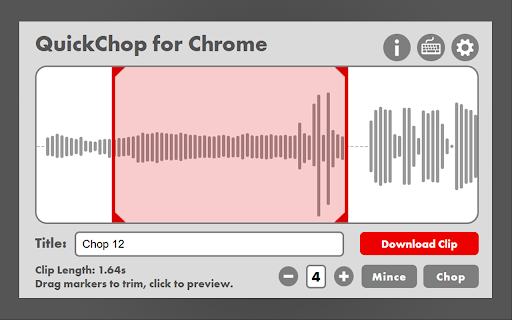


Rapidly record, edit, chop, and download audio from the internet. A rapid sampler for audio from Chrome for musicians and creatives. -Quickly record, manipulate, and download sections of audio from Chrome webpages -Use keyboard input from user to slice audio and experiment immediately with sounds -Export ‘chopped’ sounds and samples into a straightforward file format -User Interface window with visual feedback and interactive options -Find and experiment with samples from music and sounds on webpages quickly -Eliminate the need for clunky and unreliable ‘YouTube to MP3’ services -Make organization of downloaded sounds seamless and convenient

Smart Audio Capture
🏆 Introducing Smart Audio Capture - Record Tab Audio & Mic with Ease! 🎶 🎧 Capture Tab Audio: With Smart Audio Capture, you can effortlessly record tab audio from your browser. Whether it's your favorite music, podcast, or an important conference call, you can capture all the audio playing on the current tab without any hassle. 🎙️ Record Mic: Need to add your voice to the mix? Smart Audio Capture lets you record audio from your microphone. Perfect for creating voiceovers, narrations, or adding personal touch to your recordings. 🎵 Formats Supported: Webm, MP3, WAV: Save your recordings in the format that suits you best. Whether it's the space-saving webm, the widely-compatible mp3, or the lossless quality of wav, Smart Audio Capture supports all these formats for your convenience. 🎶 Stereo Audio for an Immersive Experience: Immerse yourself in high-quality stereo audio! Smart Audio Capture ensures that you experience recordings with enhanced depth and richness, making your listening experience truly captivating. Upgrade your audio recording game with Smart Audio Capture! 🚀 Enhance your browsing and recording capabilities, and take your audio recordings to the next level. Start recording tab audio and microphone audio seamlessly today! 💻🎙️🎵

SampleWizard
Sample any audio on the web with a click! Record and download audio directly from your browser. No need for shady downloader websites, just click record and save the audio. New and improved version now features a library where you can save files to download later. • Cloud based library - Save samples for download later, unlimited file storage • Settings - Use name of playing tab as default sample name - Mute current tab while recording - Automatically trim silence from start and end • Open with keyboard shortcut - Ctrl + Shift + Y - default shortcut - Set your own custom shortcut from chrome://extensions/shortcuts • No length limitations for recording • Maximum size for files saved to library is 50 MB

Sample Tab Audio
An extension that enables audio capture, preview and download from the browser's current tab Sample Tab Audio is a powerful yet user-friendly Chrome extension designed for anyone who wants to record and save audio directly from browser tabs. Ideal for music lovers, audio creators, and professionals, this extension makes audio sampling easy and efficient. Customizable Settings: Choose between MP3 and WAV file formats, adjust pan recording, and enable auto-loop recording for repetitive tasks. Visual Audio Previews: Get a clear waveform visualization of your audio recordings. Effortless Controls: Start, stop, loop, and manage recordings with a clean and intuitive UI. Instant Downloads: Save your audio recordings to your device in high-quality MP3 or WAV formats. Whether you're sampling music, capturing meeting audio, or saving web sounds, Sample Tab Audio simplifies the process, delivering high-quality results with just a few clicks.

Sample Scout
Find audio samples for music production across multiple trusted sources. Sample Scout is the ultimate companion for music producers, beatmakers, and sound designers. This extension provides instant access to a curated collection of audio sample sources, helping you find the perfect sounds for your music production needs. Key Features: One-click access to multiple sample libraries Search across trusted platforms simultaneously Clean, intuitive interface Results from both free and premium sources Supports Creative Commons and commercial samples Save your last search for quick reference No registration required Supported Platforms: ✓ Freesound - Free sound effects and samples ✓ Internet Archive - Historical and public domain audio ✓ Loopmasters - Professional sample packs ✓ Splice - Modern production samples ✓ Samplefocus - Curated sample library ✓ ADSR - Professional samples and presets ✓ Cymatics - Premium sound design ✓ Producer Loops - Royalty-free samples ✓ YouTube Audio - Creative Commons sounds Perfect for:
