
lfohcapleakcfmajfdeomgobhecliepj
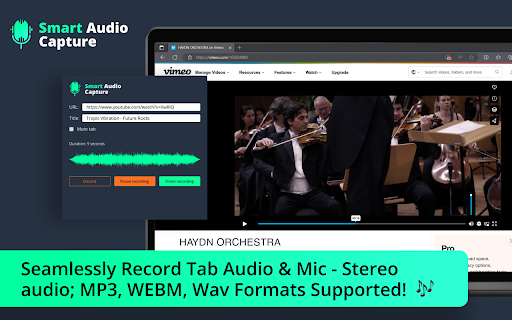
🏆 Introducing Smart Audio Capture - Record Tab Audio & Mic with Ease! 🎶 🎧 Capture Tab Audio: With Smart Audio Capture, you can effortlessly record tab audio from your browser. Whether it's your favorite music, podcast, or an important conference call, you can capture all the audio playing on the current tab without any hassle. 🎙️ Record Mic: Need to add your voice to the mix? Smart Audio Capture lets you record audio from your microphone. Perfect for creating voiceovers, narrations, or adding personal touch to your recordings. 🎵 Formats Supported: Webm, MP3, WAV: Save your recordings in the format that suits you best. Whether it's the space-saving webm, the widely-compatible mp3, or the lossless quality of wav, Smart Audio Capture supports all these formats for your convenience. 🎶 Stereo Audio for an Immersive Experience: Immerse yourself in high-quality stereo audio! Smart Audio Capture ensures that you experience recordings with enhanced depth and richness, making your listening experience truly captivating. Upgrade your audio recording game with Smart Audio Capture! 🚀 Enhance your browsing and recording capabilities, and take your audio recordings to the next level. Start recording tab audio and microphone audio seamlessly today! 💻🎙️🎵

Audio Recorder Online - Capture Screen Audio
Record audio from tabs and microphone, with support for pause, preview, and save to computer. 🎵Record audio from tabs and microphone, with support for pause, preview, and save to computer.🎵 🏆This extension can easily help users record audio from tabs and microphones, offering features such as pause during recording, preview of the recording results, and saving the output files to your computer, currently supporting Mp3, webm, and wav formats. Fast, simple, efficient - perfectly capturing every sound moment. 🔥 Features: ● Unlimited recording duration, effortlessly record online meetings, remote courses, live concerts, or everyday conversations with just one click. ● Supports separate recording of tab and microphone audio. ● Offers functions to pause, preview, and save audio files. ● Supports saving files in different audio formats, such as MP3, WAV, Webm, etc. ● Privacy first, recordings are directly exported to your computer, we do not store your data or recordings. 🎙️ How to use: 1. Click the Add to Chrome button to install the Record Audio extension. 2. Open the tab where you wish to capture audio. 3. Open the plugin, select the type of recording: tab audio, microphone audio 4. Click Start Tab Recording to begin. 5. You can cancel, pause, and save the audio file at any time during the recording. 6. Preview the audio, choose the audio format and save the file to your device. ❓ Q&A: Q: Is this extension free? A: Currently, our extension is free, and we have also launched a free AI-generated music service, offering you faster response times, unrestricted access, and priority customer support. Q: What audio formats does this extension support? A: This app supports various audio formats, including MP3, WAV, etc., allowing users to choose the saving format according to their needs. Q: Can it record tab audio and microphone audio at the same time? A: Yes, this app supports simultaneous recording of tab and microphone audio, giving users flexible recording options. Q: Can I pause and preview the audio during the recording process? A: Yes, users can pause the recording at any time, preview the recorded content, and save the file when needed. Q: Is this app safe and reliable? A: Yes, we provide a safe and efficient recording function, ensuring users can conveniently save tab and microphone audio, securing data safety and privacy.

Audio Downloader Plus
Audio Downloader Plus is a powerful Chrome extension designed to help you easily download audio files from various websites. With a simple, user-friendly interface, this extension allows you to capture and save audio content directly to your device with just a few clicks. Whether you're looking to save music tracks, podcasts, or any other audio files, Audio Downloader streamlines the process and ensures high-quality downloads. Enjoy effortless audio management and never miss your favorite sounds again!

Audio Recorder
Easily record audio from your computer's microphone! Audio Recorder is an extension that helps you record audio via your computer's microphone. To work with this addon, please click on the toolbar button to open the interface. To start recording, please click on the - Start Recording - button. The app will ask you to permit microphone access. Please note that the final audio will be downloaded to the default download location in your system. Note: Downloaded audio is in "webm" format. To get more information about this audio format, please visit the (https://en.wikipedia.org/wiki/WebM) page. You can use third-party software to change the " .webm" format to a desired one. To report bugs, please fill the bug report form on the addon's homepage (https://mybrowseraddon.com/audio-recorder.html).

Chrome Audio Capture
Chrome Audio Capture records audio from the current tab and saves the output file to your computer in MP3 or WAV format! Chrome Audio Capture is a powerful web audio capture extension that enables effortless audio recording from any active browser tab. Whether you're saving music, podcasts, webinars, meetings, or educational content, this tool delivers high-quality results with just a click - no setup required. Once installed, open the extension to start capturing tab audio instantly with one click. 🤩 If you like Chrome Audio Capture, give us a 5-star rating! 🤩 🔹 Tab Audio Capture:- Easily record high-quality audio directly from your active browser tab with a single click. Supports all web-based audio sources. 🔹 Multi-Tab Audio Recording: Capture audio from multiple browser tabs simultaneously. Each recording runs independently, allowing you to record a meeting in one tab while capturing a podcast or music stream in another - without interference. 🔹 MP3 & WAV Support:- Save recordings in MP3 for efficient file sizes or WAV for lossless, high-fidelity sound quality. 🔹 Custom Recording Options:- Set recording durations up to 60 minutes or enable unlimited mode for longer sessions. Includes a built-in timer and shortcut controls (Ctrl + Shift + 1 to start, Ctrl + Shift + 2 to stop). 🔹 High-Quality Audio Options:- Choose adjustable MP3 bitrates from 128 kbps to 320 kbps, giving you full control over audio clarity and file size balance. 🔹 Easy Recording Management:- Automatically save recordings with time-stamped file names, mute tabs during recording if needed, and manage everything through a built-in history panel. One cool thing is that this Web Audio Capture Extension is free, and you don't need to log in or sign up to use the services. (Installing or uninstalling this extension may display promotional content.) Disclaimer: All recordings are processed and saved locally on your device - nothing is ever uploaded to external servers. This makes Chrome Audio Capture safe to use for sensitive content, including meetings, personal notes, and proprietary audio.
