
ngkihcngbjapjmenfaglhpneoacehhgo
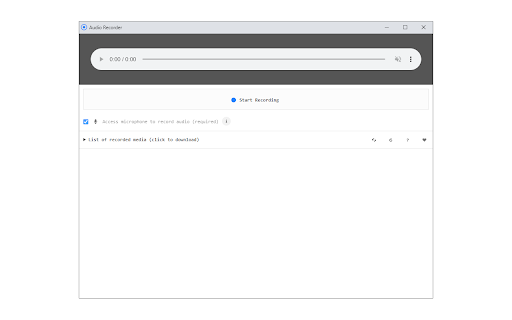

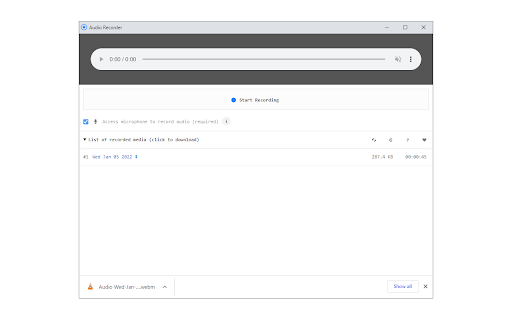
Easily record audio from your computer's microphone! Audio Recorder is an extension that helps you record audio via your computer's microphone. To work with this addon, please click on the toolbar button to open the interface. To start recording, please click on the - Start Recording - button. The app will ask you to permit microphone access. Please note that the final audio will be downloaded to the default download location in your system. Note: Downloaded audio is in "webm" format. To get more information about this audio format, please visit the (https://en.wikipedia.org/wiki/WebM) page. You can use third-party software to change the " .webm" format to a desired one. To report bugs, please fill the bug report form on the addon's homepage (https://mybrowseraddon.com/audio-recorder.html).

Chrome Audio Capture
Easily save sound with Chrome Audio Capture, an online voice recorder and online audio recorder to capture sound from computer 👋🏻 Introduction Our extension is a simple and efficient tool designed to audio record with ease. Whether you want to record sound from website, save music, or audio record online, this tool makes it effortless to collect sound directly from your web browser. 🌟 Core Features 🔸 Works seamlessly on any website, allowing you to save sound easily. 🔸 Enjoy unlimited recording time with no restrictions. 🔸 Export your recordings in a convenient WEBM format for easy access. 🔸 Provides secure data storage, ensuring your files are safe. 🔸 Features a user-friendly interface that’s simple and easy to navigate. 🔍 How It Works Using Chrome Audio Capture is simple and flexible. You can sound capture or use it as an audio voice recorder to keep your own voice. The extension offers: ➤ Ability to record computer audio as well as external sounds like your voice. ➤ No limitations on session length — feel free to store for as long as needed. ➤ Just click the extension icon while sound plays or when you’re ready to start. ➤ Once done, save and export your audio recording online for playback or editing. ✅ Use Cases Audio recorder for chrome is versatile and can be used in a variety of scenarios, including: – Record sound from browser during online classes, meetings, or webinars for later review. – Use it as an audio recorder online to store interviews, podcasts, or lectures. – Record sound from website to save music, speeches, or guides directly to your device. – Great for musicians or content creators who need to quickly sound record for projects or personal archives. 💡 Who Is This Extension For? Online sound recorder is perfect for: • Students who need to record voice during online classes or lectures. • Content creators looking for an easy way to record sound from browser for podcasts, tutorials, or music. • Anyone in need of a reliable voice recorder to save personal notes or voice memos. • Musicians who need to quickly record and audio for compositions or practice sessions. 🏆 Audio Quality and Formats Chrome Audio Capture ensures high-quality sessions with options to export in various formats. You can: 1️⃣ Capture audio from computer in high fidelity, preserving every detail. 2️⃣ Export files in WEBM format, making it easy to use the audio recorder for any project. 3️⃣ Enjoy clear, uninterrupted sound when you record audio online, perfect for professional and personal use. 4️⃣ This tool ensures that your voice recorder sessions are saved in a format that fits your needs. 5️⃣ Use the banner in the popup if you need to convert your audio from WEBM to MP3. 🔐 Security and Privacy 1. With Online audio recorder, your privacy is always a priority. The extension: 2. Does not collect or store any personal data during audio capture or online audio recording. 3. Ensures that when you record sound from web browser the data is stored locally on your device. 4. Offers safe and secure sound recorder chrome, giving you full control over your saved files. 5. Designed to respect user privacy, making it a trusted tool for anyone looking to record chrome audio without concerns about data security. ⚙️ Recording Options Recorder audio provides a variety of options for collecting sound. You can: 🔹 Audio record from any website, video, or media playing in your browser. 🔹 Use it as an online voice recorder to store voice notes or meetings. 🔹 Save both system sound and external sound simultaneously, offering flexibility for different storage needs. 🔹 Enjoy web voice recorder without any time limits, making it perfect for long sessions. 🗣️ Q&A Section ❓ How can I sound record using this extension? 📌 Simply click the extension icon and start capturing any sound playing in your browser, whether it’s music, a podcast, or a video. ❓ Can I use it to audio recorder for pc for personal sessions? 📌 Yes, you can use chrome capture audio to log any sound playing on your computer, including system sounds and online content. ❓ Is there a limit on how long I can recording with audio? 📌 No, there are no limits on the length of your session, allowing you to save as much sound as you need. ❓ Can I sound record while browsing different tabs? 📌 Yes, the extension allows you to save sound from specific tabs, so you can continue browsing while capturing. We are always happy to receive your feedback and suggestions! If you have any questions, improvement ideas, or are interested in collaboration, feel free to contact us via email. We value your input and strive to make our extension even better for all users.

Voice Recorder (with AI Noise Cancellation)
Record voice notes, memos, lectures without background noise directly to your PC! 💬 Looking for the best free online voice recorder? Powered by Effects SDK's cutting-edge AI noise cancellation, this powerful Voice Recorder instantly eliminates unwanted background noise (like typing, traffic, and fan noise), ensuring only your voice is captured. The feature is optional and can be disabled when you need to record ambient sounds. ✨ Key Features: ☑️ AI Noise Cancellation: Eliminate unwanted background noise in real-time using advanced AI technology. Enjoy clear voice recordings free from distractions. ☑️ Easy One-Click Recording: Start, stop, and download your audio recording with just a click directly within your browser. ☑️ Local Processing & Ultimate Privacy: Your recordings are processed directly on your computer. Nothing ever leaves your machine – no cloud storage, no server uploads – ensuring absolute privacy and data security. ☑️ Multiple Download Formats: Save your recordings in various popular audio formats to suit your needs (MP3, WebM, WAV). ☑️ Built-in Microphone Test: Ensure your microphone is working correctly before you start recording with the convenient mic test feature. 💡 How to Record Speech, Voice Notes, or Microphone Audio: 1️⃣ Install: Click the Add to Chrome button. 2️⃣ Open Recorder: Click the extension icon in your browser toolbar. 3️⃣ Allow Microphone Access: Click Allow while visiting the site. 4️⃣ Start/Stop Recording: Open the extension interface and click the Start Recording/Stop/Pause button. 5️⃣ (Optional) Enable Features: Check AI noise cancellation and Save recording after stop if you want to use them. 6️⃣ (Optional) Choose Format & Download: Select your preferred download format (MP3, WebM, WAV) and download. 7️⃣ (Optional) Test Mic: Click the grey triangle button before your microphone name to run a test. ❓ Why Choose Our Voice Recorder? ☑️ Crystal-Clear Audio: Eliminate background noise with cutting-edge AI for pristine recordings. ☑️ Ultimate Privacy: Your audio is processed locally and never leaves your computer. ☑️ Simple & Intuitive: Enjoy a user-friendly interface for quick and efficient recording. ☑️ Versatile Recording: Ideal for notes, meetings, voiceovers, lectures, and more. ☑️ Completely Free: Access high-quality voice recording and AI noise cancellation at no cost! 👍 Who Will Love Our Voice Recorder? 🎓 Students: Capture study notes and practice speeches, making review and learning more effective. 💼 Professionals: Easily record clear voice memos, key meeting points, and important discussions, boosting productivity and communication clarity. 🎬 Content Creators: Produce pristine voiceovers, podcast segments, and other audio content by eliminating background noise, ensuring professional sound quality. 🎙️ Anyone: Seeking a simple, private, and noise-free way to record thoughts, reminders, song ideas, or any audio directly from their microphone. 🔥 Enjoy simple, noise-free, and private voice recordings directly in your browser – install Voice Recorder for free!

Audio Transcriber
Try audio transcriber – easily transcribe audio to text in seconds. Fast, accurate transcription right from your browser. 🚀 Transform your productivity and workflow with the Audio transcriber Chrome extension – your go-to solution to transcribe audio to text with ease, speed, and accuracy. Whether you're a student, journalist, content creator, researcher, or just someone looking to transcribe audio recordings to text, this extension is built for you. Say goodbye to manual note-taking and the hassle of pausing and rewinding recordings. With our smart, AI-powered transcription tool, you can transcribe from audio to text in seconds. 🧠 With one simple click, transcribe audio files directly from your browser. Upload or drag-and-drop your audio file to text converter, and let our transcription software do the rest. You can finally focus on what matters – understanding, analyzing, and sharing insights from your recordings. ❤️ Why You’ll Love This Audio Transcriber Extension: 1️⃣ Fast and Accurate – Get high-quality audio transcription with AI-backed precision 2️⃣ User-Friendly Interface – No technical skills required to transcribe an audio file 3️⃣ Multiple Formats Supported – Convert to text from MP3, WAV, M4A, and more 4️⃣ Secure and Private – Your data is encrypted and never shared Whether you're handling interviews, podcasts, meetings, or lectures, this tool is your ideal audio to transcript assistant. Discover how effortless it is to transcribe recorded audio to text using AI. 🔝Features at a Glance: ➤ AI-powered audio transcriber engine ➤ Timestamps for easy navigation ➤ One-click convert sound to text ➤ Support for multiple languages ✨ Ever wondered how to transcribe an audio file without expensive transcription services? Now you can. This Chrome extension brings industry-grade ai transcription directly to your browser. No downloads, no external tools, just seamless transcribing audio anytime, anywhere. Need to translate audio to text for a report or an article? Done. Want to transcribe from audio recordings for research? Easy. Trying to figure out how can I transcribe an audio file for your team meeting? We've got you covered. 👀 Who Is This Audio Transcriber For? • Journalists transcribing interviews • Students recording lectures • Podcasters creating show notes • UX-researchers converting field recordings Whatever your role, if you need to convert audio to text, our extension simplifies the process with an intuitive interface and powerful engine. 🎁 Benefits of AI Transcription in Your Workflow ▸ Save hours of manual work ▸ Improve accessibility for your content ▸ Boost content creation with ready-to-use transcripts ▸ Quickly convert sound to text for blogs or reports ▸ Enhance productivity through automation Using this audio transcriber, you can transcribe audio up to 5x faster than manual typing. Perfect for tight deadlines.. ⛏️ How to Use the Extension 1. Add the extension to Chrome 2. Upload or drag your audio file to text converter 3. Click "Transcribe" 4. Done! 🎉 It's that simple. You'll never need to ask how to transcribe audio again. No more stress. Just results. 🔉 Supported Audio File Types • MP3 • WAV • M4A • WebM • mpeg ❓ Frequently Asked Questions Q: How can I transcribe an audio file from my phone or desktop? A: Use our extension to easily transcribe audio file formats directly from Chrome, without switching apps. Q: Is this an automatic or manual tool? A: It’s fully automatic audio transcriber, powered by advanced AI transcription algorithms for speedy results. Q: Can I translate audio to text in multiple languages? A: Yes! Our audio to text converter supports various languages. 🧠 The Smarter Way to Convert Audio to Text Never lose key insights again. Whether you're capturing a fleeting thought or archiving an entire conversation, our converter sound to text tool is built to perform. From small clips to full-length recordings, this audio to transcript extension scales with your needs. Use it to: - Take notes from meetings - Generate subtitles for videos - Archive audio messages - Prepare for presentations - Build searchable text databases 💡 The future of audio to text transcription is here – fast, affordable, and within reach. It’s the perfect blend of automation and accuracy for anyone who works with sound. 😊 Join Happy Users Professionals around the world trust our transcriber audio to text tool. From bloggers to ux-researchers, people are finding smarter ways to transcribe audio recording to text with just one click. Experience it for yourself and see how to transcribe audio faster than ever before. All from your browser. ✅ Install the extension now and start transcribing smarter, not harder.

Video Recorder
Use Video Recorder, a simple tool to screen record. It also lets you audio recorder online, capturing both your camera and display. 🚀 Looking for a powerful and easy-to-use screen recorder Chrome? Our extension provides all the tools you need for seamless video recorder. 1️⃣ Effortless Screen Recording: ➞ Easily capture your display with just one click using this intuitive tool. ➞ Simultaneously create a screencast. 2️⃣ Video Recording in One: – Record video while checking your webcam settings. – Perform a record camera and start capturing without interruptions. 3️⃣ All-in-One Recording Software: ◆ Webcam recorder and capture audio from your computer or microphone. ◆ Includes features like screen castify and screencastomatic for high-quality screencast. ◆ Essential for content creators and educators using a stream recorder. ◆ This recording software offers both video and audio recording. 4️⃣ High-Quality Display and Audio Recorder Online: ▶ Supports both screen and audio recording for crystal-clear video and sound quality. ▶ Full control over video recording with adjustable audio and video settings. 5️⃣ All-in-One Solution: ■ No need for tools like Clipchamp – our product provides all the features directly in the browser. ■ Forget about Bandicam – capture both display and audio directly without any additional software installation. ■ No more reliance on loom video – get full video and webcam features all in one place. 🎨 For Creators: ➞ Record a video with both display and audio at the same time. ➞ Capture high-quality screencast. ➞ Webcam test feature to ensure your camera is set up correctly. 🤓 For Remote Workers and Students: ➤ Capture lectures, webinars, or meetings effortlessly. ➤ Use the video recorder to capture both display and audio. ➤ Record video online. 🎓 For Teachers and Trainers: 🔹 Use the camera recording to capture both your display and voice. 🔹 Ideal for classroom screen captures with just a few clicks. 🔹 Works seamlessly as a screen recorder for PC or mac screen recorder. 🧑💻 For Content Creators and Bloggers: ⭐ Create engaging content with video recording software. ⭐ Capture both video and audio at once. ⭐ Enhance videos with features like online screen recorder and screencastomatic. 🖥️ For Those Who Want Simplicity Without Extra Software: ➡️ Record your video online along with audio directly, with no additional installations required. 💼 For Professionals and Beginners: ■ Screen recorder Windows and best screen recorder for mac options available. ■ Screencastify extension integration for advanced editing features. ■ Simple, user-friendly interface for the recording app. ❓ FAQ: 📌 How does the screen recording program work? 💡 Our tool lets you easily capture both your screen and audio with just one click. 📌 Can I capture both the display and webcam simultaneously? 💡 You can screen record and video with your webcam at the same time for a dynamic recording experience. 📌 Does the product support audio recording software? 💡 Yes, our tool is a screen and audio recorder that allows you to capture both video content and sound from your microphone or computer. 📌 Can I use this product to capture tutorials or presentations? 💡 Our screen video recorder allows you to capture everything you need, whether you're making a product demo or teaching a class. 📌 Can I record video online without downloading any software? 💡 Yes, our tool is an online video recorder, so you can create your video online directly from your browser without needing any extra installations. 📌 Is this tool suitable for classroom or educational use? 💡 Yes, it’s great for classroom screen recording, whether you’re teaching online classes or creating educational videos for students. 📌 What about audio recorder online capabilities? 💡 Our tool also functions as an online audio recorder, allowing you to capture high-quality audio along with media, making it ideal for podcasts or voice-over recordings. 📌 Can you screen record on mac? 💡 Yes, our screen recording software mac and screen recorder windows versions are fully optimized for their respective platforms. 📌 How to screen record on mac? 💡 Install this extension. Click the icon and press the "Record" orange button.
