
odlceielnakdomibdflildnbfllnjmgk

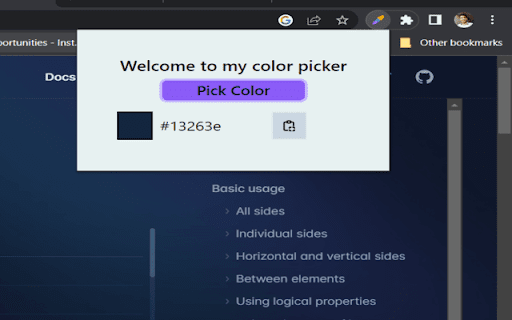
With our Color Picker Extension, you can easily and accurately capture colors from any web page with just a click. This Color Picker Chrome Extension is a powerful tool that brings the world of colors to your fingertips. Whether you're a designer, developer, or simply someone who appreciates aesthetics, this extension is designed to enhance your color selection process and streamline your workflow. With our Color Picker Extension, you can easily and accurately capture colors from any web page with just a click.

Screen Color Picker - PM Code with AI
One-click to pick colors from anywhere on your screen, instantly copy color values. A must-have tool for designers! The simplest and easiest extension you've ever seen

PromptEasily ChatGPT - HDTeam
PromptEasily ChatGPT - HDTeam adds a list of curated prompt templates for SEO, SaaS and more to ChatGPT. Try today. PromptEasily ChatGPT - HDTeam adds a list of curated prompt templates for SEO, SaaS and more to ChatGPT. Try today.

Better Color Picker
Better Color Picker is a user-oriented Chrome extension that allows you to easily pick colors from any web page. It aims to offer the highest user experience with its well-thought-out interface. Thanks to its large zoom section, this extension helps you choose the right colors easily. It also displays over 30,000 hand-selected custom color names, helping you recognize the colors you've chosen. It automatically copies the HEX code of the selected color to the clipboard. All colors you select are displayed in the extension window, with their color codes and names under the relevant domain names. You can manage the colors you choose from the 'Picked Colors' section. Better Color Picker is designed especially for UX/UI designers and web developers. Selected colors automatically sync with your Chrome account rather than being stored locally. In this way, you can access the colors you choose by logging into your Google account from any device you want. We believe in the importance of colors in the web design and development process. We aim to develop the extension to provide an in-depth solution beyond just a color picker. You can support us by leaving reviews.

Color Picker Chrome extension
Color Picker Chrome extension addon lets you to pick color from any webpage Color Picker Chrome Extension – Pick Colors from Any Website Instantly Pick colors from any website instantly with the Color Picker Chrome Extension — a powerful eyedropper and color identifier tool designed for designers, developers, and creatives who need accuracy and speed. With an advanced eyedropper tool, you can select any color directly from a webpage or image and instantly copy its color code in Hex, RGB, or HSL formats. Whether you're matching brand colors, working on UI designs, or analyzing website palettes, this extension simplifies your workflow with professional-grade precision. 🎨 Eyedropper Tool Pick any color from any webpage, image, or UI element with a single click. 🎨 Popup Color Picker Open a built-in color picker directly from your browser to tweak and refine colors easily. 🎨 Multiple Color Formats Copy color codes in Hex, RGB, and HSL for seamless use in design and development. 🎨 Image Color Identifier Extract colors from images on any webpage to discover and reuse beautiful color combinations. 🎨 Adjust & Customize Colors Fine-tune colors to perfection using an intuitive and easy-to-use interface. 🎨 Color History Automatically saves recently picked colors so you can quickly reuse them anytime. 🎯 Perfect For ✔ UI/UX designers matching brand and product colors ✔ Web developers copying exact CSS color values ✔ Digital marketers analyzing website color palettes ✔ Graphic designers & creative artists ✔ Anyone who needs fast and accurate color codes 🌐 Works Everywhere – Pick colors from any website, image, or web app ⚡ Fast & Lightweight – Optimized for speed with zero clutter 🛠️ Built for Professionals – Accurate results you can trust 🔌 Seamless Chrome Integration – One-click access from the toolbar 1. How does the Color Picker Extension work? Simply activate the eyedropper and click on any element or image in your browser. The color code is instantly shown in Hex, RGB, and HSL formats. 2. Can I save my picked colors? Yes! The extension stores your recently picked colors in a built-in color history for easy reuse. 3. Does it support images? Absolutely. You can pick colors directly from images displayed on any webpage. 4. Is this extension free? Yes, the Color Picker Chrome Extension is completely free to download and use. 5. Does it work on all websites? Yes, it works on all websites, including dynamic pages, images, and modern web apps. Install the Color Picker Chrome Extension and transform the way you pick, manage, and use colors — fast, accurate, and hassle-free.
