
jbedbdegefjlbgggibkpalnbmedplmam
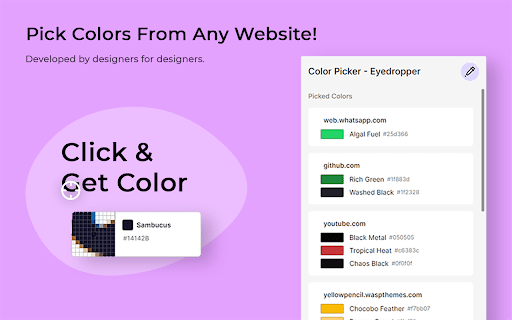
Better Color Picker is a user-oriented Chrome extension that allows you to easily pick colors from any web page. It aims to offer the highest user experience with its well-thought-out interface. Thanks to its large zoom section, this extension helps you choose the right colors easily. It also displays over 30,000 hand-selected custom color names, helping you recognize the colors you've chosen. It automatically copies the HEX code of the selected color to the clipboard. All colors you select are displayed in the extension window, with their color codes and names under the relevant domain names. You can manage the colors you choose from the 'Picked Colors' section. Better Color Picker is designed especially for UX/UI designers and web developers. Selected colors automatically sync with your Chrome account rather than being stored locally. In this way, you can access the colors you choose by logging into your Google account from any device you want. We believe in the importance of colors in the web design and development process. We aim to develop the extension to provide an in-depth solution beyond just a color picker. You can support us by leaving reviews.

ColorPickster – One-Click Color Picker & Eyedropper Tool
ColorPickster lets you quickly pick colors from any site or image. Simple color picker and eyedropper tool – no extra setup. Discover ColorPickster – your smooth and efficient color picker tool made for everyday use. Whether you're browsing a site, exploring visual content, or working on creative projects, ColorPickster helps you grab and reuse any color you see on the screen. This smart color picker combines a precise eyedropper tool, a handy color dropper, and quick copy functionality – all in one lightweight interface. It’s built for professionals and casual users alike, making it easy to pick colors without using complex design software. With one simple click, you can hover over any element, preview its color in real time, and copy the exact HEX, RGB, or HSL value to your clipboard. ColorPickster turns color discovery into a seamless part of your daily browsing. 🧲 Eyedropper Tool Preview – Hover your mouse to preview and select with pixel-level accuracy. 📋 Auto-Copy to Clipboard – The moment you click, the color code is ready to paste. 📂 Color History – Easily access your recently picked colors for reuse. ColorPickster is your go-to color picker tool for web design, branding, presentations, and daily creative tasks. Whether you're selecting brand colors, grabbing design references, or building digital content – it fits right into your workflow. ✅ Fast and simple to use ✅ No setup or login required ✅ Works on all websites and web apps ✨ Add ColorPickster to Chrome and turn every page into a color palette. Your color picker and eyedropper tool – exactly when and where you need it.

Color-Picker
With our Color Picker Extension, you can easily and accurately capture colors from any web page with just a click. This Color Picker Chrome Extension is a powerful tool that brings the world of colors to your fingertips. Whether you're a designer, developer, or simply someone who appreciates aesthetics, this extension is designed to enhance your color selection process and streamline your workflow. With our Color Picker Extension, you can easily and accurately capture colors from any web page with just a click.

Color Picker for website - Monster pick
🎨 Color Picker Monster — powerful color picker & eyedropper tool for your browser Color Picker Monster is a fast, lightweight, and precise color picker extension built for designers, developers, and creative professionals. Whether you're building a brand, designing a website, or creating digital art — this HTML color tool helps you grab, organize, and use colors like a pro. 💡 With this color picker, identifying, copying, and editing colors from any web page becomes simple. Just point and click to instantly grab HEX, RGB, or HSV values from text, backgrounds, gradients, and images. It's your go-to eyedropper tool for everything design-related. 🚀 Main features of Color Picker Monster: • Instant color picker from any website element • Shows color values in HEX, RGB, and HSV formats • Built-in eyedropper tool for quick color detection • Automatically detects the most used color on a page • Color history panel with your recently picked colors • Create and edit custom color palettes with ease • Use the interactive RGB color wheel to fine-tune selections • Lightweight & privacy-friendly – no trackers, no data collection This is more than a simple color picker extension — it's a full-featured web design tool made for modern creative workflows. Perfectly suited for tasks like CSS color picking, website redesigns, branding projects, and theme adjustments. 🌐 Ideal for: • Web developers and frontend engineers • UI/UX designers and product teams • Digital artists and content creators • Anyone who wants to grab color from screen and build color schemes • Users looking for a trusted browser color extractor Whether you're grabbing HEX codes, fine-tuning RGB values, or exploring design ideas, Color Picker Monster helps you stay organized and creative. Use it as a fast CSS color picker, a design reference, or simply to explore how websites use color.

Easy Color Picker
Grab colors from webpages anytime, instant color picker and personal color history. Easy Color Picker is a handy tool for developers and designers, making it simple to pick colors from websites or choose from a color board. It helps you get accurate color values and keep a record of the ones you've used. 2) Supports Multiple Formats: Get colors in the format you need, including HEX, RGB, HSV. 3) Color History: Keep track of every color you’ve selected so you can reuse them easily and stay consistent in your designs. 4) Easy to Use: The tool is designed with a simple, user-friendly interface that anyone can understand and use, no matter their experience level. Easy Color Picker is perfect for anyone looking to save time and keep their designs looking great with accurate and consistent colors. Enjoy the simplicity and convenience of the Easy Color Picker tool! And there’s more—at the bottom, you’ll find additional color-inspired extensions crafted for your creativity and comfort. These include Color Overlay for a more eye-friendly viewing experience. CHANGELOG ========== Version 0.1.6 - 0.2.5 - Clean JS files and links - Add new extension list at the bottom - Update the list over time Version 0.1.2 - 0.1.5 - Grab colors from web pages - Upgrade to extension V3 standard - Add google analytics - Add related new tools
