
odhjcodnoebmndcihdedenkmdmklpihb
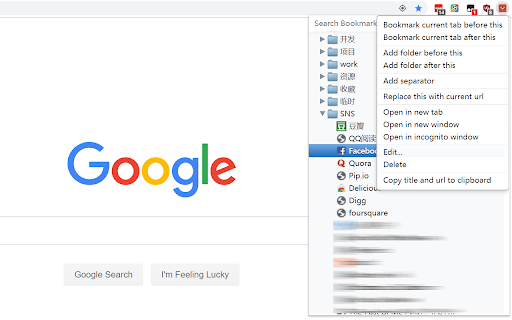


A successor of NeatBookmarks, an excellent bookmark extension for Google Chrome. Migrated "AddBookmarkHere" and some new features into "NeatBookmarks". Features: 1) Bookmark current tab before selected bookmark/folder. 2) Bookmark current tab after selected bookmark/folder. 3) Bookmark current tab to the top of selected folder. 4) Bookmark current tab to the bottom of selected folder. 5) Add a sub-folder into selected folder. 6) Update URL of selected bookmark with current URL. 7) Copy title and URL information for selected bookmarks into clipboard. 8) Add an option: only show the nodes of the Bookmark Bar. 9) Add: Synchronizable bookmark separators. 10) Fix bugs in Neat Bookmarks.

Bookmark Pro
If you're a power user of Chrome's basic bookmarks, then you're probably not very satisfied with the experience of saving bookmarks in Chrome. This extension replaces Chrome's default Save Bookmark popup with a new popup experience that has modern, search-empowered features and a clean design. (Note: This extension does not work when using Google's newer Bookmark Manager extension.) + Start typing to smart-search for a folder instead of digging through a menu for it. + Choose from 3 recently-saved-to folders without searching for a folder at all. + Create and save to a new folder without needing to open a new popup. + Update the location or delete the bookmark if you've already saved the page. + Elegantly designed using Google's new Material Design language. + Highlighted a favorite quote? It'll automatically be prepended to the bookmark title. How does it work? Keyboard shortcuts? + Bookmark the same way you always have, whether through the Bookmarks menu, star icon, or keyboard shortcut (Mac: Cmd + D, Others: Ctrl+D) + Tab to jump between inputs, ESC to escape, and Enter to Save, just as you'd expect. Original extension design & development by Jeff Vlahos

Quick Bookmarks Menu
Just click on the toolbar button to access your bookmarks. Main feature: 1. Browse bookmarks with a breadcrumb navigation. 2. Enter a folder when mouse hovering over it automatically. 3. Search bookmarks easily. 4. Set startup folder by clicking current folder title. 5. Hide any items by right clicking on it. (Only hide in Quick Bookmarks Menu) 6. And many other customizations!! Includes horizontal layout, dark mode etc. If you have any questions or suggestions, you can go to the support page and tell me, thanks!😀 [0.6.0] - 2021-10-12 - Add options page. - Add context menu. - Add middle button and keep showing customization. [0.5.1] - 2019-09-14 - Rewrite all code for better maintainability. - New feature: Hide items by right click.

Bookmark Manager and Viewer
An elegant bookmark manager with fuzzy search and more The "Bookmarks Manager and Viewer" extension provides a panel view to modify your bookmarks. The panel is equipped with fuzzy search (like Google search) to help you find the matching bookmarks. You have a set of tools to edit your bookmarks on the fly. It is even possible to drag a bookmark to a new position in the tree or create a new directory and place the bookmark inside it. Features: 1. Fuzzy Search: Use to find matching items even if you are not sure what the exact title or URL of the stored bookmark is. 2. Validation Button: Delete broken bookmarks or find duplicated bookmarks recursively. 3. Edit Properties: Modify the title or address of a bookmark 4. Toolbar Color: Detect if the current page is bookmarked or not 5. Sort Bookmarks 6. Supports Live Bookmarks 7. Opening Mode: Open in a browser tab or popup view 8. Keyboard Navigation and Operation

Better Bookmarks | Streamline Your Favorites
Effortlessly organize bookmarks with advanced sorting, powerful search, bulk actions, and seamless import/export. Better Bookmarks is the perfect solution for users looking to efficiently organize, manage, and retrieve their bookmarks. With its sleek design and advanced features, Better Bookmarks replaces your browser's default bookmark manager, providing enhanced controls, faster search capabilities, and seamless functionality. Say goodbye to cluttered bookmarks and hello to streamlined organization. (1) Advanced Sorting Options (2) Powerful Custom Bookmark Search (3) Bulk Operations for Editing, Moving, and Deleting (4) Enhanced Bookmark Folder Organization (5) Optimized Bookmark Index View (6) Comprehensive Import and Export Options (7) Dark and Light Themes (8) Secure Bookmark Deletion with Undo Function (1). Advanced Sorting Options Organize your bookmarks your way: • By Date: Keep your most recent bookmarks on top. • By Name: Arrange them alphabetically for easy navigation. • Chrome Default Order: Maintain the default sorting for a familiar browsing experience. (2). Powerful Custom Bookmark Search Locate bookmarks instantly with our advanced search functionality. • Real-Time Results: Get results as you type for faster retrieval. • Efficient Search Filters: Narrow down your search to pinpoint the exact bookmark. (3). Bulk Operations for Efficient Management Manage multiple bookmarks effortlessly with powerful bulk actions: • Select Multiple Bookmarks: Easily select and perform actions on several bookmarks at once. • Open in New Tabs/Windows: Open multiple bookmarks simultaneously in new tabs, new windows, or private mode. • Edit Bookmarks: Update bookmark titles and URLs to keep them accurate. • Move Bookmarks: Reorganize bookmarks into appropriate folders quickly. • Delete Bookmarks: Remove unwanted bookmarks individually or in bulk. • Export Bookmarks: Save your bookmarks in HTML or CSV formats for backup or sharing. • Copy URLs to Clipboard: Select multiple bookmarks and copy their URLs to the clipboard for easy sharing with anyone. (4). Enhanced Bookmark Folder Organization • Folder View: See all folders along with the number of bookmarks in each. • Parent Folder Display: Every bookmark shows its parent folder name for better context. (5). Optimized Bookmark Index View • Comprehensive Overview: View all bookmarks in a neatly arranged list with folder names, URLs, favicons, and titles. • Better Navigation: Quickly identify and access bookmarks related to specific projects or categories. (6). Comprehensive Import and Export Options • HTML and CSV Formats: Import/export bookmarks for backups or sharing. • Seamless Sync: Sync bookmarks via your Chrome profile—no additional login required. • Data Safety: Always have a backup to ensure your bookmarks are secure in case of accidental deletion. (7). Dark and Light Themes Choose between dark and light themes to suit your preferences and reduce eye strain during extended use. (8). Secure Bookmark Deletion with Undo Function Accidentally delete a bookmark? No problem! Easily restore deleted bookmarks with the undo function. ⭐ Active Support Center At Better Bookmarks, we care deeply about our users. We continually improve the extension based on your feedback. Feature Suggestions: Share your ideas and requests for new features. Support Assistance: Need help? Our team is ready to assist you. ↪ Submit a Request: https://betterbookmarks.io/contact/?reason=feature ⭐ Privacy Policy Your privacy is our priority: • No Data Tracking: We don’t track your browsing data, website usage, or any personal information. • Local Storage Only: All data is securely stored in your browser. We don’t access or share your data. • Anonymous Analytics: We use Google Analytics solely for anonymous error reporting to improve extension quality. Have questions or concerns about your privacy? Contact us anytime: ↪ Contact Us: https://betterbookmarks.io/contact/?reason=general
