
odfcpcabgcopkkpicbnebpefigppfglm

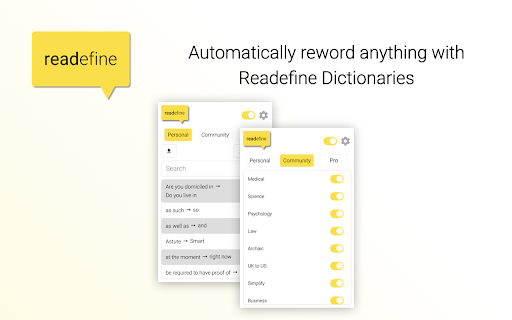


Turn confusing jargon into simple English, or just give the internet a fresh spin. Readefine rewords the internet. -Dictionaries at Hyper-speed Readefine's advanced dictionary engine lets you automatically reword thousands of words and phrases. Use your own dictionary, or opt-in to our community created dictionaries, and Readefine will reword the dictionary items faster than you can say "Wait, what does that word mean?" -AI-Powered Rewording Magic Ever wish the internet spoke YOUR language? With our AI-driven rewording tool, it kind of does. Whether you're translating, summarizing, or just browsing, Readefine shapes the web to suit you. Readefine AI allows you to: * Simplify for Children, Average Adults, and ESL * Summarize * Complexify * Change Tones to make text sound more professional, friendly, or even sarcastic * Translate into many languages, including Spanish, Greek, Russian, and Latin * Reword as a pirate, a mob boss, or Yoda * Convert units of measurement, like Celsius to Fahrenheit With an upgraded subscription, you can change the AI prompts to reword the internet however you'd like! Try it today!

Word Replacer Max
Seamlessly replace text on any web page. ⚡️ Smart Text Replacement Set up rules to automatically transform text across the web. 🌐 Domain Controls Specify which sites your rules apply to using allow or block lists. 🤝 Share & Import Exchange rule sets with friends and teammates to share useful replacements. 🎯 Pattern Matching Fine-tune rules using whole word, case sensitivity, or regular expressions for exact control. 🎨 Visual Styling Optionally highlight changes with styles such as bold, italic, underline, or background colors to make them stand out. 🌗 Dark Mode Eye comfort for all times of day. 1. Install Word Replacer Max 2. Click the extension icon in your toolbar 3. Create your first replacement rule 4. Start browsing with your personalized web experience ❯ Simple to use but powerful when you need it ❯ Full control over where replacements happen ❯ Your rules stay private on your device ❯ Open source code on GitHub: https://github.com/dan-lovelace/word-replacer-max

Writing Assistant
Writing assistant for researchers and professionals - Transform your writing to professional English AI writing assistant for researchers and professionals. Writing Assistant is a tool designed for scientists and professionals whose native language is not English to improve their English writing. No matter what your current English level is, Writing Assistant can help you to transform your writing into professional-standard English. It can also directly translate your own language (e.g., Spanish, Japanese, Chinese, and many other languages) into English. It can rewrite a sentence, or an entire paragraph. Currently, many researchers and professionals from universities and companies such as Harvard University, Stanford University, Caltech, and Clariant, are using Writing Assistant to improve English in their manuscripts, technical reports, and emails. An account is required to use this extension. Some features require an premium subscription. For more information, please visit https://www.storkapp.me/writeassistant/. Please contact us for questions and suggestions (https://www.storkapp.me/contact.php).

Note Sidebar
Note Sidebar is a lightweight and useful add-in designed for taking notes from the sidebar of your web browser. With this browser extension, you can customize the note paper according to your preferences, whether it is your favorite background color, squared graph paper, or lined paper. It serves as a secure notepad extension for writing notes in a minimalist design. Everything you type is automatically saved securely in your web browser. The Note Sidebar can be used for various purposes, such as creating a to-do list for tasks you plan to work on later in the day, jotting down any thoughts, taking notes on YouTube videos in the simplest way possible, or even recording meeting notes. It is ideal for students, teachers, managers, IT experts, influencers, engineers, and business owners. Additionally, it is suitable for medical professionals who need to write therapy notes, urgent care doctor notes, and physical reports. You can retrieve your personal notes on all your synced web browsers and edit them at a later time without interrupting your work. What are you waiting for? Your thoughts deserve the best. Install the extension and start taking notes. Browser extension features: ◆ Automatically Saving: Instantly type your note and automatically save it on your local and synced settings. ◆ Infinity Text: Write as much as you want without worrying about character limits, just like your personal journal. ◆ Font Style: Customize the font color, font size, line height, and background paper. ◆ Text Format: Choose between Plain Text or Rich Text format, supporting Bold, Italic, Underline, Hyperlink, and custom text background. ◆ Text To Speech: Convert your text to speech and select your preferred voice for a personalized experience. ◆ Copy to Clipboard: Easily copy text the complete text area in your clipboard with a single click button. ◆ Print: Print your current note directly from the sidebar. ◆ Character Counter: Keep track of the number of characters in your typed text. ◆ Context Menu Note Addition: Quickly add notes using the right-click menu to copy text into your note sidebar. ◆ Toolbar Customization: Hide buttons in the bottom toolbar to streamline your workspace. ◆ Note Locking: Secure your note with your personal password ◆ Export Options: Export your notebook text to a TXT file, perfect for importing into Google Docs, Microsoft Word, or Apple Pages. ◆ Shortcut: Customizable shortcut key to open the Note Sidebar. ◆ Custom Toolbar Icon: Select your preferred toolbar icon in either light or dark mode, adapting to your visual preferences. ◆ Accessibility: Accessibility Ready with labels for the interactive elements. ◆ Support Dark Mode, which makes it comfortable for your eyes. Project Information: https://www.stefanvd.net/project/note-sidebar/browser-extension Required Permissions: ◆ "contextMenus": This is to add the "Copy text to sidebar" menu item in the web browser context menu. ◆ "sidepanel": Allow the note to be visible in the side panel. ◆ "storage": Save settings locally and sync with your web browser account. >> Unlock an option feature to protect your eyes at night and focus on the video player, such as YouTube™, by installing Turn Off the Lights browser extension for YouTube and Beyond. https://chromewebstore.google.com/detail/turn-off-the-lights/bfbmjmiodbnnpllbbbfblcplfjjepjdn

Easy to read
Easy to Read extension turns difficult sentences into easy sentences. All you have to do is hover over a sentence that is hard to understand. The app will then show you a version that is simple to understand. We created this app for a family member who has a mental disability. But we soon found out it helps many people, both with disabilities and with no disabilities. To use the extension follow these easy steps: 1. Click the green Install button. 2. When the button turns from Install into Open, click Open. 3. Go to the top right side of your Chrome and click the jigsaw puzzle icon. 4. From the menu that will open, choose Manage Extensions at the very bottom. 5. On the web page that will open, you will see all your chrome apps. The Easy to Read one, will be on the top left. 6. There will be a toggle button. Move it to the right. It will turn from gray to blue. If it is already blue. Leave it like that. 7. Now the Easy to Read pink icon will appear on your Chrome. Click it, and a tiny window will open up. At the bottom of the window there will be a link, saying “How do I get a license?” Click it. 8. Now a web page will open. Scroll to its bottom, fill in your details, and get a code. 9. Copy the code. 10. Now click the Easy to Read button again. The tiny window will open. There will be a field titled My User Number. Paste the code there. Now move the gray toggle button to the right. It will become pink. 11. The app is now ready to use. Visit any website. We recommend trying The New York Times. Hover over a hard sentence, and let us show you the simple version of that sentence. Would you like to learn how this extension works? We use Machine Learning to improve the app. This means that when you use our tool, we learn from the way you use it, if you are happy with the results. And we improve the tool based on how much it helped you. So go ahead, start simplifying difficult texts. We hope you will get a lot of value from our app. And please leave us feedback. We want to improve for you. Thank you.
