
icfibfjidabjcklhikmodelmopjmghgj
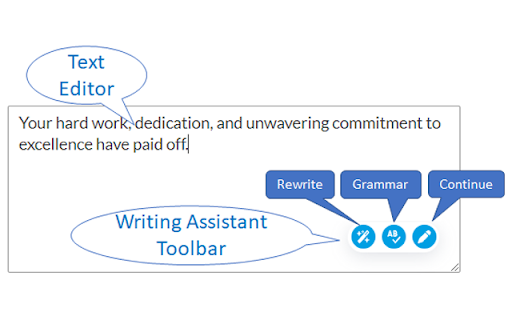
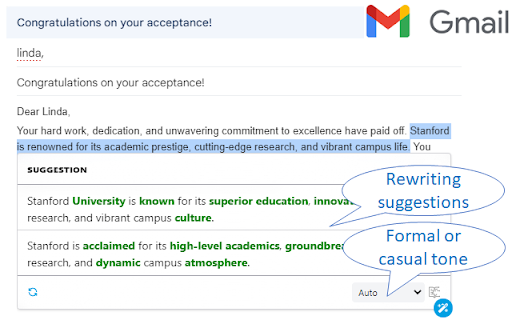
Writing assistant for researchers and professionals - Transform your writing to professional English AI writing assistant for researchers and professionals. Writing Assistant is a tool designed for scientists and professionals whose native language is not English to improve their English writing. No matter what your current English level is, Writing Assistant can help you to transform your writing into professional-standard English. It can also directly translate your own language (e.g., Spanish, Japanese, Chinese, and many other languages) into English. It can rewrite a sentence, or an entire paragraph. Currently, many researchers and professionals from universities and companies such as Harvard University, Stanford University, Caltech, and Clariant, are using Writing Assistant to improve English in their manuscripts, technical reports, and emails. An account is required to use this extension. Some features require an premium subscription. For more information, please visit https://www.storkapp.me/writeassistant/. Please contact us for questions and suggestions (https://www.storkapp.me/contact.php).

Eskritor: Smart Writing Assistant
Smart Writing Asistant. Automatically generate text with artificial intelligence (AI) content writer. Automatically generate text with artificial intelligence (AI) content writer. Eskritor provides best AI powered results for your needs. Eskritor takes some info about your needs and gives you the best results for you. Eskritor Chrome extension is easy to use. Press create new file for any needs and select one of the use cases and let Eskritor do its magic. You can use Eskritor for more than 30 use cases for any kind of needs. How to Use Eskritor? 1-Download the Eskritor Chrome extension. 2-Pin the Eskritor extension as it is shown when it is downloaded. 3-Press the create new file button in the extension. 4-Select the most appropriate use case for your needs in the pop-up page. 5-Add some input and keywords for your content. 6-Then click on generate button and wait for the best results. 7-After receiving results, edit them in the text editor. 8-Save the file and download the text to use in the future.

Readefine - Reword the Internet
Turn confusing jargon into simple English, or just give the internet a fresh spin. Readefine rewords the internet. -Dictionaries at Hyper-speed Readefine's advanced dictionary engine lets you automatically reword thousands of words and phrases. Use your own dictionary, or opt-in to our community created dictionaries, and Readefine will reword the dictionary items faster than you can say "Wait, what does that word mean?" -AI-Powered Rewording Magic Ever wish the internet spoke YOUR language? With our AI-driven rewording tool, it kind of does. Whether you're translating, summarizing, or just browsing, Readefine shapes the web to suit you. Readefine AI allows you to: * Simplify for Children, Average Adults, and ESL * Summarize * Complexify * Change Tones to make text sound more professional, friendly, or even sarcastic * Translate into many languages, including Spanish, Greek, Russian, and Latin * Reword as a pirate, a mob boss, or Yoda * Convert units of measurement, like Celsius to Fahrenheit With an upgraded subscription, you can change the AI prompts to reword the internet however you'd like! Try it today!

Writetone: AI Writing Assistant & Grammar Fix
AI writing assistant to rephrase, fix grammar, humanize, summarize, draft content, and generate replies. Ensure that you convey the perfect tone for any context with Writetone (https://writetone.com). The Writetone website (https://writetone.com) and its Chrome extension help you write your text naturally, using the ideal tone, vocabulary, and style for any given situation. It offers a variety of writing tones to choose from, including Simple, Normal, Formal, Informal, Casual, and more. Writetone is the best AI Paraphraser, AI Researcher, and more. With Writetone, you can be sure that your writing will be clear, concise, and effective, no matter who you're writing to or what the occasion is. Writetone speaks your language by supporting all the features in 50+ languages Chrome Extension Features: • Inline text rephrasing on any webpage • 10+ tones including Simple, Formal, Casual • Grammar fix directly in the inline toolbar • 3 Humanize modes (Subtle, Human, CEO) to make AI-generated text sound naturally written • Reply generator in 8 tones (Normal, Positive, Disagree, Question, Answer, Motivate, Thankful, Funny) • AI Writer to generate text from prompts • Summarizer Additional features on writetone.com: • AI Tools (30+ specialized writing tools) • AI Tutor (learn any subject with AI) • HumanGPT AI Humanizer in multiple languages • Text-to-speech and speech-to-text • Co-Writer • Use Cases generator Writetone HumanGPT is your AI Humanizer that makes AI-generated text sound naturally written. It also supports multiple languages. Writetone offers a variety of writing tones to choose from, so you can always find the perfect one for your message. Whether you're writing a formal email to your boss, a casual message to a friend, or a persuasive blog post, Writetone has you covered. In addition to its writing tones, Writetone also offers a powerful grammar checker, summarizer, and AI Humanizer. The grammar checker identifies and corrects grammar errors in your writing — available both on the website and directly in the Chrome extension's inline toolbar. The summarizer helps you create concise and informative summaries of your text. Additionally, on the website, you can utilize the Writetone text-to-speech generator, which generates voice in multiple natural tones. Similarly, we have a speech-to-text option to help you write on the go. Try: https://writetone.com/text-to-voice.html Furthermore, you can reply to social media messages in your desired tone and even customize it for a more personalized response. The Chrome extension also features an inline Reply generator — select any message on social media, email, or forums and instantly generate a contextual reply in 8 different tones: Normal, Positive, Disagree, Question, Answer, Motivate, Thankful, and Funny. If you need more diverse AI writing, you can even use the AI writer to give a prompt and it can write a text for you in a natural human tone. With Writetone, you can take your writing to the next level. Whether you're a student, a professional, or just someone who wants to improve their writing skills, Writetone is the perfect tool for you. So what are you waiting for? Elevate your writing with Writetone today! And if you need a writing buddy, check out Writetone's Co-Writer: https://writetone.com/writer.html Elevate your writing with Writetone today. Visit https://writetone.com for more details and a full-featured tool.

FutureWrite AI for Writing & More w/ ChatGPT
Free-Boost writing w/ AI! FutureWrite w/ ChatGPT for emails & more. Say bye 2 writer's block & hello 2 smarter,faster writing. Boost writing w/ AI! FutureWrite w/ ChatGPT for emails & more. Say bye to writer's block & hello to smarter, faster writing. FutureWrite is the ultimate writing assistant for professionals. With its AI-powered technology and easy-to-use interface, it helps you write smarter and succeed faster. From crafting perfect cover letters and LinkedIn summaries to writing job descriptions, email responses, and capturing meeting notes, FutureWrite has got you covered. Say goodbye to writer's block and hello to efficient, effective, and flawless writing. Unlock your full potential with FutureWrite and Write Smarter & Succeed Faster! Seamless integration with popular platforms such as Gmail and LinkedIn. With its integration into the Gmail email reply window, FutureWrite.AI appears right next to the send button, allowing you to easily compose and edit your emails without ever leaving your inbox. Similarly, in LinkedIn, FutureWrite.AI appears next to the Job Apply button, making it easy to craft the perfect cover letter or summary for your job applications. Free for Ever: FutureWrite.AI is a 100% free writing assistant that can be used by anyone, anytime, anywhere. Best Writing Assistant: FutureWrite.AI beats all other writing assistants in the market with its advanced features and ease of use. Integration: Seamlessly integrates with popular platforms like Gmail and LinkedIn, appearing next to the send button in the Gmail email reply window and next to the Job Apply button in LinkedIn, allowing you to easily compose and edit emails and craft the perfect cover letter or summary without ever leaving the platform. Works in Every Webpage: FutureWrite.AI works seamlessly in every webpage, ensuring that you never have to switch between different tools while writing. All Languages Supported: FutureWrite.AI supports all languages, making it accessible to professionals from all over the world. Secured and Privacy Built-in: FutureWrite.AI takes your privacy and security seriously. The tool is built with robust security features to ensure that your data is safe and secure. Created by Professionals for all Professionals: FutureWrite.AI was created by a team of professionals who understand the needs of other professionals. The tool is designed to make your life easier and help you succeed in your career. No Need for Chat GPT Account: Unlike other writing assistants, FutureWrite.AI does not require you to have a Chat GPT account to use the tool. Works Independently: FutureWrite.AI is a standalone tool that works independently, allowing you to use it on any device or platform. You can now auto-generate contextual responses to tweets on the Twitter App. 🐦💬 All current users of the FW Chrome extension will have access to the Tweet Response feature. 🖥️🔗 Simply select the reply option on any tweet that you’d like to reply to. 👉💬 Click on the FutureWrite icon on the reply input field. 🖊️🔮 FutureWrite’s context window will open. In this window, you need to provide an input prompt about what you’d like to do with the context. You can either manually input your context prompt or select from the following hints in the dropdown. 🪟❓ Congratulations – For tweets about achievements 🎉🏆 Retweet – For tweets that can be re-posted 🔄📢 Agree – For tweets you agree with 👍😄 Disagree – For tweets you disagree with 👎😤 Ask More – For tweets about insufficient information 🤔❓ Expand More – For tweets seeking advice or opinions 🗣️📈 Select Generate AI Response and select one from the 5 drafts generated. The selected response will be auto-filled into the reply input field. 🤖✉️
