
odbbkogjmgpmdfindgkngoojldhephif
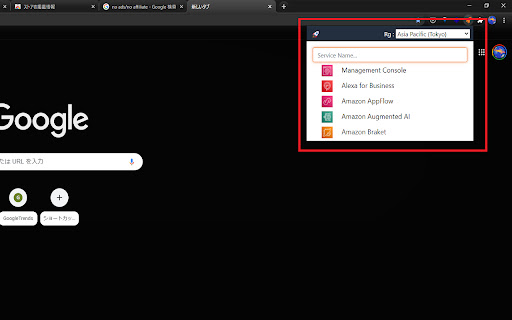
Simple popup launcher for hundreds of AWS services. Just press ctrl(cmd)+shift+L, or click an icon to open. Introducing our simple popup launcher for accessing hundreds of AWS services on Chrome. With just a press of ctrl(cmd)+shift+L or a click of an icon, you can open the launcher and easily access your desired service without the need for mouse controls. For instance, to open the S3 console, simply press "ctrl(cmd)+shift+L" and type "s3" into the search box. The hotkey can be edited in settings by visiting "chrome://extensions/shortcuts" and recreating the shortcuts. In case the hotkey doesn't work on your browser, try the recreated shortcuts. Our extension covers almost all AWS services, making it a convenient tool for your daily AWS tasks. Should you have any issues or requests for improving the extension, please let us know by adding an issue on the repository. https://github.com/kota-imai/awslauncher-chromeex/issues Install our Simple AWS Launcher now and streamline your AWS experience.

AWS Dark
Update aws dark mode cookie on page load Amazon AWS has begun the infrastructure to enable a dark mode on select web pages in their console via a cookie. This extension will set and attempt to keep the cookie in dark mode.

AWS Favicons
Favicons for all AWS services Tired of all your AWS browser tabs having the same orange cube favicon? This extension fixes that by setting the favicon to the appropriate one for the current service.

AWS Extend Switch Roles
Extend your AWS IAM switching roles. You can set the configuration like aws config format Switch role history does not remain only five maximum on the AWS Management Console. This extension gives you show all of switch roles from a browse menu by loading your aws configuration. ### Simple Configuration The simplest configuration is for multiple **target roles** when you always intend to show the whole list. **Target roles** can be expressed with a `role_arn` or with both `aws_account_id` and `role_name`. * `color` - The RGB hex value (without the prefix '#') for the color of the header bottom border and around the current profile. * `region` - Changing the region whenever switching the role if this parameter is specified. * `image` - The uri of an image to use on top of any color attribute supplied. The color and image are not mutually exclusive. ### Complex Configuration More complex configurations involve multiple AWS accounts and/or organizations. - If your account is aliased, you specify `aws_account_alias` in **base account**. - A **target role** is associated with a **base account** by the **target role** specifying a `source_profile`. - As above, **target roles** can be expressed with a `role_arn` or with both `aws_account_id` and `role_name` and can optionally pass the optional parameters. - If `target_role_name` is set in **base account**, the value is provided as the default role name for each **target roles**. ``` [organization1] aws_account_id = your-account-alias If you sign-in a base account, target roles of the other base accounts are excluded. For more information, please visit the homepage.

AWS Account Identifier
Adds a description with a specific color to the AWS's navigation bar depending on the account you are connected to. Adds a header to the Navigation Bar of AWS with a description and color based on the account you are connected to. In a multi account environment this is a very useful tool to help you to quickly identify the current account. A new feature has been added so you can import the accounts from the AWS SSO start page. This makes maintaining the accounts in this extension a lot easier. As from version 1.1.0 we stopped using an extra row on the navbar for the description as certain console feature were designed with a fixed position what would make it impossible to access certain functionalities of the AWS Console. Instead, we moved the description to the lower bar where enough space is available to add the description. version 1.2.1: Fix Account detection and improve style.
