
ochllolgankegacjbcjcheibjopfmfij
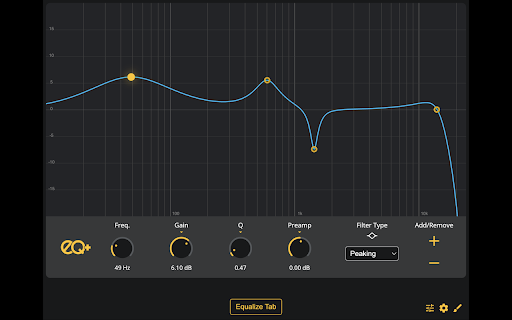
eq+ is an in-browser Parameteric Equalizer that will equalize audio from your tab of choice. Boost bass on your favorite tracks, make speech in videos more understandable, or tweak the sound however you desire with the intuitive interface. Save as many presets as you want. Customize eq+'s colors to get the look exactly how you want it. eq+ is designed to be as flexible as you want it to be. eq+ is open-source and free (and always will be)!

Browser EQ v2
BrowserEQ V2: Advanced Audio Control for Your Browser BrowserEQ V2 is a powerful parametric audio equalizer that gives you complete control over the sound of any tab in your browser. This major upgrade brings all the features you loved in V1 plus a suite of new tools to enhance your audio experience. Transform Your Listening Experience Frustrated with inconsistent audio levels? Boost quiet videos or tame overly loud content Bass too boomy or treble too harsh? Apply precise parametric EQ filters to shape the sound exactly how you like Need to focus on speech? Use our presets to enhance vocal clarity and reduce background noise Recording your favorite content? Capture and save high-quality WAV files with your EQ settings applied Key Features in V2: - Complete 6-band parametric EQ with lowpass, highpass, bandpass, peaking, and shelf filters - Customizable presets for different content types (music, podcasts, videos, games) - Mono/Stereo switching to fix balance issues or focus content to center - Record and download processed audio directly from any tab - Compact mode for minimal interface while browsing - Media playback controls for convenient navigation - Persistent settings between sessions - Easy to Use - Simply click the BrowserEQ icon while playing audio in any tab, adjust your settings, and immediately hear the difference. Your settings persist between URL changes and page refreshes, giving you consistent sound across your browsing experience. What's New in V2: - Completely rebuilt interface with intuitive controls - Save and recall your favorite EQ settings with the preset system - Toggle between mono and stereo modes to fix balance issues - Record processed audio directly to your device - Quick access to media controls without leaving the extension - Toggle EQ on/off without closing tabs - BrowserEQ V2 works with any audio source in Chrome - YouTube, Netflix, Spotify Web Player, games, and more. Take control of your browser's audio and enjoy a customized listening experience tailored to your preferences.

Parametric EQ - Tab Equalizer with Volume Control
Parametric EQ for Chrome - Control Tab Sound Like an Audio Engineer 🎵 Transform Any Web Audio Into Perfect Shape For Your Ears! This professional parametric equalizer brings DAW-level audio processing to Chrome, letting you enhance music, podcasts, videos, and streaming audio with precision EQ, real-time spectrum analysis, and customizable presets 🎛️ Professional Parametric EQ - Add unlimited EQ bands to any Chrome tab 📊 Real-Time Spectrum Analyzer - See your audio frequencies in action 🎯 Click & Drag Interface - Intuitive EQ curve editing 💾 Smart Presets - Save your settings or use built-in profiles 🎧 Solo & Bypass - Audition bands and A/B compare instantly ⚡ Zero Latency - Real-time processing with no audio delay Perfect for music enthusiasts. We overly engineered it, here's the new 1.1 version's update notes: Added Google sign-in option on the login page. Each tab now runs its own independent EQ session — enabling EQ on one tab no longer disables it on another. Spectrum analyzer and dB meter now only show data for the tab the popup controls. - Rebuilt from the ground up. Runs at up to 240 fps with a true stereo pre/post-EQ tap and rendering. - A new feature for the spectrum. Hover mouse for half a second to focus on spectrum. - Optional translucent pre-EQ ghost layer underneath the post-EQ trace. - Replaced the single "Speed" setting with separate Attack (5–500 ms) and Release (20–3000 ms) sliders. - Fixed ghost spectrum on silent tabs. Spectrum now follows solo: only the soloed band's shaping is reflected during a solo hold. - Spectrum analyzer and EQ curve now smoothed and snappy on high-refresh displays. - Bypassed bands stay visible in off state. - Selected band indicators improved. -Clicking a band selects it and shows an inline frequency / gain / Q readout. - Band gain range widened to ±30 dB; the footer GAIN knob now triggers the same axis upgrade as canvas drag. - Range auto-upgrade now triggers from the band's actual position, not the cursor's, preventing double-upgrades. - Multi-band drag — shift-click or marquee-select bands and drag any one to move the group in lock-step on the log frequency axis. - Selection now persists through dragging a band that is already part of a multi-selection. - Multi-band bypass — the Turn On / Turn Off button applies to every selected band. - Fixed multi-band audio sync: every band in a group drag is flushed to the audio engine on the same tick. - Fixed click-then-drag deleting a band (the second click was being counted as a double-click). - Fixed band vanishing when EQ was enabled immediately after creation. - Fixed hover-create hold-drag freeze-then-snap — new bands now follow the pointer immediately on click-and-drag. - HP/LP tooltip rows now read frequency → dB/oct slope → filter type, matching every other filter type. - HP/LP slope changes now immediately re-derive Q from the band's vertical position. - Fixed HP/LP creation Q — bands created near the canvas edges now seed Q from the click position instead of always defaulting to Q = 1 - HP/LP resonance at 0 dB is now calibrated per slope for better user experience. - High/low shelf Q is now capped at 10; bell bands above Q = 10 snap down when switched to a shelf. - Fixed audible click on every shelf frequency/gain/Q mouse-move — shelves now crossfade coefficients over ~12 ms. - Bell solo now uses a 6-stage bandpass cascade (~36 dB/oct skirts) for tighter focus. - Bell solo now reflects the band's stored gain - Dragging horizontally during a solo hold now keeps the new frequency on release. - Fixed Q drift on Macs from trackpad inertia during solo - Fixed tooltip flickering to the audition Q during the solo fade-out. - Hover tooltips on muted bands are suppressed for the duration of a solo hold. - Fixed level bars and peak-hold markers tracking apart — over-smoothing on the bar has been corrected. - Numeric peak readout now uses a peak follower (instant attack, ~12 dB/s release) and updates at 10 Hz instead of 60 Hz. - L/R values use fixed-width tabular numerals so columns no longer shift as digits change. - PH (Peak hold) and RST (Reset) buttons are now working (sorry about prior inconvenience) - UI is now little smaller to have you more space (EQ area size didn't change.) - Footer band editor now updates in place when switching bands (no crossfade on knob colors, divider, or filter-type buttons). - Account profile button with name changed to be only small icon button.

Just-EQ
Equalizer extension for web browsers An interactive audio equalizer for web browser that implements basic biquad filters utilizing the Web Audio API. There is also a safe limiter at the end of audio chain to prevent clipping. Usage of this extension requires extreme care to prevent damage to speakers/hearing by monitoring gain stages (ex: OS volume, hardware volume, media volume, etc...)

YouTube EQ (Equalizer)
YouTube Equalizer is a Chrome extension that adds a powerful, customizable equalizer directly to YouTube. Enhance your listening experience by adjusting audio frequencies to suit your preferences. Features: Audio Visualizer Multiple Band Options: 5, 10, 20, and 31-band equalizer options. Intuitive sliders for precise audio control. Dynamic adjustments with smooth frequency transitions. Built-in Presets Works seamlessly with YouTube videos. Reset button to restore default settings. Why Use YouTube Equalizer? Tailor audio to your taste, whether you're boosting bass, enhancing treble, or fine-tuning mid-tones. Great for music enthusiasts, content creators, and casual viewers alike. Install now and take control of your YouTube audio experience!
