
ldlklclppdfafbpggilnoakgnbpekpml


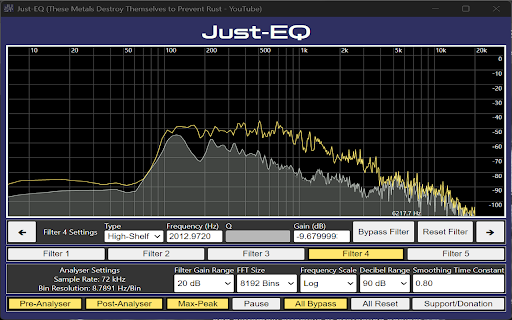
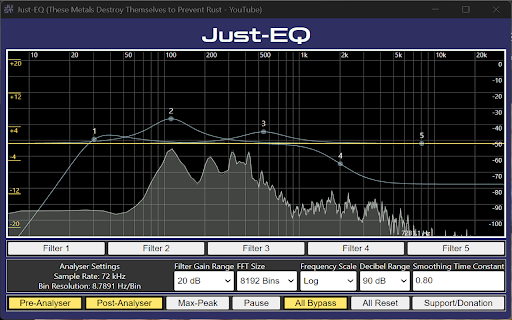
Equalizer extension for web browsers An interactive audio equalizer for web browser that implements basic biquad filters utilizing the Web Audio API. There is also a safe limiter at the end of audio chain to prevent clipping. Usage of this extension requires extreme care to prevent damage to speakers/hearing by monitoring gain stages (ex: OS volume, hardware volume, media volume, etc...)

Parametric EQ - Tab Equalizer with Volume Control
Parametric EQ for Chrome - Control Tab Sound Like an Audio Engineer 🎵 Transform Any Web Audio Into Perfect Shape For Your Ears! This professional parametric equalizer brings DAW-level audio processing to Chrome, letting you enhance music, podcasts, videos, and streaming audio with precision EQ, real-time spectrum analysis, and customizable presets 🎛️ Professional Parametric EQ - Add unlimited EQ bands to any Chrome tab 📊 Real-Time Spectrum Analyzer - See your audio frequencies in action 🎯 Click & Drag Interface - Intuitive EQ curve editing 💾 Smart Presets - Save your settings or use built-in profiles 🎧 Solo & Bypass - Audition bands and A/B compare instantly ⚡ Zero Latency - Real-time processing with no audio delay Perfect for music enthusiasts. We overly engineered it, here's the new 1.1 version's update notes: Added Google sign-in option on the login page. Each tab now runs its own independent EQ session — enabling EQ on one tab no longer disables it on another. Spectrum analyzer and dB meter now only show data for the tab the popup controls. - Rebuilt from the ground up. Runs at up to 240 fps with a true stereo pre/post-EQ tap and rendering. - A new feature for the spectrum. Hover mouse for half a second to focus on spectrum. - Optional translucent pre-EQ ghost layer underneath the post-EQ trace. - Replaced the single "Speed" setting with separate Attack (5–500 ms) and Release (20–3000 ms) sliders. - Fixed ghost spectrum on silent tabs. Spectrum now follows solo: only the soloed band's shaping is reflected during a solo hold. - Spectrum analyzer and EQ curve now smoothed and snappy on high-refresh displays. - Bypassed bands stay visible in off state. - Selected band indicators improved. -Clicking a band selects it and shows an inline frequency / gain / Q readout. - Band gain range widened to ±30 dB; the footer GAIN knob now triggers the same axis upgrade as canvas drag. - Range auto-upgrade now triggers from the band's actual position, not the cursor's, preventing double-upgrades. - Multi-band drag — shift-click or marquee-select bands and drag any one to move the group in lock-step on the log frequency axis. - Selection now persists through dragging a band that is already part of a multi-selection. - Multi-band bypass — the Turn On / Turn Off button applies to every selected band. - Fixed multi-band audio sync: every band in a group drag is flushed to the audio engine on the same tick. - Fixed click-then-drag deleting a band (the second click was being counted as a double-click). - Fixed band vanishing when EQ was enabled immediately after creation. - Fixed hover-create hold-drag freeze-then-snap — new bands now follow the pointer immediately on click-and-drag. - HP/LP tooltip rows now read frequency → dB/oct slope → filter type, matching every other filter type. - HP/LP slope changes now immediately re-derive Q from the band's vertical position. - Fixed HP/LP creation Q — bands created near the canvas edges now seed Q from the click position instead of always defaulting to Q = 1 - HP/LP resonance at 0 dB is now calibrated per slope for better user experience. - High/low shelf Q is now capped at 10; bell bands above Q = 10 snap down when switched to a shelf. - Fixed audible click on every shelf frequency/gain/Q mouse-move — shelves now crossfade coefficients over ~12 ms. - Bell solo now uses a 6-stage bandpass cascade (~36 dB/oct skirts) for tighter focus. - Bell solo now reflects the band's stored gain - Dragging horizontally during a solo hold now keeps the new frequency on release. - Fixed Q drift on Macs from trackpad inertia during solo - Fixed tooltip flickering to the audition Q during the solo fade-out. - Hover tooltips on muted bands are suppressed for the duration of a solo hold. - Fixed level bars and peak-hold markers tracking apart — over-smoothing on the bar has been corrected. - Numeric peak readout now uses a peak follower (instant attack, ~12 dB/s release) and updates at 10 Hz instead of 60 Hz. - L/R values use fixed-width tabular numerals so columns no longer shift as digits change. - PH (Peak hold) and RST (Reset) buttons are now working (sorry about prior inconvenience) - UI is now little smaller to have you more space (EQ area size didn't change.) - Footer band editor now updates in place when switching bands (no crossfade on knob colors, divider, or filter-type buttons). - Account profile button with name changed to be only small icon button.

EQ Toolkit - Audio equalizer
EQ Toolkit is a free and open-source extension that provides audio control. Enhance every audio experience in your browser with the EQ Toolkit equalizer. Whether you’re streaming music, watching videos, or joining a conference call. Take full control of your audio with powerful bass boost, precision volume boost, and advanced volume amplification across multiple frequency bands—no more tinny treble or drowned-out dialogue. Features: - Audio amplification, volume amplification - Bass boost - Mute volume on the tab - Modify audio across multiple bands while media is playing - Create your own equalizer presets - Easy graphic equalizer - User friendly interface - Multiple configs for multiple tabs - Spectrum visualization (experimental) - Import/export presets - Selection of the number of bands - Dark and light themes Install now to unlock the full potential of your browser’s sound!

EQ & Volume Boost
Powerful and simple volume boost and 3-band equalizer for Chrome. 🚀 Boost your audio to the max with EQ & Volume Boost! EQ & Volume Boost is a professional-grade, privacy-first audio suite for Chrome. Amplify volume up to 400% with clean digital gain and sculpt your sound using a precision HD 3-Band Equalizer — now re-tuned for audiophile transparency and musicality. Perfect for music, movies, podcasts, meetings — anywhere the default volume or EQ falls short. 🎚️ HD 3-Band Equalizer (Audiophile Re-Tune) • Sub-Bass: 80 Hz – deep, resonant low-end extension • Vocal Clarity: 2500 Hz – enhanced presence for voices & instruments • Air / Brilliance: 8000 Hz – crisp, open highs without harshness • ±15 dB range with smooth 0.7 Q-factor peaking filters • New Dynamics Chain: Gentle 3:1 compressor (soft-knee, -24 dB threshold) prevents clipping while preserving natural punch and dynamics 📻 Retro Marquee Mode Scrolling “ticker” song-title display with classic MP3-player nostalgia 🌙 Custom Theme Editor • Create, save & delete your own themes using a professional 3-color picker • Builds on the "Void" foundation for full personalization with high readability • Unified "Light-Up" logic via CSS :has() for smooth fade/glow transitions 🎨 Midnight Dark Mode Premium high-contrast dark theme with deep blue-black base (#020617) + midnight slate cards (#0F172A) Electric Orange (#FF7A00) active glow + Neon Jade status indicators Dynamic Contrast Engine auto-adjusts text & button colors for perfect legibility Reset button chameleon-adapts to your custom accent color 🌍 Global Support – 22 Languages Auto-detects your browser language on first run English, Español, Português-BR, Deutsch, Français, Italiano, Polski, Русский, Українська, Türkçe, Indonesia, 日本語, 한국어, हिंदी, 中文 (简体), 中文 (繁體), ไทย, Tiếng Việt, Filipino, ភាសាខ្មែរ, Lietuvių, Nederlands 🛡️ Privacy & Security First Built on Manifest V3 using the Principle of Least Privilege: • No script injection into web pages • No tracking of browsing history • Audio processed in a secure, sandboxed Offscreen Document via tabCapture API • Only the permissions absolutely required — nothing more PRIVACY POLICY We do not collect, store, or transmit any personal data. Audio stays local and is never sent anywhere. Your tabs and browsing remain completely private. 🆕 Latest – v1.9.1 "Void" Edition • Core Stability Upgrades: Centralized audio lifecycle management to prevent memory leaks and resolved background storage crashes for rock-solid reliability. • Stunning premium midnight UI overhaul (deep blue-black aesthetic) • Unified "Light-Up" glow logic + dynamic chameleon Reset button • High-luminance Electric Orange / Neon Jade indicators • Full contrast polish & readability upgrades across the interface • All previous HD audio upgrades (refactored engine, gentle compressor, 80/2500/8000 Hz EQ, ±15 dB range) Completely free and open-source. Made with ❤️ by Jussi Torres

EQ Sound Booster for Chrome
Adjust audio frequencies with bass, mid, and treble controls ## Single Purpose Description Enhance audio quality on any website with professional equalizer controls, including bass, mid, and treble adjustments. ## Permission Justification (Host Permissions) This audio equalizer needs permission to work on ANY website with audio - YouTube, SoundCloud, Spotify, podcasts, etc. Users expect universal functionality. We ONLY process audio elements, never access personal data, and the extension is disabled by default for security. ## Detailed Description Professional audio equalizer for Chrome that works on any website. Features: • Easy Mode: Simple 3-band equalizer (Bass, Mid, Treble) • Pro Mode: Professional 10-band equalizer (32Hz to 16kHz) • 6 Music Presets: Classical, Rock, Pop, Jazz, Hip Hop, Electronic • Custom Presets: Save your favorite settings • Volume Boost: Up to 200% volume • Real-time Processing: Instant audio enhancement • Universal: Works on YouTube, Spotify, SoundCloud, and more Privacy & Security: • No data collection or tracking • Disabled by default • Only processes audio elements • No external server communication • Open source and transparent Perfect for: • Music lovers wanting better sound • Podcast listeners needing voice clarity • Movie watchers enhancing dialogue • Gamers improving audio experience
