
obnjfbgikjcdfnbnmdamffacjfpankih
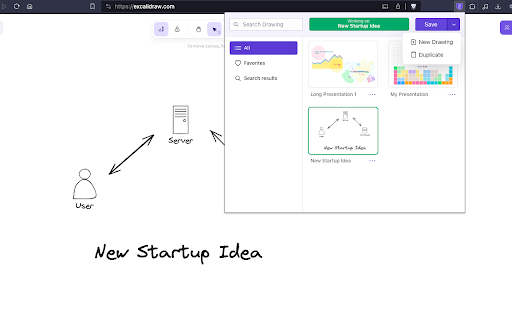
Save your excalidraw drawings. Excalidraw is an awesome tool for creating diagrams, sketches, and other visual representations of your ideas. However, it has one limitation - it only allows you to work on one drawing at a time. If you want to save your work and start a new drawing, you need to copy and paste the image, or download it to your device. That's where Excalisave comes in! This extension makes it easy to save your Excalidraw drawings with just one click. You no longer have to worry about losing your work or cluttering your computer with multiple image files. With Excalisave, you can store your drawings in the browser storage and access them later whenever you need them. 1. One-click saving: Save your Excalidraw drawings with just one click. No need to copy and paste or download the image. 2. Browser storage: Store your drawings in the browser storage. Your drawings are safe and accessible even if you close the Excalidraw tab or restart your computer. 4. Easy retrieval: Access your saved drawings easily from the Excalisave menu. You can preview the image, delete it, or open it in a new tab. 5. Multiple drawings: Save as many drawings as you want. You can organize them by name and date, or search for a specific drawing using keywords. 6. User-friendly interface: Excalisave has a simple and intuitive interface. You don't need any technical skills to use it. 7. How to use Excalisave: Install the extension from the Chrome Web Store. Open Excalidraw and create your drawing. Click on the Excalisave icon in the browser toolbar. Choose a name for your drawing (optional). Click "Save" to save your drawing in the browser storage. To access your saved drawings, click on the Excalisave icon and select "Open Saved Drawings". From the menu, you can preview, delete, or open your drawings in a new tab. That's it! With Excalisave, you can enjoy the full benefits of Excalidraw without any limitations. Try it out today and let us know what you think.

Excalidraw in New Tab
If you are tired of seeing the usual new tab and want to pen down your thoughts more freely on a page that is very commonly used, you can use this to open excalidraw inside new tab and do your creative note taking here with all your data being stored locally in localstorage.

Excalidraw custom font
Change Excalidraw's handwriting font with custom url. 1. Visit Excalidraw. 2. Enter font URL and click "Change font". 3. Toggle Night/Day mode to trigger font update. Visit https://github.com/jcyh0120/excalidraw-custom-font for more info.

Excalidrive
Open & Save Excalidraw files on your Google Drive Excalidrive is a handy Chrome extension that makes it super easy to connect Excalidraw, the fun online drawing tool, with your Google Drive. Now you can sketch, diagram, and save your creations effortlessly, all in one place. What's new in 1.2 1. Set current drawing into favorites, and it's sync into google drive 2. Introducing Sidebar, where you can see your favorites drawing & recents drawing 3. Auto Save 1. Smooth Integration: Open and save your Excalidraw diagrams directly to Google Drive—no jumping between apps, just pure creativity. 2. Safe & Sound: Uses OAuth 2.0 to keep your Drive access secure, so you can focus on your sketches and diagrams directly from browser (no backend not man in the middle). 3. Feels Just Right: Works right inside Excalidraw, blending in like it’s part of the magic. Excalidrive slips right into the Excalidraw interface, adding simple options to open from or save directly to Google Drive. With a few quick clicks, your diagrams are stored safely in the cloud, ready whenever you are. Perfect For: • Developers who love creating clear, hand-drawn diagrams in Excalidraw • Artists, thinkers, or anyone who enjoys doodling without worrying about losing their work • Teams that need a shared, cloud-based home for their sketches and diagrams • Fans of Excalidraw who want a quick and easy way to back up their creative genius Take your Excalidraw workflow to the next level with Excalidrive. Keep your sketches and diagrams safe, and never lose a masterpiece again! ⚠️ **IMPORTANT**: This extension is currently in beta. Please back up your Excalidraw files before installing and using Excalidrive.

Excalidraw Super Zen
Hide all UI for a clean, focused experience. MacOS: Cmd + Shift + B Windows: Ctrl + Shift + B Hide all UI for a clean, focused experience. Cmd/Ctrl + Shift + B to toggle UI. For more info about the developer see: swarnim.me
