
obfhlkjmacpckmfpckkphgbdffajefjc


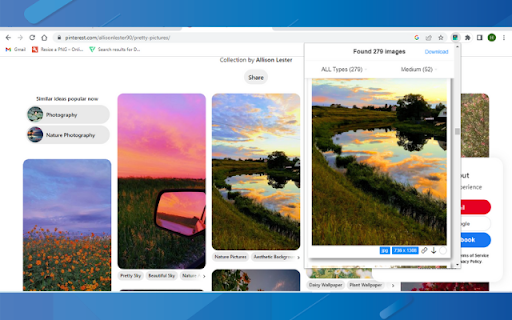


Full Image Downloader, in a nutshell, it detects images from websites and allows you to download them to your computer. Depending on your settings, it also performs other functions. It's your turn Full Image Downloader, don't forget to vote. 😊😊 You can reach Full Image Downloader from the mail "harrylucas.imagedownloader@gmail.com" on the side.

Download All Images
Easily save images with a wide range of customization features, such as file size, dimensions, and image type. This is a bulk image downloader to extract all photos from the current web page. This online image downloader provides highly customizable filters based on file size, image size, and more! Features: 1. Detects all images loaded on the current web page (even if they're nested iframes) 2. Filters images by file size, dimension, URL or type 3. Finds images in links, background scripts, and CSS files 4. Displays images in a gallery view before downloading 5. Download blob-type images even if the source is dead Filters: 1. Filter by file size 2. Filter by image dimension 3. Filter by image type 4. Filter by image URL (regular expression matching) 5. Filter by same-origin policy 6. Detect image width and height by downloading only the header section of the image Features: 1. Bulk download images 2. Filter based on file properties 3. Filter based on image properties such as width and height 4. Deep image search (extract images from the current page and subsequent pages) 6. Can detect single image path 7. Can download photos in ZIP format 8. Can detect the original image size from thumbnail Download location: By pressing the "Save" button, the extension downloads all selected images in the default download directory or a specified subfolder. Change Log: Version 0.1.1 1. The extension now stores images in a sub-folder (the default sub-folder name is the domain's name) 2. One security bug is fixed. Version 0.2.0 1. Images are now saved in a zip archive to prevent multiple downloads and better file-naming 2. The image detection algorithm is improved. Version 0.2.1 1. User preferences are now persistent. It is still possible to reset them from the UI 2. It is now possible to ask for "Save Dialog" from the UI 3. There is progress indicating how many images proceed 4. UI closes itself when all images are downloaded. Version 0.2.2 1. Deep image searching through all links (up to two levels) 2. Updates JSZip library Version 0.3.4 1. You can now open "Gallery View" in a new browser tab 2. You can now click on a single image in the "Gallery View" 3. It is possible to download images from multiple tabs at once Version 0.3.7 1. Two new filters: remove identical images and remove images with forbidden keywords 2. It is now possible to stop the image spider from the UI without closing it Version 0.5.6 1. Deeps search level 3 (search for both links and images in the destination HTML pages) 2. Custom RegExp filters to increase the searching speed. Version 0.9.0 1. Moves to manifest v3 2. Internal module to detect image width and height only by downloading the header section 3. Detects images first, then detects other mime types 4. The extraction of hard-coded image links is improved

Image Downloader - Image Search
Image downloader free, multiple image formats. Image search, filter by size and bulk image downloader. Image Downloader free Chrome extension for browse and download images on the web! ⭐️⭐️⭐️⭐️⭐️ Main Feature: 🔍 Image search: it will automatically scan all the images available on the present page and show their list inside Image Downloader interface. 📏 Filter by size: filter images by size to make selection easier. 📥 Bulk image downloader: download several images simultaneously with Image Downloader. 🖼️ Multiple image formats: supports png, svg, jpeg, gif, webp, bmp, ico and tiff. 📁 Specify download location: select folder to save the downloaded images. 🔗 Image URL: get the direct link for any image. 👀 In Image Downloader, look through each image in picture preview to make sure its precisely what you would like before downloading. 🌎 Support for popular image sites: Works with sites like Unsplash, Google Images, Pinterest and more. ⭐️⭐️⭐️⭐️⭐️

Image Downloader Pro
Image Downloader Pro is a tool for downloading images from websites. 🚀 Image Downloader – The Ultimate Bulk Image Saver for Chrome Looking for a fast and efficient way to download images in bulk from any website? Image Downloader is the ultimate Chrome extension that streamlines the process, making it easier than ever to collect high-quality images for personal or professional use. Whether you're a designer, researcher, marketer, blogger, or collector, this tool is your go-to solution for hassle-free image downloads. 🔥 Key Features That Set Image Downloader Apart ✅ One-Click Bulk Image Download – Forget saving images one by one! Instantly download all images from any webpage with a single click, saving you time and effort. ✅ Smart Filtering & Selection – Customize your downloads with intelligent filters based on image size, format, domain, and resolution, ensuring you get only the images you need while avoiding unnecessary clutter. ✅ Instant Preview & Quick Save – Hover over an image for a quick preview before downloading. Choose individual images or download them all at once with easy, intuitive controls. ✅ Fully Customizable Settings – Personalize your experience by setting custom file naming rules, download locations, and batch selection preferences, ensuring a seamless workflow tailored to your needs. 🌟 Why Choose Image Downloader? 🔹 Fast & Lightweight – Designed for high performance without slowing down your browser. 🔹 No Watermarks, No Restrictions – Download high-quality images without limitations. 🔹 100% Free & Secure – No hidden fees, no malware, just a powerful image-saving tool. 📥 Download Now & Start Saving Images Effortlessly! Boost your productivity and enhance your workflow with Image Downloader today. Add to Chrome and start downloading images in bulk with ease! 🚀

Image Downloader
Find any images from any website and efficiently download them in bulk to meet your business demands. Downloading image materials with the extension is a simple process: 1. Navigate to the website containing the desired image materials. 2. Open the menu of the Image Downloader extension. 3. Download any images you find appealing. --- Features --- ✅ Browse through images on the current page ✅ Apply filters based on size, width, height, type, or URL ✅ Download or open individual images in a new tab with just one click ✅ Save images to a designated subfolder ✅ Perform bulk image downloads This extension is particularly useful as a social media image downloader, supporting image downloads from various websites. Some of the websites frequently used with our tool include: instagram Facebook Twitter Pinterest LinkedIn Snapchat
