
obfdpipablmakibiibddbeckmiokachl
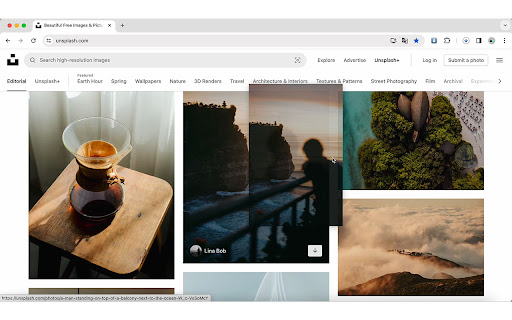
Just one step! Drag images to download them instantly to your default folder. Just one step! Drag images to download them instantly to your default folder.

Bulk Image downloader - Image Duke
Chrome image downloader extension, bulk image downloader, enlarge and display images/videos on mouse-over for downloading. Are you looking to quickly and easily download all the images from your favorite website? Look no further than our Image Downloader browser extension! With our powerful tool, you can search, view, and download every image on a web page with just a few clicks. Our extension offers a range of features to help you find and download the images you need, including: The ability to find the original image by thumbnail The ability to find more relevant images via links The option to filter based on pixel width and height The option to filter based on URL Bulk download all images at once Choose the images you want to download Check the size of each image Copy the URL of the original image Support for all major websites (Twitter, Facebook, Instagram, and more!) Experience the convenience and power of our Image Downloader for yourself. Download our extension today and start enjoying hassle-free image downloading on all your favorite websites.

Fitkun Batch Download Image
Browser extension that can find, select, filter and batch download images from any web page Fitkun is a browser extension that can find, select, filter and batch download images from any web page. Batch Download Supports one-click selection / deselection, can download one by one, or one-click batch download, saving time and energy. Integrated Smart Scripts Fitkun integrates smart scripts from many websites, including mainstream e-commerce websites (displayed by main, sku, details, product video), blog websites, comic websites (displayed in sequence and downloaded in sequence), etc. You can extract image you need on demand, saving your time and improving efficiency. Multi-Modality Fitkun provides sidepanel, new tab to open the image extraction page, and the sidepanel opening method can obtain page pictures in real time, which is convenient and fast, and can obtain image of the current page or all pages on demand. Image Edit Built-in powerful image edit tools, you can edit image twice, and save them easily to improve efficiency. Search by Image The image search function is integrated, which allows you to find similar products on 1688 and search for image sources. Format Conversion Built-in image format conversion function, quickly convert images into specified formats and download them. Intelligent HD Image Analysis We have added large image analysis rules for many websites, so you can effortlessly extract HD images from the page and download them with one click. Provide bright color theme and dark theme, free to switch.

Fat cat picture batch download
Find all images for the current page and batch download Get web page all images and batch download images

Image Batch Download Master - Little Bee
A free Chrome extension, streamlines image analysis, filtering, and efficient batch downloads, enhancing work productivity. Little Bee is a free Chrome browser extension designed for batch image downloading. With this plugin, you can easily analyze, filter, and efficiently download various types of images from web pages, making your work more effortless and productive. Browse images in large format for easy selection. Zoom in, zoom out, flip, rotate, and switch between images seamlessly. Powerful Filtering Options: Sort and filter images by file name, file format, file size, width, and height. Speed up image display and enhance operational smoothness. Multiple criteria filtering based on format, width, height, and file name. One-Click Select/Deselect: Effortlessly select/deselect images similar to file management in Windows. Streamline operations with one-click select/deselect functionality. One-Click Batch Format Conversion: Lossless conversion ensures images remain sharp and clear. Convert webp to jpg or png formats during downloads. Download Efficiency: One-click batch download to save time and effort. Make Little Bee your go-to image downloading tool in your Chrome browser, simplifying image processing for greater convenience!
