
ngnfcfdjhdkiohcmiakmjkjlfgigopob


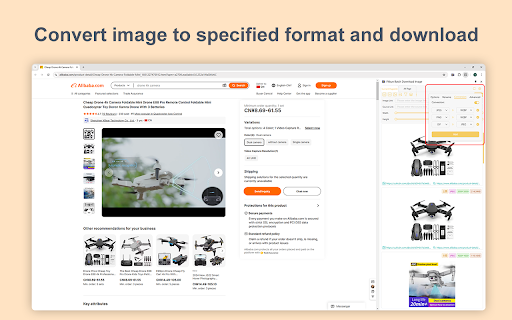

Browser extension that can find, select, filter and batch download images from any web page Fitkun is a browser extension that can find, select, filter and batch download images from any web page. Batch Download Supports one-click selection / deselection, can download one by one, or one-click batch download, saving time and energy. Integrated Smart Scripts Fitkun integrates smart scripts from many websites, including mainstream e-commerce websites (displayed by main, sku, details, product video), blog websites, comic websites (displayed in sequence and downloaded in sequence), etc. You can extract image you need on demand, saving your time and improving efficiency. Multi-Modality Fitkun provides sidepanel, new tab to open the image extraction page, and the sidepanel opening method can obtain page pictures in real time, which is convenient and fast, and can obtain image of the current page or all pages on demand. Image Edit Built-in powerful image edit tools, you can edit image twice, and save them easily to improve efficiency. Search by Image The image search function is integrated, which allows you to find similar products on 1688 and search for image sources. Format Conversion Built-in image format conversion function, quickly convert images into specified formats and download them. Intelligent HD Image Analysis We have added large image analysis rules for many websites, so you can effortlessly extract HD images from the page and download them with one click. Provide bright color theme and dark theme, free to switch.

Temu选品助手 - 免费Temu选品与数据分析
极鲸云旗下的官方Temu选品与数据分析工具,支持商品数据查询、历史销量价格查询、图搜同款等功能,帮助卖家洞察行业商机、高效选品。 Temu选品助手(特卖选品助手)——【永久免费】的Temu选品与数据分析工具。通过丰富的数据&图表和实用工具,透视竞争对手,轻松发现趋势与爆款商品。 提供Temu商品历史销量价格追踪、以图搜图找货源、一键上架、供货价预估、竞品分析等使用功能。 【主要功能】 1.全站点覆盖,丰富的数据&图表,透视竞争对手,轻松发现爆款 支持日/周/月/总销销量查询、日/周/月/总销售额查询、品类查询、评分/评论数查询等,让您轻松洞悉竞品情况,了解市场趋势,类似云启数据、卖家精灵、知了数据等工具。 2.上架时间、开店时间都能看,新款&潜力款无处遁形 支持商品上架时间查询、店铺开店时间查询,轻松地让您识别爆款新品和潜力店铺,让跟卖更简单。 3.供货价/核价预估,买手有的工具,你也要有 支持产品供货价查询,为您提供供货价参考。与Temu买手几乎同款的查价工具,让您报价有依据,核价有参考。 4.相似同款一键搜索,调查竞品So Easy 支持Temu、Shein、亚马逊平台相似同款搜索,一键调查竞争对手同款。不仅让您对商品提前有参考,更可以提前预判蓝海&红海市场,拒绝内卷!类似于AliPrice、Fatkun等工具 5.全网一键图搜货源,找货源如此简单 内置图搜货源功能一键查询1688、Temu、Shein希音、亚马逊等同款货源,帮助您快速找到价格最低货源。 6.一键下载主图、视频 内置主图、视频下载工具,自动下载原图并打包成压缩包一键下载,使用更方便。 快来使用Temu选品助手,让您的Temu选品和数据分析更得心应手,让竞争对手没有秘密,让爆款无处遁形。

PicHound - Professional Image Assistant
PicHound allows you to easily find and manage images on websites 📸 Powerful Management Plugin: Effortlessly Manage and Edit Abundant Images! 🌟 If you find yourself frequently dealing with a large number of images, this plugin is undoubtedly your best choice. Let's dive into its amazing features together! ✨ 🌿 Batch Download and Filtering: Effortlessly Manage a Vast Amount of Images! Handling a large quantity of images can be a daunting task, but PicHound is here to solve that challenge for you. It offers a one-click batch download and filtering feature, allowing you to quickly find the desired content within a vast collection of images. Whether you're gathering resources, organizing albums, or managing projects, PicHound provides immense convenience and boosts efficiency! 💪 🔍 Quick Open and Edit Images: Efficiency Improvement Is No Longer a Problem! Have you ever encountered a situation where you wanted to make secondary edits to one of the images you were browsing through? The traditional approach would involve the cumbersome process of downloading and using external editing tools. However, PicHound simplifies this process significantly. Just click on the image within the platform, and you can swiftly open and make secondary edits, saving you both time and effort! Say goodbye to efficiency concerns! 💡 ✨ Image Search by Image: Finding Similar Images Made Easy If you frequently find yourself puzzled by an unknown image, this feature is undoubtedly your savior! 🌟 Whether you're shopping and want to find a similar product or you're captivated by a beautiful scenery during your travels, simply capture or upload the image, and PicHound will swiftly help you discover similar images. ✨ 🔥 Built-in Window Layout: Bid Farewell to Tedious Operations for Easier Management! In the past, managing images often involved switching between tabs, which was quite laborious. However, PicHound stands out by incorporating a built-in window layout, eliminating the need to open additional tabs for management. With its user-friendly and intuitive interface, you can effortlessly access and edit your images, saving time and enhancing work efficiency. Whether you're a photographer, designer, or any professional handling images, this feature will leave you enamored! 🖼️ PicHound is continuously developing and introducing more practical features. If you have any questions or suggestions, please feel free to reach out to us. We eagerly anticipate your feedback as we work together to create a more refined plugin! 📢 Please note that PicHound currently supports Chrome versions 114 and above, and it may not be compatible with other browsers.

ImgGet - Image Downloader
Effortlessly Download, Filter, and Archive Web Images with ImgGet - Your Comprehensive Image Downloader Companion Simplify your image workflow with ImgGet. Effortlessly download, filter, and organize web images with ImgGet. Streamline your tasks and save time while managing your visual content like a pro. 📥 Bulk Image Downloads: Easily grab multiple images from any web page in one go! ✅ Selective Downloads: Choose the specific images you want to save hassle-free. 🔍 Smart Filtering: Filter images by size, shape, or by their names for a tailored downloading experience. 📂 Flexible Download Options: Save images as a folder, individual files, or a ZIP archive.

Image Downloader | Suricata
Find and download all images on a web page in bulk or individually. You can filter the images based on image characteristics. You can select which image to download or download all images that pass filtering. You can choose a custom folder for the images and a custom file name sequence. Main features: • Very quick and clean group display of all images. • Download a single, multiple or all images in the web page. • Filter images by: width, height, type, orientation and aspect ratio or URL. • Custom or auto generated folders and files names. • Auto convert files to JPEG, PNG or WebP. • Side panel is supported.
