
gjollpknhcpffpophlagemekjakfgfdk
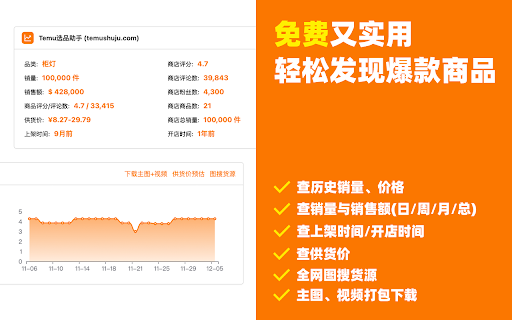
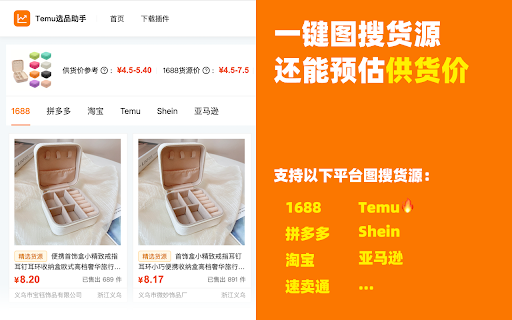
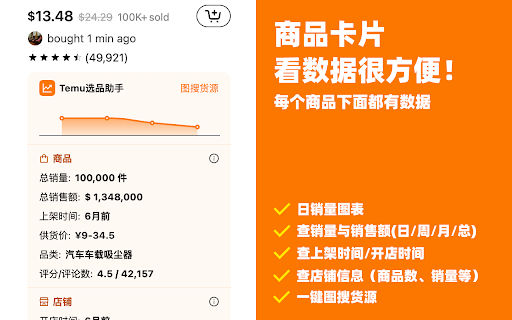
极鲸云旗下的官方Temu选品与数据分析工具,支持商品数据查询、历史销量价格查询、图搜同款等功能,帮助卖家洞察行业商机、高效选品。 Temu选品助手(特卖选品助手)——【永久免费】的Temu选品与数据分析工具。通过丰富的数据&图表和实用工具,透视竞争对手,轻松发现趋势与爆款商品。 提供Temu商品历史销量价格追踪、以图搜图找货源、一键上架、供货价预估、竞品分析等使用功能。 【主要功能】 1.全站点覆盖,丰富的数据&图表,透视竞争对手,轻松发现爆款 支持日/周/月/总销销量查询、日/周/月/总销售额查询、品类查询、评分/评论数查询等,让您轻松洞悉竞品情况,了解市场趋势,类似云启数据、卖家精灵、知了数据等工具。 2.上架时间、开店时间都能看,新款&潜力款无处遁形 支持商品上架时间查询、店铺开店时间查询,轻松地让您识别爆款新品和潜力店铺,让跟卖更简单。 3.供货价/核价预估,买手有的工具,你也要有 支持产品供货价查询,为您提供供货价参考。与Temu买手几乎同款的查价工具,让您报价有依据,核价有参考。 4.相似同款一键搜索,调查竞品So Easy 支持Temu、Shein、亚马逊平台相似同款搜索,一键调查竞争对手同款。不仅让您对商品提前有参考,更可以提前预判蓝海&红海市场,拒绝内卷!类似于AliPrice、Fatkun等工具 5.全网一键图搜货源,找货源如此简单 内置图搜货源功能一键查询1688、Temu、Shein希音、亚马逊等同款货源,帮助您快速找到价格最低货源。 6.一键下载主图、视频 内置主图、视频下载工具,自动下载原图并打包成压缩包一键下载,使用更方便。 快来使用Temu选品助手,让您的Temu选品和数据分析更得心应手,让竞争对手没有秘密,让爆款无处遁形。

THunt - Product Analysis Tool
👋 👋 Product data analysis tool. It helps you quickly analyze hot-selling products and make smarter decisions. You can use this plug-in to quickly compare prices and evaluate seller reputation quickly to maximize your profit margin! You can also get a better understanding of the competitive landscape and make more competitive decisions. 👋 👋 What are the main functions? 💰 1.Product research With this plugin, you can simply search by image to find similar products with lower prices and higher sales. For each product, this plugin provides: ➡️ Product overview: Includes basic information such as sales, sales volume, and listing time. ➡️ Bulk download of product images: Includes main images, specifications, and descriptions. ➡️ Product review analysis: Includes information such as rating, bad rating, and review content. ➡️ List of competitors: Includes information such as seller name, sales volume, and other competitors. ➡️ Image search for sources: Finds sources for products on platforms such as AliExpress, Taobao, and 1688 based on product images. ➡️ Ranking pages/category pages: Provides statistical charts, statistical panels, and product list data preview and export functions. 👋 👋 How to use it? ———————————————————————————————— Just install it on your Chrome browser, The extension will do it all for you automatically! 1. Install the Data analysis extension on your Chrome browser. 2. Visit website. 3. You will find the most popular charts on the home page, category page, and search results page. 4. An additional extension information panel will appear under each result you search. 5. Click on the floating icon on the product image to quickly view other source channels for the same product. ———————————————————————————————— 👋 👋 👋 👋 👋 👋 👋 👋 👋 👋 A must-have tool for your wholesale business! Download for free now and take your wholesale business to the next level!

SellerSprite - Amazon Research Tool
Join over a million sellers using SellerSprite to research, analyze, and optimize smarter — directly from your browser. Built on powerful data and AI, SellerSprite's Chrome Extension mirrors 80% of the full web app’s functionality. From product research to keyword analysis and competitor tracking, streamline your Amazon FBA business with real-time insights —all without leaving the Amazon page. In a single view, you can instantly spot high-potential products, analyze top competitors, uncover hidden keywords, and filter by sales, ratings, BSR, and more — without ever switching tabs. Key Features 📊 Deep Market Insights - Analyze subcategories with 16+ data points: demand, competition, supply/demand ratio to instantly spot high-potential niches and blue-ocean markets - Access granular BSR analytics with Top 400 rankings—track performance by parent and child ASINs, analyze variant-level sales distribution, and identify underexploited long-tail demand with precision - Customize your own product lists to batch-research trends, volume, and seasonality 🔑 Smart Keyword Tools - Discover high-converting long-tail keywords and build optimized listings - Track organic & sponsored keyword rankings in realtime - Reverse-search competitor ASINs to uncover hidden keyword strategies 🎯 Competitor Intelligence - Track BSR and sales across global sites - Detect brand infringement risks and benchmark strategies - Analyze reviews with AI and generate optimization suggestions ⚙️ Bulk Efficiency Tools - Download images, reviews, and selling points in one click - Collect ASINs and invite reviews in batches - Save hours with automation and smart scraping 💡 Why Sellers Choose SellerSprite - Feature-rich extension with 80% of full functionality — built into your browser - Real-time insights directly on Amazon pages - Trusted by over 1,400,000 Amazon sellers worldwide - Works with all major Amazon marketplaces ✅ Free to install — start exploring today! 1. Install the Extension • Download the SellerSprite Chrome Extension from the Chrome Web Store. 2. Create a Free Account • Sign up or log in. • New users get a 3 day-free trial of premium services. 3. Start Researching • Visit any Amazon product page to activate the extension. • Uncover competitor strategies, analyze product performance, and explore market trends. • Access in-depth historical data on pricing, sales, and keyword rankings to make informed decisions.

tool4seller - Amazon Product Research Extension
Analyze products, keywords, markets, and profits directly on Amazon to support efficient, data-driven decision-making. Tool4seller's extension is designed to provide clear insights into market trends and competitor performance, helping sellers research and operate with greater efficiency. • Search Results Analysis Aggregate and display key product data from Amazon search results, including price, estimated sales / units sold, review ratings, and BSR rankings. Also supports multi-dimensional comparison of sales performance by product, brand, category, fulfillment method, seller's country, and more. • Product Research Product Research: Provides a consolidated product list from search results, covering core product information, category ranking, ratings, and seller count, helping sellers quickly identify sales opportunities and efficiently support product selection and development. See More Product Analytics: Analyzes aggregated data from the top 100 products in search results, clearly presenting monthly units sold distribution, including top 10 products, buy box price distribution, and brand. Product Detail Page: Centralizes key metrics for products and their variations, including category ranking, estimated monthly sales, ratings, listing quality score, organic keywords, and FBA fee. • Keyword Research Provides search terms, Amazon recommended keywords, ABA search terms, and core performance metrics. Also supports reverse ASIN keyword lookup, keyword expansion, and frequency analysis, enabling sellers to conduct comprehensive keyword research and identify high-quality keywords. • Category Insights Offers in-depth category insights reports, including glance views, units sold, net sales, search preferences, return rate, and competition. All data is sourced from official to help sellers quickly understand overall market trends and make targeted product selection or development decisions. • Ad GPS Visually maps the relationship between front-end ad placements on Amazon and corresponding backend advertising campaigns, helping sellers better understand ad performance and optimize advertising strategies with clearer objectives. • FBA & FBM Profit Calculator Supports ASIN-based cost analysis, including Amazon referral fee, fulfillment fee, and monthly inventory storage fee. Also provides FBA vs. FBM comparison analysis, allowing sellers to evaluate product profitability before launching sales. • Listing Quality Score Automatically evaluates listing content based on Amazon’s official listing quality standards and provides intelligent optimization suggestions. Helps with competitor research and listing optimization to improve content quality and conversion performance. • Competitor Tracking Continuously tracks historical changes across key metrics such as monthly sales, Lightning Deals, and listing prices, helping sellers analyze competitor pricing and promotion strategies and support optimization decisions for their own products.

Shopdora - Shopee Keyword & Analytics Tools
Shopdora is an all‑in‑one intelligence and optimization assistant for Shopee sellers. Instantly discover high‑demand products,… Shopee seller's product selection and keyword assistant, allowing you to directly view competitor product sales and other data on the Shopee buyer website. Check sales rankings, new product sales, SKU sales, keyword search volume, and an overview of product analysis in the keyword market anytime, anywhere. 🔥 Shopdora is an all-in-one product selection assistant for Shopee sellers. Open the Shopee buyer website (shopee.com/xiapibuy.com) to activate. We provide assistance for data-driven tasks such as competitor sales rankings, new product sales monitoring, product traffic analysis, title analysis, review analysis, and more. 💪 Core Features: 👉 Product sales and ranking trends ✔️ Product sales: View total sales, monthly sales, and market trends by category. ✔️ SKU sales: Directly view the sales proportion of SKUs on Shopee's local product detail pages. ✔️ RMB pricing: Supports viewing product prices based on real-time or custom exchange rates. ✔️ Launch time: Use the microphone button to enable voice interaction without typing. 👉 Keyword market and traffic analysis ✔️ Directly view keyword search volume and search trends. ✔️ Product data in the keyword market, supporting various filtering methods to view data and download product data to your computer. ✔️ Analyze keywords that bring traffic to products, distinguishing between organic traffic keywords and ad traffic keywords. ✔️ Bulk analysis of high-frequency product title keywords and other features. 👉 Find identical products ✔️ Follow-sell analysis: Directly view key information such as sales, pricing, and launch time of identical products. ✔️ Image search for suppliers: One-click search for identical products on platforms like 1688. 👉 High-efficiency tools ✔️ Image and video download: Batch download main product images, videos, etc. ✔️ Review download and analysis: Extract product selling points and understand buyer needs. ✔️ Profit calculator: Clear pricing, controllable costs. ✔️ Bulk operations: Batch copy product titles. 💻 How to Use: 🔸 Click the "Add to Chrome" button and pin it to the toolbar. 🔸 Log into your account. 🔸 Open the Shopee buyer website to activate Shopdora. 🔸 Start 🧐 exploring competitor data! ❓ Frequently Asked Questions: 📌 Which Shopee websites are supported? Currently supports local Shopee buyer websites in Malaysia, Indonesia, Taiwan, Thailand, Singapore, the Philippines, Vietnam, Brazil, Mexico, and cross-border buyer websites like xiapibuy.com. 📌 Is a Shopee account required? Yes, you need to log in with either a seller or buyer account on the Shopee buyer website to view information. 📌 Is it free to use? Yes, we offer limited free usage. To unlock unlimited full access, you can opt for the paid version. Experience the powerful features of this data-driven product selection and keyword assistant now!
