
obbhdebhbmlhegoeokjcleodhgmdbcaf

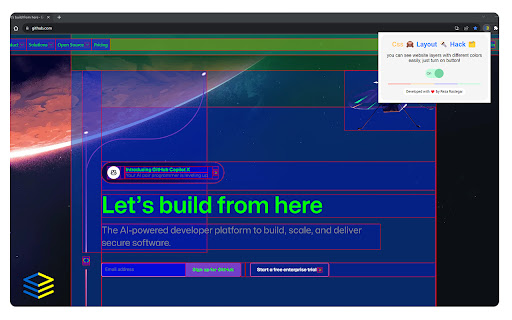
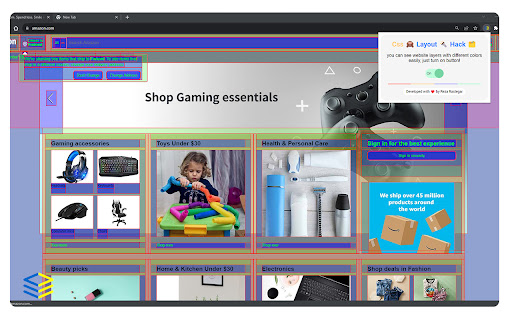
You can see website layers with different colors easily EN: Css Layout Hack is a powerful Chrome extension tailored for user interface (UI) designers and front-end programmers. With a single purpose in mind, this extension provides a visual representation of website layers by assigning different colors to each layer. By offering a clear and organized view of elements, Css Layout Hack streamlines the design and development process, enhancing efficiency and precision. Layer Identification: Css Layout Hack enables easy identification and differentiation of website layers by assigning distinct colors to each layer. With this feature, you can visually grasp the structure and hierarchy of elements, gaining a deeper understanding of the website's layout. Seamless Integration: This extension seamlessly integrates with your Chrome browser, ensuring quick access whenever you need it. With just a single click, you can activate Css Layout Hack and instantly view the color-coded layers on any website you're working on. Developer-Friendly Tools: Css Layout Hack goes beyond visualizing layers and offers additional tools to aid front-end programmers. It allows you to inspect specific layers, view element dimensions, analyze z-index values, and access relevant CSS properties, empowering you with essential information for efficient coding. By focusing on a single purpose and providing straightforward functionality, Css Layout Hack empowers UI designers and front-end programmers to streamline their workflow and gain deeper insights into website structures. Install Css Layout Hack today and revolutionize your design and development process with its color-coded layers display.

Amino: Live CSS Editor
Customize any website with your own CSS and see your changes instantly with Amino! Amino is a free CSS editor that lets you write and apply persistent CSS to any website. Use Amino to experiment with CSS in realtime, style your favorite websites, fix rendering issues—the applications are endless. Your CSS is stored in the cloud and is served every time you visit the page, making it effectively permanent as long as the extension is enabled. NEW FEATURE Guest mode: after many requests from users to be able to use amino without creating an account we've finally launched our Guest mode! It will work entirely locally with no need to create an account. If you want cloud storage you can simple create an account at anytime and enjoy the same great Amino experience sync'd across all your devices. Amino has previously been featured in: Chrome's ‘Top Picks’ in developer tool extensions, Smashing Magazine, Product Hunt, Designer News, Codrops, Sidebar, and more. FEATURES - Syntax highlighting - Automatic indenting and outdenting - Inspect tool - DevTools integration (*new*) - SCSS/Sass support - Autocomplete - Autosave - Data export - Multiple color schemes - Guest Mode USAGE TIERS - Guest & Free Cloud Tier - Free tiers are supported by ad displays in the sidebar/editor and cloud dashboard - Pro Cloud Tier - Remove ads - Access to collections - Unlimited Cloud Storage - Access to beta features BETA FEATURES (Pro Only) - AI Assistant to help write and understand your CSS rules For new feature announcements or just to say hello, please follow Amino on X: https://x.com/aminoeditor For more info or to sign up visit: https://amino.dev For frequently asked questions visit: https://amino.dev/faqs For documentation and guides on how to get the most out of Amino: https://docs.amino.dev For Amino's open source projects: https://github.com/aminoeditor By installing the extension or accessing the amino.dev website, you agree to Amino’s Privacy Policy (https://amino.dev/privacy) and Terms of Use (https://amino.dev/terms). TLDR: We care about user privacy, and we will never sell your data. To learn about the permissions this extension requests: https://amino.dev/permissions Thanks for giving Amino a try. If you like our product, please consider leaving us a review.

UI Inspector - Visual CSS Editor
Inspect and visually edit elements and their CSS directly on the page for faster design and UI debugging. A Visual CSS Editor for the Browser Elevate your web development and design workflow with UI Inspector, a powerful Chrome extension that lets you inspect, edit, and style any web page visually and in real-time. Skip the hassle of diving into DevTools and make instant adjustments directly on the page. With UI Inspector, you can: - Inspect elements — activate the extension and click on any element to view its attributes. - Edit attributes — modify styles in the visual editor and see changes in real time. - Control typography — adjust font family, size, weight, line height, and letter spacing. - Configure layout and spacing — set margins, paddings, display properties, and alignment. - Enhance backgrounds and shadows — apply custom colors, gradients, background blurs, and shadow effects. - Customize borders — adjust border width, style, color, and radius. - Fine-tune appearance — control opacity, blend modes, and transforms like rotation. - View all changes — see a list of every element you've updated in one place. - Copy CSS — view and copy the compiled CSS of your changes instantly. Unlock UI Inspector PRO and: - Apply changes globally — use the sensitivity slider to automatically apply style changes to similar elements across the page. - Style presets — save any element as a reusable preset and apply it across any website with a single click. - Export as Tailwind, SCSS, or JSX — copy your changes in the code format your project needs. - Export screenshots — capture high-resolution PNG screenshots of individual styled elements. - Export to GitHub — generate a GitHub issue with your design changes compiled to CSS. Who Is UI Inspector For? Web Developers: - Accelerate front-end development: quickly identify and fix layout or styling issues by editing elements on the fly. - Simplify CSS debugging: bypass DevTools with an intuitive, visual editor. - Export production-ready code: copy changes as CSS, Tailwind, SCSS, or JSX directly into your codebase. Web Designers: - Real-time design validation: adjust and perfect designs in the browser to ensure pixel-perfect implementation. - Bridge design and development: collaborate more effectively by directly tweaking live pages. - Save and reuse presets: build a library of reusable styles and apply them consistently across projects. 1. Activate the Extension: click the UI Inspector icon in your browser toolbar or press Alt/Option + Shift + I. 2. Inspect and Edit Elements: hover over any element to select it and instantly view its adjustable styles. 3. Modify Styles Visually: use the intuitive interface to change typography, layout, spacing, backgrounds, borders, shadows, and more. 4. Save and Apply Presets: create style presets for consistent design and apply them to any element on any site. 5. Export and Share: copy CSS in multiple formats, capture screenshots, or export changes as a GitHub issue. Compatible with any Chromium browser that supports the Side Panel API. For best results, ensure your browser supports all required APIs. If installation issues arise, update your browser to the latest version and try again.

HTML & CSS Design Analysis
Helps you analyze an HTML page by disabling or enabling various features. Tools for disabling CSS: - Disable external CSS (added using 'link' tag): - Disable inline CSS (added via 'style' attribute) - Disable internal CSS (added via 'style' tag) - Disable external print CSS (added using 'link' tag) - Disable internal print CSS (added via 'style' tag) - Disable internal handheld CSS (added via 'style' tag) - Disable external handheld CSS (added via 'style' tag) Tools for hiding images: - Hide all images. - Hide background images. - Make background images invisible. Image utilities: - Display image alt attribute. - Display image dimension. - Display image path. - Make all images full size or natural size. - Make all images invisible. - Replace image with alt attribute. Outline images: - Images with adjusted dimensions. - Images with empty alt attributes. - Images with oversized dimensions. - Images without alt attributes. - Images without dimensions. Miscellaneous tools - Linearize page. - Display hidden elements. - Mark all links as visited. - Mark all links as un-visited. - View source code. Tools for reloading assets, such as: - reload external CSS. - images etc. Supported elements: This software supports iframe elements and shadow dom as well. Nested shadow elements and nested iframe elements are not fully supported by this tool. This tool also does not support shadow root opened with the closed mode. Privacy notice: This software neither collects nor transmits any personally identifiable information. This software does not track your browsing behaviour. Information necessary for functioning of this software is stored on the devices of the end user, our servers do not have access to this information. For more information please read our privacy policy and terms of service.

Hack-Tools
The all in one Red team extension for web pentester HackTools, is a web extension facilitating your web application penetration tests, it includes cheat sheets as well as all the tools used during a test such as XSS payloads, Reverse shells and much more. With the extension you no longer need to search for payloads in different websites or in your local storage space, most of the tools are accessible in one click. HackTools is accessible either in pop up mode or in a whole tab in the Devtools part of the browser with F12. - Dynamic Reverse Shell generator (PHP, Bash, Ruby, Python, Perl, Netcat) - Shell Spawning (TTY Shell Spawning) - MSF Venom Builder - XSS Payloads - Basic SQLi payloads - Local file inclusion payloads (LFI) - Data Encoding - Obfuscated Files or Information - Hash Generator (MD5, SHA1, SHA256, SHA512, SM3) - Useful Linux commands (Port Forwarding, SUID) - RSS Feed (Exploit DB, Cisco Security Advisories, CXSECURITY) - CVE Search Engine - Various method of data exfiltration and download from a remote machine
