
oajalfneblkfiejoadecnmodfpnaeblh
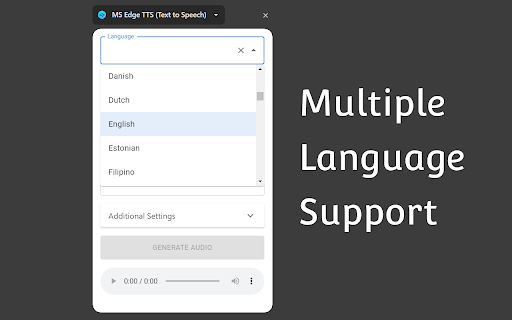


MsEdge TTS Extension (Text to Speech) This is a text-to-speech browser extension that utilizes Microsoft Edge's Online TTS service. It offers several notable features: 1. Natural Sounding Voices: The extension provides high-quality, natural-sounding voices for a more engaging and enjoyable listening experience. 3. Context Menu Item: The extension integrates a context menu item, enabling users to quickly and easily convert selected text into spoken audio with just a right-click. 4. Download Generated Audio File: Users have the option to download the generated audio files. 5. Advanced Controls: The extension offers advanced controls for adjusting the rate, pitch, and volume of the generated speech. 6. Free for Personal and Commercial Use: The generated audio files are free to use for both personal and commercial purposes. 7. User-friendly Interface: The extension features a user-friendly interface that is easy to navigate and use. The extension provides language and country auto-complete functionality, making it quick and convenient for users to select the desired language or country for text conversion. Attribution: The extension icon is created by Freepik - Flaticon: https://www.flaticon.com/free-icons/loud-speaker

Edge Text to Speech Voice Reader
Text-to-speech service leveraging the Read Aloud API from Microsoft Edge. Bring your browsing experience to life with Edge TTS Reader, the ultimate text-to-speech (TTS) extension powered by Microsoft Edge’s advanced Read Aloud API. With natural-sounding voices and customizable options, this extension makes it easy to listen to selected text or entire web pages—anytime, anywhere. 🛠️🔓 Completely Open-Source @ https://github.com/travisvn/edge-tts-extension Gone are the days of staring at long articles or struggling to absorb information visually. Edge TTS Reader transforms your browser into a virtual assistant, delivering high-quality, natural-sounding audio. Whether you’re multitasking, improving productivity, or simply prefer listening over reading, Edge TTS Reader has you covered. Access high-quality voices powered by Microsoft’s Read Aloud API at no cost. Enjoy clear, lifelike narration that’s easy to understand and customizable for different contexts. Highlight any text on a webpage, right-click, and choose “Read Aloud with Edge TTS.” The extension will instantly read the selected content aloud. Right-click anywhere on a webpage and choose “Read Entire Page Aloud with Edge TTS” to listen to the full page content seamlessly. Select a word and/or right-click on a word and select from the context menu "Start reading aloud from here" to begin the narration from that spot on the page. - Adjust reading speed to your preference (from slow to fast). - Choose from a wide variety of voices to match your style, tone, or mood. Edge TTS Reader respects your system preferences with light, dark, and system theme options for a comfortable user experience. Control playback, select voices, and adjust settings effortlessly with the intuitive popup menu. Perform text-to-speech actions directly from the right-click menu, streamlining your workflow. 🛠️ Lightweight and Efficient Built with performance in mind, Edge TTS Reader is fast, responsive, and works seamlessly without slowing down your browser. Your data stays secure. Edge TTS Reader processes text locally or securely through Microsoft’s trusted APIs. We never store or share your data. 1. Highlight Text or Use Context Menu: Select the text you want to hear, or right-click and choose “Read Entire Page Aloud.” 2. Launch the Popup: Use the popup menu to customize settings like voice, speed, and theme. 3. Listen and Enjoy: Sit back and let Edge TTS Reader turn text into clear, natural-sounding speech. Perfect For: - Professionals: Listen to articles, emails, or reports while multitasking. - Students: Use TTS for study materials, research, or eBooks. - Accessibility: Support for users with visual impairments or reading difficulties. - Language Enthusiasts: Explore different voices and pronunciations. Q: What languages and voices are supported? The extension supports a wide range of voices and languages provided by Microsoft’s Read Aloud API. Choose voices that best suit your needs and preferences. Q: Does this work offline? Edge TTS Reader requires an internet connection to process text via Microsoft’s API, but it’s lightweight and efficient, minimizing bandwidth usage. Q: Is my data secure? Absolutely. Your text is processed securely and never stored or shared. Privacy is our priority. Transform the way you consume content online with Edge TTS Reader. Whether you’re browsing for fun or studying for exams, this extension brings the power of natural-sounding text-to-speech right to your browser. Click “Add to Chrome” and start listening today!

Piper Text-to-Speech Voices
High quality neural text-to-speech voices from Piper, synthesized locally in your browser Piper is a collection of high-quality, open-source text-to-speech (TTS) voices developed by the Piper Project, powered by machine learning technology. These voices are synthesized in-browser, requiring no cloud subscriptions, and are entirely free to use. This extension lets you install Piper voices to your computer, then adds these voices to the browser's list of available TTS voices, which can then be used by websites, apps, and by other browser extensions to synthesize text to audio. For example, after installing your favorite voices. You can use this tool to test them out: https://ttstool.com/soundboard.html Piper Project home page https://github.com/rhasspy/piper Piper extension project page https://github.com/ken107/piper-browser-extension

Readify - Lifelike Text to Speech Reader (TTS)
Readify - Smart Web Content Reading Assistant Free Your Eyes, Listen Globally | 30+ Languages with Lifelike Voices | Your Secret Weapon for 2x Efficiency 🎯 Core Value Powered by professional Text-to-Speech (TTS) technology, Readify instantly converts web articles, documents, and materials into natural, fluid audio. Supporting 30+ languages and human-like voice tones, it lets you absorb information efficiently through listening, reduce eye strain, and boost productivity in learning and work. ✨ Key Features 1. Lifelike Audio Experience - AI-enhanced human-like voice engine with 97% naturalness score, delivering immersive pronunciation for deeper comprehension. 2. Smart Speed Control & Follow-Along - 0.5x-3x seamless speed adjustment for any scenario; real-time text highlighting + click-to-skip, enabling "listen-and-learn" efficiency. 3. Minimalist Interaction - Floating controls: Drag, hide, or pin for instant access without disrupting browsing; built-in player for instant voice/speed switching. 4. Adaptive Content Parsing - Automatically detects webpage structure for section-by-section reading, making long texts effortless to digest. 🌍 Scenarios for Everyone >Office Professionals Tired of screen fatigue? Need to multitask during commutes? → 200% efficiency boost with hands-free information processing. >Students Struggling with dense textbooks? Losing focus while studying? → 65% higher retention through audio-visual learning. >People with Reading Challenges Difficulty decoding text or maintaining focus? → Gain equal access to information with auditory support. >Families Limited time for bedtime stories? Kids learning new languages? → Multilingual audiobooks spark early language development. 🚀 Install Readify Now Let your eyes rest while your ears explore the world of knowledge!

Gemini Live Text-to-Speech
Gemini Live TTS: Advanced text-to-speech powered by Google Gemini. Features include: - Instant text transcription from selection. - Image transcription – read text from any image! - Customizable voices and settings. - Seamless integration with your browser.
