
nnheobpfcpicnkfpdaafonmoaiehgmkj
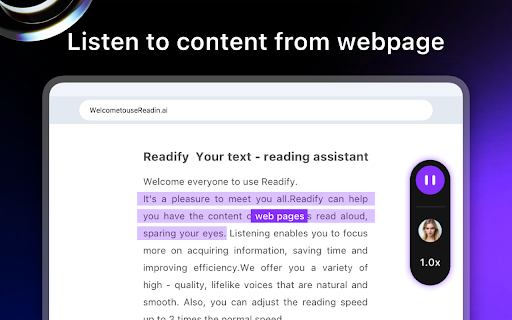


Readify - Smart Web Content Reading Assistant Free Your Eyes, Listen Globally | 30+ Languages with Lifelike Voices | Your Secret Weapon for 2x Efficiency 🎯 Core Value Powered by professional Text-to-Speech (TTS) technology, Readify instantly converts web articles, documents, and materials into natural, fluid audio. Supporting 30+ languages and human-like voice tones, it lets you absorb information efficiently through listening, reduce eye strain, and boost productivity in learning and work. ✨ Key Features 1. Lifelike Audio Experience - AI-enhanced human-like voice engine with 97% naturalness score, delivering immersive pronunciation for deeper comprehension. 2. Smart Speed Control & Follow-Along - 0.5x-3x seamless speed adjustment for any scenario; real-time text highlighting + click-to-skip, enabling "listen-and-learn" efficiency. 3. Minimalist Interaction - Floating controls: Drag, hide, or pin for instant access without disrupting browsing; built-in player for instant voice/speed switching. 4. Adaptive Content Parsing - Automatically detects webpage structure for section-by-section reading, making long texts effortless to digest. 🌍 Scenarios for Everyone >Office Professionals Tired of screen fatigue? Need to multitask during commutes? → 200% efficiency boost with hands-free information processing. >Students Struggling with dense textbooks? Losing focus while studying? → 65% higher retention through audio-visual learning. >People with Reading Challenges Difficulty decoding text or maintaining focus? → Gain equal access to information with auditory support. >Families Limited time for bedtime stories? Kids learning new languages? → Multilingual audiobooks spark early language development. 🚀 Install Readify Now Let your eyes rest while your ears explore the world of knowledge!

Read Aloud - Text to Speech AI Voice Generator
Text to speech (TTS) reads any text aloud using human-like, context-aware AI voices, with 30+ natural voice options. Text to speech lets you listen to docs, articles, PDFs, email, and other formats — anything you read. Convert text to audio so you can listen to your document for proofreading, for reasons of dyslexia or other learning disabilities. Features: ➤ Have 30+ lifelike spoken voices ➤ Supports 60 languages ➤ Supports webpages, Google Docs, PDF, Emails and images or text to audio The TTS model supports the following languages: Afrikaans, Arabic, Armenian, Azerbaijani, Belarusian, Bosnian, Bulgarian, Catalan, Chinese, Croatian, Czech, Danish, Dutch, English, Estonian, Finnish, French, Galician, German, Greek, Hebrew, Hindi, Hungarian, Icelandic, Indonesian, Italian, Japanese, Kannada, Kazakh, Korean, Latvian, Lithuanian, Macedonian, Malay, Marathi, Maori, Nepali, Norwegian, Persian, Polish, Portuguese, Romanian, Russian, Serbian, Slovak, Slovenian, Spanish, Swahili, Swedish, Tagalog, Tamil, Thai, Turkish, Ukrainian, Urdu, Vietnamese, and Welsh. You can generate spoken audio in these languages by providing the input text in the language of your choice.

GPT Reader/Transcriber: Free AI Text to Speech/Speech to Text (TTS/STT)
Free AI text to speech (tts) & speech to text (stt) with ChatGPT. Listen to natural voices or transcribe audio instantly. To use the extension: 1️⃣ Click the extension icon (or visit chatgpt.com) 2️⃣ Sign in with your ChatGPT account 3️⃣ Click the extension icon or the button on the ChatGPT page 4️⃣ You will notice an overlay open where you can choose either the text to speech or speech to text option 🔥 Key Features of ChatGPT Reader & Transcriber 🔥 ✅ Free to Use AI Text to Speech (TTS) ChatGPT Reader & Transcriber is completely free to use and includes a premium tier for more serious users ✅ Download AI-Generated Audio (NEW!) Save high-quality speech as an audio file for offline listening ✅ Read Aloud Any Text Instantly (WEB and FILE UPLOAD supported!) Convert Google Docs, PDFs, EPUB or custom text into natural-sounding speech with one click. ✅ Human-Like AI Voices Uses OpenAI's voices for clear, smooth, and natural narration ✅ New! Free Speech-to-Text (STT) Transcription • Live transcription – speak and see your words appear in real-time • File transcription – upload audio files and convert them to text • Download transcriptions – export as PDF or TXT for easy sharing • Unlimited & Free – no usage caps, enjoy all transcription features at no cost ✅ Supports Multiple Inputs Paste text or upload documents—ChatGPT Reader & Transcriber handles it all ✅ Customizable Playback Controls Adjust speed, pause, rewind, and play at your preferred pace ✅ Accessibility and Productivity • Students – Listen to notes and papers while studying • Professionals – Review reports and emails hands-free • Readers with Dyslexia & Vision Impairments – Improve comprehension with assistive speech • On-the-Go Listeners – Enjoy articles or documents while commuting, exercising, or multitasking ❗ Not affiliated with or endorsed by OpenAI or ChatGPT ❗ ❗ Free alternative to sites like ElevenLabs, Speechify, Rev, Otter.ai or other text to speech/transcription services❗ 🛠 Download ChatGPT Reader & Transcriber: Free AI Text to Speech & Speech to Text today and elevate your reading and transcription experience with free, high-quality AI voices and transcriptions. 🛠

Text Reader: Free Selected Text Reader
Read selected text out loud with one click. No login. No data collection. No ads. Just free, built-in text-to-speech (TTS). Highlight any text on a webpage, click the extension, and it speaks. Full page Reading. Speed, pitch and volume change option.

Text To Speech Reader Pro
Convert selected text to speech with customizable voices and reading speed Easily convert any text on the web into speech with customizable voices and controls. How it works: - Select any text you see online - Right-click and choose "Read Selection Aloud" from the menu - A popup will appear with playback controls - Listen to the text being read with your preferred voice and settings Features: - Support for multiple languages and voices with flags for easy identification - Navigation controls to move between sentences - Adjustable reading speed and volume controls - Keyboard shortcuts for play/pause (Alt+Shift+P) and stop (Alt+Shift+S) - Sentence highlighting as the text is being read - Smart sentence splitting that handles abbreviations and numbers correctly - Works on any website - Fast and lightweight - won't slow down your browsing - All text processing happens on your device - your data stays private - Compatible with both light and dark browser themes - Settings are synced across your Chrome browsers Additional benefits: - Perfect for multitasking while browsing - Ideal for users with visual impairments or reading difficulties - Great for proofreading your own writing - Helps with language learning and pronunciation - Useful for long articles and documents No account needed, no complicated settings. Just install and start listening to any text from the web.
