
oacdbpdkkcfihlppfjefkmaeabllfibi
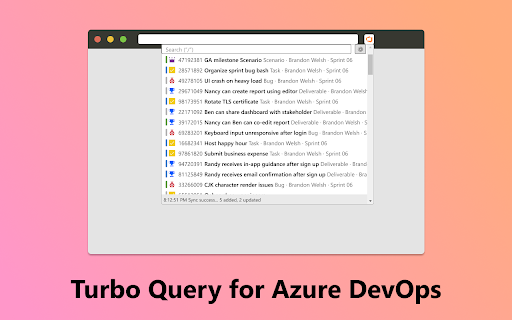
This extension helps you search and filter up to 20,000 work items, with zero latency. You can query work items by any of these fields, in any order: You can seamlessly copy-paste item links into Azure DevOps, Teams, Outlook, and other software with the perfect formatting. The IDs can be pasted into Azure DevOps to speed up these workflows: - Adding work items to a Pull Request. - Referencing work items in the Description field using # syntax. - Adding links to a work item. - Setting the Parent of a work item. To help you stay in the flow, the entire UI can be navigated using Tab and Arrow keys. For power users, VIM keys (H, J, K, L) are also supported and mouse interaction is optional. You can view the full list of features and shortcuts on the extension's options page. This extension respects your privacy. It does not collect any telemetry and will only communicate to Azure DevOps for querying purposes. This is a free and open-source project. Visit https://github.com/chuanqisun/turbo-query for source code or bug reports.

ADO Ticket Helper
Collection of useful tools to elevate developer experience with Azure DevOps tickets Collection of useful tools to elevate developer experience with Azure DevOps tickets. Includes: Button to copy a branch name according to ticket title. Button to copy commit message according to ticket title. Button that helps you to quickly add child tickets for UI, API and Testing.

GitHub Clone Helper
Adds 'git clone' before HTTPS and SSH clone URLs on GitHub. Are you a developer, engineer, or tech enthusiast who frequently clones repositories from GitHub? If so, you know the drill. You need to prepend 'git clone' before every clone URL manually. But what if we told you there's a way to make it all easier? Well, that's exactly what GitHub Clone Helper is here for! With GitHub Clone Helper, you don't need to type 'git clone' before your URLs anymore. Our extension automatically adds 'git clone' before the clone URLs on GitHub. Now, when you copy the clone URL, you're actually copying the entire 'git clone' command! It's as simple as click, copy, and paste! 🔒 Respecting Your Privacy We value your privacy. GitHub Clone Helper does not collect, store, or share any personal data. The operations are performed locally on your machine, and the extension does not communicate with any servers or third-party services. The extension is designed to work seamlessly with GitHub pages. Whether you're browsing on a public or private repository, GitHub Clone Helper is here to streamline your cloning process. So, why wait? Install GitHub Clone Helper today and experience a smoother, more efficient GitHub journey. Happy cloning! 🎉 Please note that you may want to further customize this based on any unique features your extension may have or any specific tone you want to set.

ReadAnything
Read anything with the power of AI Are you bothered by long and tedious papers filled with jargon? Are you frustrated by bad writing that seems to prevent you from understanding? Don't worry, let's harness the power of GPT to help us read anything!

Tower of Anki
AnkiWeb with a tower climbing and levelling game Features: - Add dark mode for AnkiWeb - Added gamification levels for AnkiWeb Note: Use the mouse to click on the 'Show Answer' button for the first few times before the keyboard shortcuts will start working. Changelog: 29/3/2023 - Anki has added their native keyboard shortcuts feature, instead we added gamification feature with levelling as you do Anki cards 31/3/2023 - Now added floors and levels to the game 02/5/2025 - Updated to work with new Anki web version, removed dark mode
