
clgpgfphimnojoobfkaeapodhmklolfa
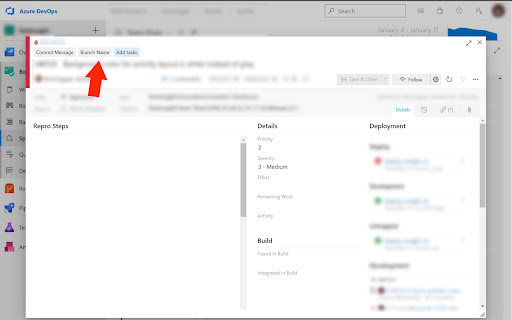

Collection of useful tools to elevate developer experience with Azure DevOps tickets Collection of useful tools to elevate developer experience with Azure DevOps tickets. Includes: Button to copy a branch name according to ticket title. Button to copy commit message according to ticket title. Button that helps you to quickly add child tickets for UI, API and Testing.

0xTeabag
Stop Scams. Spot Phishing. Cross-Chain Security with Transparent Accounting. Tagging Ethereum Addresses and Blockchain Assets Graphically Introducing 0xTeabag – your one-stop solution for organizing and managing all your blockchain interactions across prominent explorers like Etherscan, Arbiscan and many others! 🚀 With 0xTeabag, you can effortlessly label and comment on addresses and transactions, giving you a clear picture of your activities at a glance. No more struggling with random strings of characters - just simple, recognizable labels that keep you one step ahead of scams. Enjoy seamless persistence across all blockchain explorers, ensuring that you always know what's happening with your addresses and transactions. Stay in control and never lose track again! 🎯 But that's not all! 0xTeabag’s robust team and permissions model lets you tailor access to your stored data, giving you complete control over who can view or edit. Collaboration has never been this secure and easy! 🔐 Want more? 0xTeabag offers optional integration with Tres.finance, allowing you to automatically track your Web3 finances while you navigate the extension. Monitor and manage your crypto world with convenience and confidence. Experience the future of blockchain management with 0xTeabag today! 🌐✨

Flowr
Extract SVG from Flourish and Datawrapper templates A tool to extract and download SVG content from Flourish and Datawrapper templates and save them locally. Flourish and Datawrapper templates which are updated with latest data contain SVG files which after download can be edited in external packages.

Nexweave - LinkedIn AI Messages
Revamp your LinkedIn outreach with customized visuals and AI-powered messaging through the Nexweave plugin. Personalized Outreach with Nexweave | Send Hyper-personalized Images and Videos to your prospects over LinkedIn How would you respond if … You received an image in your LinkedIn chat that contains your name, company logo and a screenshot of your website You clicked on the image and it took you to a video that contains your name, logo and something that could help improve your website performance? Would it make you more curious? Would it increase the chances of you replying to the messages? You can now serve hyper-personalized images & video links through LinkedIn with the help of Nexweave’s Outreach Plugin and boost your reply rates & engagement. So go ahead and try them out. if you need assistance, send us an email on connect@nexweave.com or message us through the chat option on our website https://www.nexweave.com/

Stackflow Devtools
Devtools for Stackflow Apps An extension for the Chrome browser that helps you develop and debug Stackflow Apps. Currently, if you're developing a web app on Stackflow and something goes wrong, it can be a pain to interpret, and solve the problem because you don't have much information other than the app's screen. Stackflow Devtools is designed to eliminate this frustration and take the information about the stack to the next level of abstraction so you can troubleshoot with the data you need. - Stack Viewer Visualize what's going on inside your stack that you can't easily see in your app. - Stack Explorer It shows the current stack data in a interactive tree view. It also provides a snapshot of the stack data. - Action Dispatcher Instead of just checking the stack status, you can trigger actions like push and pop to inject your favorite activities into your Stackflow app. The Action Dispatcher also has the ability to read the activities that you pass as params to the stackflow() function and automatically generate a form for the activity params needed for the action. - Event Logger View a log of events that have affected the stack.
