
ejcigjmnigceeimhkjjpolcffocifokf
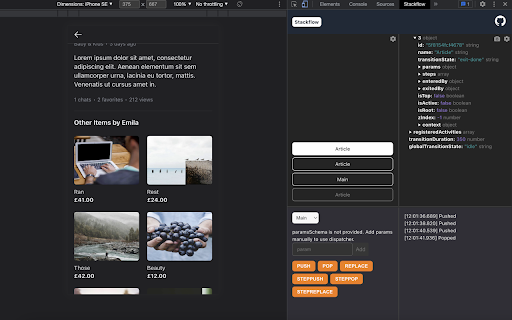
Devtools for Stackflow Apps An extension for the Chrome browser that helps you develop and debug Stackflow Apps. Currently, if you're developing a web app on Stackflow and something goes wrong, it can be a pain to interpret, and solve the problem because you don't have much information other than the app's screen. Stackflow Devtools is designed to eliminate this frustration and take the information about the stack to the next level of abstraction so you can troubleshoot with the data you need. - Stack Viewer Visualize what's going on inside your stack that you can't easily see in your app. - Stack Explorer It shows the current stack data in a interactive tree view. It also provides a snapshot of the stack data. - Action Dispatcher Instead of just checking the stack status, you can trigger actions like push and pop to inject your favorite activities into your Stackflow app. The Action Dispatcher also has the ability to read the activities that you pass as params to the stackflow() function and automatically generate a form for the activity params needed for the action. - Event Logger View a log of events that have affected the stack.

Typing in Tigrina
input element and ctrl+shift on keyboard to typing and repeat ctrl+shift to stop. This extension helps to type Tigrina alphabets on a browser. Just click the input element and press ctrl + shift on the keyboard to start typing and repeat ctrl + shift to stop it whenever you like to stop. It will also help to translate text to Tigrina or vice versa if text is selected and hovered but at this moment the translation functionality is not working, however it will come at the next version definitely. In normal situation :To type "መጻኹ" then you could type in keyboard like this "mexaKu". When typing, it always begins with the 6th letter of any stem alphabet, however when you add vowels to it then it will switch to the intended alphabet in Tigrina.

Chatin for Problem Analysis
This extension enables Design Science Research through Mindmeister. This extension integrates Mindmeister with LLMs such as GPT for Problem analysis in Design Science Research The source code and documentation is available in: https://github.com/onekin/Chatin

WHAM! Was Human or Automated Message?
Mark those "spammers" easily so they don't spread all over the network. It's very easy to use. If you think the message you receive is spam, just report it. If several people have reported it, it will appear as reported, so you will know that this message has been sent to hundreds of people. The icons are only available on those people who wrote to you first, and only on their first messages. Claim a clean network, where, if they want to sell you something, they don't treat you like a flyer in a mailbox. It works even with similar messages, even if you change the name, or the company name, or some phrase (which is what mass mailing bots allow you to do), Wham detects similar messages when someone reports them.

Fextralife Fix
This little extension removes the twitch embed from the fextralife website. If you want to use that site for some reason. This little extension removes the twitch embed from the fextralife website. If you want to use that site for some reason.
