
npmficphbhbhebhjfekjopgkpojjcfem

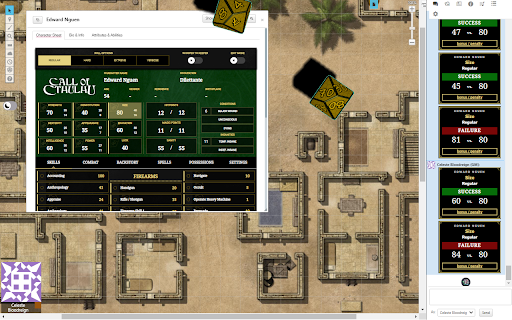
Roll 3D digital dice using your favorite browser-based VTT. Roll 3D digital dice from anywhere! You can connect any of the supported VTTs and character builders together to get a seamless click-and-roll experience. Click on your character sheet -- see it in the VTT you want. Other dddice tools this extension can connect with: - Foundry VTT (via a Foundry VTT module) - Stream deck - dddice stream overlays

AboveVTT
Integrated VTT for D&DBeyond Integrated VTT for D&DBeyond Turn your dndBeyond (DDB) campaign page into a VTT with AboveVTT - d&d made easy. AboveVTT is a all-in-1 chrome extension that allows you and your friends to turn your DDB Campaign page into a VTT session in seconds. No sign up, no fees, just your DDB account (free) and you are ready to go, With your DDB character sheet, 1 click maps, 1 click tokens (monsters & PCs), easy fog of war and more! Key features, advantages and DDB integrations: ⚡️ Use your DDB character sheet from the web or DDB app! HP, dice rolls, conditions & send spells, abilities, and even monster art directly to chat. ⚡️ Monsters, more monsters and even more monsters - 1-Click DBB monster tokens (Art,HP,AC) with clickable stat blocks (Hit, Dis/Adv, Crit) Including homebrew monsters. - Open5e monster stat blocks with clickable stat blocks - Customer monster stat blocks ⚡️Maps, more maps and even more maps - 1-Click official DDB maps (pre-grided by our discord community) including all player & DM versions from your purchased DDB modules. - 1-Click 500+ battle maps supplied by Neutral Party, Dice Grimorium and hundreds of animated VIDEO maps. - Import UVTT files with official DungeonAlchemist map integration - Community produced module scenes with pre-populated tokens ⚡️Prepare like a pro DM! - Access your own material from anywhere that you can share via a URL (One Drive/Google Drive etc) - Grid Wizard - standard grid and hex grid maps - Dynamic light and vision for tokens using walls, windows and doors. - All tokens can have persistent, custom images assigned to make your game your own - Create and manage scenes with Cloud-persisted folders - Fog of War - Dynamic text creation and drawing - In-app import chapters from the DDB books you own for easy accessibility of material - Create notes on tokens that you can make available for players to see/access. - Fine-grained permissions to allow players access to multiple tokens and effects. ⚡️Camera, Action! - Projector mode for live streamers to showcase player view to their audience - Use DDB dice, RPG Dice Roller or standard notation - In-built sound player - Pause the action at any time with a single key press - Hot Keys available for common actions ⚡️Comprehensive community managed support and thriving Discord channel

Alseta's Passage
Share Pathbuilder2e character actions and dice rolls to Discord Alseta's Passage is a Pathbuilder2e to Discord Exporter tool designed for tabletop RPG enthusiasts, specifically those who use Pathbuilder2e for their Pathfinder 2nd Edition character management. This extension seamlessly bridges the gap between Pathbuilder2e and Discord, making it easier than ever to share your character's rolls and details with your gaming group. - Roll Sharing: Instantly export your character's rolls from Pathbuilder2e to your designated Discord channel, allowing your party to see your results in real-time. - Detailed Character Information: Share comprehensive details about your character's skills, spells, weapons, feats, and more with just a click. - Easy Integration: Set up in minutes. All you need is a webhook URL from your Discord server owner to start sending messages. - Effortless Collaboration: Enhance your gaming sessions by keeping everyone informed and engaged with up-to-date character information. How to Use: - Get a Webhook URL: Request a webhook URL from your Discord server owner or administrator. - Install the Extension: Add the Pathbuilder2e to Discord Exporter to your Chrome browser. - Configure the Webhook: Enter the provided webhook URL in the extension settings. - Start Sharing: Use the extension to export rolls and character details directly to your chosen Discord channel. Transform your Pathfinder 2nd Edition gameplay experience by keeping your group in the loop with the Pathbuilder2e to Discord Exporter. Stay connected, stay informed, and keep the adventure rolling!

D&D Beyond Combat Tracker Enhancer
Enhances the dndbeyond combat tracker by adding checkboxes to creature statblocks to track spell slots and other special abilities. You wanted the functionality, but they didn't add it... so I did. Enhances the D&D Beyond Combat Tracker by adding checkboxes to creature statblocks, so you can actually track spell slots and other limited-use abilities within the tool. Once the encounter is fully loaded, the extension injects checkboxes into a rendered creature's statblock by following common content patterns. The checkboxes save their state to the browser's local storage so they maintain their saved value. You can see the example screenshots for the "before" and "after". Please keep in mind the extension is currently in "Beta" and might have bugs or not properly support every statblock on d&dbeyond. I plan on only building support for official creature statblocks but the extension will still work for homebrew content as long as the statblocks are following standard / typical content patterns used by the official stuff. I've tested plenty of my own homebrew.

D&D Beyond DM-Screen
Customizable DM Screen for D&D Beyond Campaigns ~~~DM SCREEN~~~ https://dmscreen.silas.link/gmscreen Decide for yourself which information of the players should be displayed! Open the screen by going to the campaign-screen and press the "DM Screen"-Button. If a character is open under DNDBeyond, the extension's settings can be opened. Here you can customize the DM Screen. If you have any questions, visit the website or contact me via the form on the website You can add links to the screen in order to open them fast! The extension supports dark and light mode. A Defense Roll is an alternative way to shape the monster attacks. The goal is to let the player roll outside of his turn and get him more involved. Here, the player rolls to see if he can escape the monster's attack. It also often improves roleplay because by having the player make the roll, you no longer describes how the monster attacks, but rather how the player dodges. The player is the focus of the narrative. If you have any questions, visit the website or contact me via the form on the website.
