
ipcjcbhpofedihcloggaichibomadlei

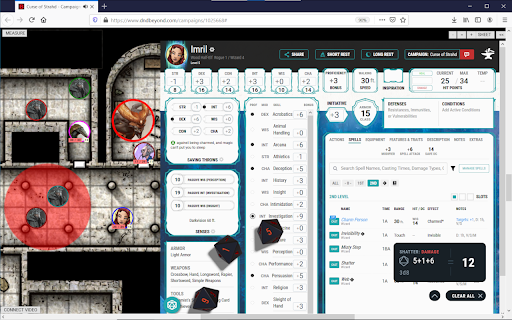

Integrated VTT for D&DBeyond Integrated VTT for D&DBeyond Turn your dndBeyond (DDB) campaign page into a VTT with AboveVTT - d&d made easy. AboveVTT is a all-in-1 chrome extension that allows you and your friends to turn your DDB Campaign page into a VTT session in seconds. No sign up, no fees, just your DDB account (free) and you are ready to go, With your DDB character sheet, 1 click maps, 1 click tokens (monsters & PCs), easy fog of war and more! Key features, advantages and DDB integrations: ⚡️ Use your DDB character sheet from the web or DDB app! HP, dice rolls, conditions & send spells, abilities, and even monster art directly to chat. ⚡️ Monsters, more monsters and even more monsters - 1-Click DBB monster tokens (Art,HP,AC) with clickable stat blocks (Hit, Dis/Adv, Crit) Including homebrew monsters. - Open5e monster stat blocks with clickable stat blocks - Customer monster stat blocks ⚡️Maps, more maps and even more maps - 1-Click official DDB maps (pre-grided by our discord community) including all player & DM versions from your purchased DDB modules. - 1-Click 500+ battle maps supplied by Neutral Party, Dice Grimorium and hundreds of animated VIDEO maps. - Import UVTT files with official DungeonAlchemist map integration - Community produced module scenes with pre-populated tokens ⚡️Prepare like a pro DM! - Access your own material from anywhere that you can share via a URL (One Drive/Google Drive etc) - Grid Wizard - standard grid and hex grid maps - Dynamic light and vision for tokens using walls, windows and doors. - All tokens can have persistent, custom images assigned to make your game your own - Create and manage scenes with Cloud-persisted folders - Fog of War - Dynamic text creation and drawing - In-app import chapters from the DDB books you own for easy accessibility of material - Create notes on tokens that you can make available for players to see/access. - Fine-grained permissions to allow players access to multiple tokens and effects. ⚡️Camera, Action! - Projector mode for live streamers to showcase player view to their audience - Use DDB dice, RPG Dice Roller or standard notation - In-built sound player - Pause the action at any time with a single key press - Hot Keys available for common actions ⚡️Comprehensive community managed support and thriving Discord channel

D&D Beyond PrettyPrint
Prettier printing for your resources on D&D Beyond A minimalistic extension which makes paper and PDF prints from D&D Beyond a little prettier. Mostly just by removing redundant or annoying elements from the printed page, as well as redistributing some space and moving a few things around. At the moment, all images are hidden (accepting pull requests on GitHub).

dddice
Roll 3D digital dice using your favorite browser-based VTT. Roll 3D digital dice from anywhere! You can connect any of the supported VTTs and character builders together to get a seamless click-and-roll experience. Click on your character sheet -- see it in the VTT you want. Other dddice tools this extension can connect with: - Foundry VTT (via a Foundry VTT module) - Stream deck - dddice stream overlays

Beyond The Forge
Integrate D&D Beyond with The Forge's Bazaar. This extension allows you to integrate D&D Beyond's marketplace, its source adventures with The Forge's Bazaar. This would allow Forge users to import adventures and rule books into their Foundry games hosted on The Forge. Check out the Forge for more details : https://forge-vtt.com/bazaar

Owl20 - Beyond20 to Owlbear Bridge
Bridges Beyond20 dice roll data to Owlbear Rodeo Extension iframes Seamlessly connect your D&D Beyond character sheets to Owlbear Rodeo virtual tabletop. Owl20 bridges dice roll data from the Beyond20 extension directly to your Owlbear Rodeo sessions, so rolls from your D&D Beyond character sheet appear instantly in your VTT. How It Works: Roll dice on D&D Beyond → Beyond20 captures the roll → Owl20 transmits the data → Roll appears in Owlbear Rodeo for everyone to see. Key Features: - Automatic dice roll synchronization from D&D Beyond to Owlbear Rodeo - Works with D&D 5e and D&D 5.5e (2024 edition) - Real-time roll display for all players in the session - Lightweight and privacy-focused — data-only transmission, no visual UI - Minimal permissions — only requires access to Owlbear Rodeo pages - Free and open source Requirements: - Beyond20 browser extension (must be installed and configured first) - Owlbear Rodeo account - DM must have the Owl20 Owlbear Rodeo extension installed in their room Setup: 1. Install Beyond20 extension and configure it for Owlbear Rodeo 2. Install Owl20 extension 3. Have your DM install the Owl20 OBR extension in their Owlbear room 4. Start rolling dice! Perfect For: - D&D 5e and 5.5e campaigns - Online tabletop RPG sessions - Players who want seamless dice integration - DMs running games on Owlbear Rodeo Visit https://owl20.uberdragon.org for detailed setup instructions and video tutorials. Note: Owl20 requires the Beyond20 extension to function. Both extensions work together to create a complete bridge between D&D Beyond and the Owlbear Rodeo Owl20 extension.
