
npjecebdjnmlolggnoajngnlodhgpfac
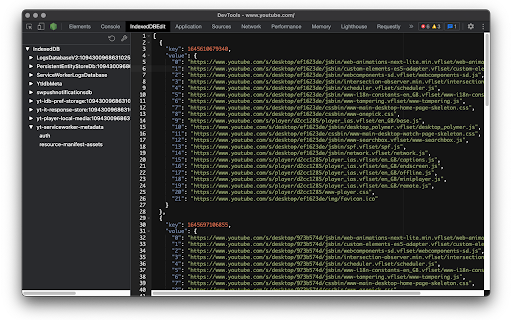
Devtools panel for changing IndexedDB key values Extension enables the ability view, edit and delete IndexedDB records.

IndexedDB Downloader
Download IndexedDB in any website with single click. Effortlessly list all available IndexedDB data. Download with a single click. User-friendly UI/UX. Frequent updates and improvements.

IndexedDB Explorer
Explore and manage IndexedDB databases in your browser **IndexedDB Explorer – Chrome Extension** IndexedDB Explorer is a powerful Chrome extension that lets you explore and manage IndexedDB databases directly from your browser. It provides a clear view of database structures, stores, and indexes, and offers tools to efficiently fetch, search, and manipulate data. * Deep searc across dbs and stores. * Visualize database structures with interactive graphs. * Fetch and page through large datasets (up to 5000 records per page). * Real-time record search across stores. * Add or delete records with ease (CRUD operations). * Calculate store sizes and record counts. * Generate charts for quick insights using Chart.js. **Acknowledgments:** Built using Chrome APIs and Chart.js.

idb-crud
An open-source Chrome extension for managing various types of browser storage and databases with an intuitive interface Are you a developer working with local databases like IndexedDB, LocalStorage, or SessionStorage? IDB CRUD is the ultimate Chrome extension designed to streamline your browser-based data workflows. With a sleek, modern drawer interface, this tool lets you seamlessly browse, edit, and manage your app’s local databases — all without writing a single line of code. Whether you're debugging, inspecting, or just exploring data, IDB CRUD offers a powerful yet user-friendly experience built specifically for modern web development 🔑 𝗞𝗲𝘆 𝗙𝗲𝗮𝘁𝘂𝗿𝗲𝘀: 1. Elegant UI — Clean, responsive drawer layout for distraction-free interaction 2. Tabular Data View — Explore database entries in an intuitive, sortable table 3. Full CRUD Support — Easily Create, Read, Update, and Delete records 4. Advanced Sorting & Filtering — Quickly find and organize your data 5. Customizable Columns — Show or hide fields to focus on what matters 6. Export/Import Functionality — Backup or share data in seconds 7. Modular Architecture — Built for compatibility with multiple storage types 💡 𝗪𝗵𝘆 𝗖𝗵𝗼𝗼𝘀𝗲 𝗜𝗗𝗕 𝗖𝗥𝗨𝗗? Designed for developers, testers, and power users Makes working with local browser storage fast, simple, and efficient Saves time during debugging and testing workflows

OPFS Explorer
OPFS Explorer is a Chrome DevTools extension that allows you to explore the Origin Private File System (OPFS) of a web application. OPFS Explorer is a Chrome DevTools extension that allows you to explore the Origin Private File System (OPFS, https://fs.spec.whatwg.org/) of a web application. To use it, open Chrome DevTools and click on the OPFS Explorer tab. The extension will automatically analyze the OPFS of the current web application and display the file hierarchy. You can then click on any file to download its contents or delete the file (which may fail if the file is locked). Note that deleting files may cause the application to break. You can test the extension on the demo page (https://tomayac.github.io/opfs-explorer/). The source code is on GitHub (https://github.com/tomayac/opfs-explorer).
