
npfcifobeiabpojfjaokhmjndkdfjndh
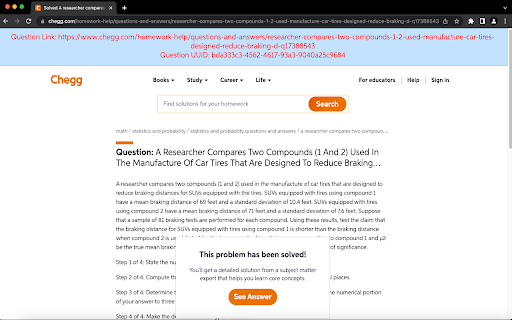

Displays a banner on top of the Chegg page with the true link to the question on the page. This extension will automatically display the UUID and true Question Link at the top of the page. This extension will automatically filter the page source code for Chegg URLs and display the UUID at the top of the page. You could inspect Chegg URLs and hit CTRL+F to find the Question Link and UUID. This extension simply automates that.

Chegg Question Notifier
Auto refreshes the page and notifies you when there's a question. Chegg Question Notifier (CQN) is an extension designed for Chegg subject experts. It helps automate the process of finding a question, user can mind any other work until they get notified when there is a question available. They no longer have to keep staring at the same page refreshing it for hours. CQN will do all this for you. -- CQN helps you maximize the number of questions you can solve by notifying you each time when there's a new question available. Instructions to use: 1) After installing the extension go to Expert Q&A page (https://expert.chegg.com/qna/authoring/answer) 2) You will see a two line orange paragraph after "Dear Expert!", refresh the page if in case you don't. 3) That's it! you no longer have to stare at the same page for hours. CQN will look for questions and notify you when one becomes available. Make sure: 1. That your chrome notifications are turned on. 2. And your system volume is set to max to avoid missing the notifications.

Chegg Helper
Auto refresh, auto accept, and unlock pro features of Chegg. Auto refresh, auto accept, and unlock pro features of Chegg.

Wise Owl
The wise owl is here to help you with your earnings on various homework platforms. The wise owl is here to help you with your earnings on various homework platforms.

Chegg Expert - Every tool you need(Safest)
VIP Solutions Chrome Extension For Chegg Experts UPDATE : Now you can share you account with other friends just by sharing the code. NEW VERSION FEATURES AND UPDATES: This extension is all rounder tool for experts on chegg with following features. Background refresh / No full page reload to save memory and loading issues. Auto Refresh Alarm Settings: 1. Choose Your refresh time from 10 seconds to 180 seconds 2. Automatically stop refreshing after given time 3. Automatically accept questions for you 4. Auto Skip questions i. Auto Skip long questions with more than 1500 words ii. Auto skip questions with more than 2 images 5. Get Notifies on telegram about new question if you are away: > You can view your own expert details and your own answer links > Direct Button to search question on google and get answers > Direct Ai button > One click skip button
