
nolmnigomliekdkmellioaabncmlgfnj
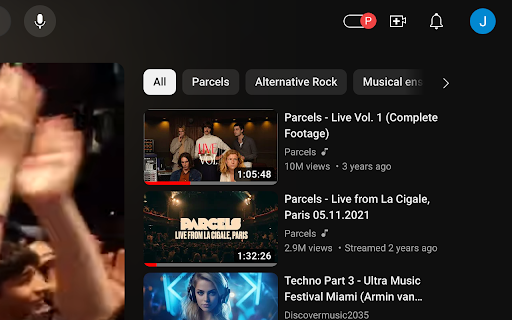
Let's you switch on Youtube to an incognito mode, making sure that watching videos doesn't affect your suggestions Let's you switch on Youtube to an incognito mode, making sure that watching videos doesn't affect your suggestions

GrayScaleAdz
GrayScaleAdz is a revolutionary browser extension that transforms distracting, colorful advertisements into subtle grayscale, helping you maintain focus while still supporting content creators and publishers. Unlike traditional ad blockers that completely remove advertisements, GrayScaleAdz takes a more balanced approach by reducing the visual impact of ads without eliminating them. This innovative method helps you: GrayScaleAdz is specially optimized for YouTube, where it: - Applies grayscale filters to video advertisements - Works with sidebar ads and sponsored content - Preserves native skip buttons for a seamless experience - Processes both standard video ads and shorts advertisements ⚠️ Pro Tip: If you encounter an unskippable YouTube advertisement, simply refreshing or reloading the page will resolve the issue and allow you to continue watching your YouTube content without interruption. Your privacy is our priority: - Zero data collection or tracking - No browsing history monitoring - Works entirely on your device - No external servers or data transmission - Open and transparent privacy policy Take full control of your browsing experience with: - Adjustable grayscale intensity sliders (0-100%) - Independent settings for ads and pop-ups - Domain whitelist for your favorite websites - Global toggle for quick enabling/disabling - Simple, intuitive interface GrayScaleAdz works across your entire browsing experience: - Compatible with all major websites - Specially optimized for YouTube - Works with both video and display advertisements - Handles pop-ups and modal windows - Seamless integration with your browser 💡 The GrayScaleAdz Philosophy We believe in creating a more balanced internet ecosystem where users can focus on what matters while still supporting the content economy. By turning ads grayscale instead of blocking them completely, we help: - Reduce the psychological impact of colorful, attention-grabbing advertisements - Maintain the revenue stream for content creators and publishers - Create a more mindful browsing experience - Promote a healthier relationship with online content Install GrayScaleAdz today and transform your browsing experience into a more focused, less distracting journey while still supporting the websites and creators you love.

Vulners Lookup
Automatically detect and highlight CVE IDs on web pages with vulnerability information from Vulners.com Vulners Lookup: Instant CVE Context in Your Browser Automatically detect and highlight CVE IDs on any web page—powered by the Vulners vulnerability knowledge graph. • Real-time CVE detection — instantly spot vulnerabilities on any page, from blogs and advisories to GitHub repositories. • On-hover insights — see CVSS severity, EPSS probability, AI-driven impact scoring, Known Exploited Vulnerabilities (KEV) status, and reference links in a clean, compact card. • One-click deep dive — open any CVE on [Vulners.com](https://vulners.com/) for full details, including descriptions, affected products, exploits, advisories, and patch information. • High-quality data — built on Vulners’ continuously updated knowledge graph, aggregating over 200 trusted sources with real-time enrichment. • Security engineers and vulnerability researchers • SOC and incident response teams • Red teams and penetration testers • DevSecOps and SRE professionals reviewing documentation, PRs, or vendor advisories 1. Install the extension. 2. Visit any website with vulnerability references. 3. CVE IDs are automatically highlighted—hover for instant context, click to explore full details. • No account required. • The extension only scans the page you’re viewing to identify CVE patterns. • Minimal metadata is fetched securely from Vulners to render context cards. • Built with minimal permissions and low overhead.

EuroSaver - Amazon Europe Price Comparison
🇪🇺 All European Amazon Stores Automatically search all european Amazon stores with EuroSaver for the best prices. This saves you time and money! 💵 Currency Conversion Foreign currencies are immediately converted into your store currency. So you always know how much you end up paying. 🚛 Shipping Costs EuroSaver also shows you possible shipping costs so that you can be sure to choose the best price. ✨ Customizable You decide how EuroSaver integrates, whether you want a popup accessible via the menu bar, a price table directly on the website or choose which stores you want to search in the first place. ✅ Your Savings Experience Due to the different pricing and availability of these formats in different shops, our extension may display incorrect prices for these product types. We are aware of this issue and are working to improve our algorithms to provide more accurate pricing information for all product types. We apologize for any inconvenience caused and thank you for your patience and understanding while we work to improve our extension. If you have any problems or would like to give us feedback, please don't hesitate to contact us. This browser extension may display messages from selected partners, including but not limited to N26, iGraal, and Payback. These partnerships enable us to maintain and continue developing this extension as a free service. By using this extension, you acknowledge and agree that: You may see promotional content from our partners. We do not endorse or guarantee any products or services offered by these partners. Your use of any partner services is subject to their respective terms and conditions. We may receive compensation for displaying partner messages or for user interactions with partner content. We strive to ensure that partner messages do not interfere with your browsing experience. If you have any concerns or feedback, please contact our support team.

Hide What You Dislike!
Hide any item by link, image or text on a page! This extension lets you right-click any link you dislike and hide it forever! It works the same on images! You can even select some text right-click and chose "Hide items with this text", yeah its that easy. Quick example of how you may use it: You search for something in Youtube but in the listed results you see one particular channel you dislike that you rather never see again, what do? Now you can right click the channel name and click "Hide entries with this link" and voila! That channel will no longer appear in your search results! BTW If you change your mind you can always go to the options page and unhide any of the things. === Version 1.17 === Fixing more bugs on element selection and visibility logic === Version 1.16 === Fixing bugs on element selection and visibility logic === Version 1.14 === Refactor, much faster selectors, much more strict testing against popular sites, ability to login using your Google account to save your filters on the cloud. New name.
