
jaeemfeobniaogimkhfnmmaamnllnpjm
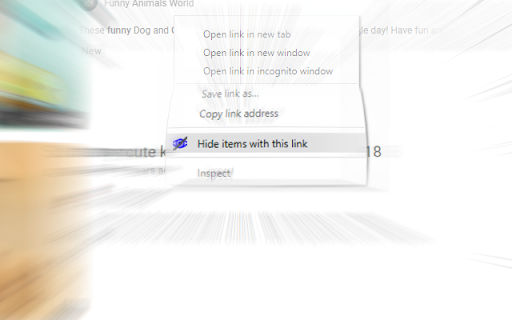
Hide any item by link, image or text on a page! This extension lets you right-click any link you dislike and hide it forever! It works the same on images! You can even select some text right-click and chose "Hide items with this text", yeah its that easy. Quick example of how you may use it: You search for something in Youtube but in the listed results you see one particular channel you dislike that you rather never see again, what do? Now you can right click the channel name and click "Hide entries with this link" and voila! That channel will no longer appear in your search results! BTW If you change your mind you can always go to the options page and unhide any of the things. === Version 1.17 === Fixing more bugs on element selection and visibility logic === Version 1.16 === Fixing bugs on element selection and visibility logic === Version 1.14 === Refactor, much faster selectors, much more strict testing against popular sites, ability to login using your Google account to save your filters on the cloud. New name.

hide-element
Define hidden rules for webpage elements, and then customize and change the UI of the webpage, which can be used to hide advertisements, optimize the website interface, and so on. 定义网页元素的隐藏规则,进而自定义更改网页的UI,可以用于隐藏广告、优化网站界面等.

LiteTube: Fix YouTube Lag & Adblock Detection
Fix YouTube Lag & Adblock Detection. Forces lightweight player (m.) with full Desktop UI. Ad-free, SponsorBlock & Background Play. Solves high CPU usage and "Ad blocker detected" screens by utilizing the lightweight Mobile API. LiteTube AdFree is a performance-focused extension designed to fix the YouTube experience on Desktop. It uniquely forces the ultra-fast mobile layout (m.youtube.com) to save RAM and CPU, but injects custom code to restore the look, feel, and functionality of the Desktop player. Get the instant speed of the mobile site without losing the features you love. Lightweight Engine: Redirects videos to the mobile version to drastically reduce system resource usage. Perfect for laptops and older PCs. Force H.264 Codec: Option to enforce the H.264 codec for smoother hardware acceleration on older GPUs. No "Ad Blocker Detected": Because LiteTube uses the mobile API and payload sanitization, it naturally bypasses YouTube's anti-adblock screens. Advanced Blocking: Strips ads directly from the JSON data before they load. SponsorBlock Integration: Automatically skips sponsored segments, intros, outros, and subscription reminders. Shortcuts: Full support for J, K, L, Space, F (Fullscreen), M (Mute), and Arrow keys. Mouse Optimization: Hover over the video to see controls (just like Desktop). Shorts Support: Enables mouse wheel scrolling for YouTube Shorts. Loop Button: Dedicated toggle for single-video looping directly in the player. Copy Timestamp: One-click button to copy the video URL at the current time. Restores the missing sidebar from the mobile view. You get direct access to: Aggressive logic keeps audio playing even when you minimize the window, switch tabs, or turn off the screen. No Tracking: We do not collect your personal data or watch history. Transparency: The source code is publicly available on GitHub for security auditing. Why LiteTube? YouTube has recently become heavier due to tracking scripts and anti-adblock measures. LiteTube cuts through the bloat, ensuring videos load instantly without errors or warning banners.

Smart Hide
A smart way to hide elements on web pages with layout preservation This is a powerful yet simple webpage element hiding tool that helps you clean up advertisements, pop-ups, and other distracting content on webpages, making your browsing experience cleaner. Key Features: ✨ Smart Selection: Click to select webpage elements you want to hide 🎯 Precise Control: Choose to hide or completely remove elements, with option to maintain original page layout ⚡ Auto-execution: Rules are permanently effective once set, supports delayed execution 🔄 Flexible Adjustment: Modify or delete created rules anytime 📦 Rule Export: Support exporting rules to share with other users 📥 Multiple Import Options: Support importing rules via text, file, or URL 🚀 One-click Import: Built-in common ad-blocking rules, ready to use with one click Advantages: • User-friendly: No programming knowledge required, create rules by clicking and selecting • Precise Matching: Support precise element targeting through ID, class name, XPath, and more • Layout Preservation: Option to maintain original page layout to avoid display issues • Rule Management: Intuitive rule management interface for easy control of all rules • Delayed Execution: Support setting delayed rule execution for dynamically loaded content Smart Hide makes your webpage browsing experience purer and more focused!

RemoveElement
Remove HTML elements from the right-click context menu Right-click over the HTML element you want to delete. You can view the tag name and size in the context menu. And all you have to do is click it.
