
nohphjepbjannpjpmodlcgdlialokkpd
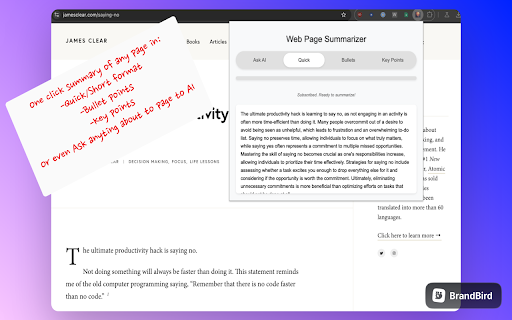
Description: The ChatGPT Webpage Summarizer is a powerful Chrome extension that leverages OpenAI's GPT-4 model to provide quick and intelligent summaries of web pages. This tool is perfect for researchers, students, professionals, or anyone who needs to quickly grasp the key points of online content. 💡Multiple Summarization Options: 💡Quick Summary: Get a concise overview of the webpage content. 💡Bullet Points: Receive the main ideas in an easy-to-read bullet point format. 💡Key Takeaways: Extract the most important points from the page. 💡Ask AI: Pose specific questions about the content and receive tailored answers. 💡AI-Powered Analysis: The extension uses advanced natural language processing to understand and summarize web content accurately. 💡Multi-Language Support: Automatically detects the language of the webpage and provides summaries in the same language. 💡User-Friendly Interface: Simple, intuitive popup with clearly labeled buttons for different summary types. Subscription Model: 💡7-day free trial available for new users. 💡Subscription option for continued access to all features. 💡Privacy-Focused: Only processes the visible text content of web pages, ensuring user privacy. 💡Responsive Design: Works seamlessly across various websites and page layouts. 🤖Install the extension and click on its icon in your Chrome toolbar. 🤖Choose your desired summary type or ask a specific question about the page content. 🤖The extension extracts the page content and sends it to a secure server for processing. 🤖Within seconds, receive a concise summary or answer based on your selection. 📚Research: Quickly understand the main points of academic papers or articles. 📚News Consumption: Get the gist of news stories without reading lengthy articles. 📚Content Curation: Easily summarize multiple articles for content roundups or newsletters. 📚Learning: Summarize educational content for better comprehension and retention. 📚Business Intelligence: Quickly extract key information from industry reports or competitor websites. Privacy and Permissions: 🕵️Connects to a secure server for AI processing (no user data is stored). Support and Feedback: We're committed to improving your browsing experience. For support or to provide feedback, please contact us through the Chrome Web Store or visit our website. Try the ChatGPT Webpage Summarizer today and transform the way you consume online content!

Free Spell Checker for Google Chrome™
Check your grammar, spelling and style. See word and character counts...! Need a free and simple spell checker solution? This extension supports over 20+ languages for spell checking, check for typos. Check the spelling of words and it comes up with suggestions for misspelled words. This software helps finding spelling errors that the spelling checker cannot find. For example, misuse of the words "there" and "them", "a" and "an" or repeated words. Supports over 25 languages - for example: English, Spanish, French, German, Polish, Russian, etc are all supported. Your text is remembered between visits. You can close the extension at any time and open it again without losing your work. Do a quick spellcheck for english language. Clear the text area if you don't want the text to persist. The number of words and characters which you are checking is shown below the original text. When counting words, a space is used as a separator. Light and dark themes are available to make this extension more comfortable to use. Disclaimer: Please note this extension is NOT made by Google and is made by an independent development team. All copyrights belong to their respective owners. Google doesn’t endorse or sponsor this extension. This extension Free Spell Checker for Google Chrome™ is not owned by, is not licensed by and is not a subsidiary of Google Inc.

Outwrite — Grammar checker & rewrite tool
Write perfect content with Outwrite. Check spelling & grammar, improve writing style, find synonyms and paraphrase sentences. Become a better writer with Outwrite for Chrome. Our AI writing assistant is more than just a grammar checker—it helps turn your ideas into powerful sentences. It works wherever you write online, including Gmail, Outlook, LinkedIn, Medium, and WordPress. You can use Outwrite to paraphrase entire sentences, strengthen your vocabulary, fix passive voice, and help increase or decrease your word count. Free features of the Outwrite Editor include: ★ Spell Checker ★ Grammar and Punctuation Checker ★ Thesaurus suggestions ★ Writing statistics (including readability, grade level and word count) ★ French, Spanish, and English support Upgrade to our Pro plan to access: ★ Paraphrasing Tool (to rewrite and restructure entire sentences) ★ Style suggestions ★ Structure suggestions (like changing passive voice to active voice) ★ Plagiarism Checker It's not just Chrome—you can also use Outwrite to improve your writing using Google Docs, Word, Edge, iOS, and with our web app. Get started with your free Outwrite account today! Over 1 million people use Outwrite for tasks like: ➤ Editing homework or an English essay for school ➤ Enhancing assignments for college using appropriate synonyms from our thesaurus ➤ Checking punctuation, like commas and apostrophes ➤ Writing clear and impactful copy for websites, ads, and social media ➤ Refining business documents & reports ➤ Grading an academic thesis ➤ Rewriting text to improve SEO and readability ➤ Teaching students how to write more effectively You don't have to be Shakespeare or Hemingway—just use Outwrite to proofread and write like a pro.

Linguix: Grammar Checker and AI Writing App
Improve your writing and create compelling content with Linguix grammar checker & rewriter. Improve your writing and create compelling content with Linguix multilingual grammar checker & rewriter. Features include grammar checker, punctuation checker, paraphrasing, and ChatGPT writing. Linguix for Chrome offers real-time grammar checking and rewriting to instantly improve content on millions of websites in English, French, German, Spanish, Portuguese, and Polish. Solve your writing tasks, from crafting emails to preparing large documents. Our generative AI features and OpenAI/ChatGPT integration also allow you to instantly fix mistakes, make your content, shorter/longer, and more! 🔥 What you get ~ Free Plan The free version of the tool offers you basic writing suggestions that will instantly improve your writing: ✅ Multilingual Grammar Check: Spot and fix errors in English, Spanish, French, German, Portuguese, Italian, and Polish. ✨ Text Humanizer: Instantly adjust your tone to make content sound more natural, engaging, and human-like. 🔄 Advanced Paraphrasing: Rephrase with precision while keeping your original intent intact. 📝 Smart Text Refinement: Improve clarity, fluency, and style from single sentences to entire documents. 📊 Generative AI Integration: Powered by ChatGPT/OpenAI, make your content shorter, longer, or tailored to your needs. 🌍 Inline Translations: Translate text into 14 languages seamlessly while writing, helping you communicate across languages effortlessly. ~ Pro Plan Upgrade to Pro plan to get your communications to a whole new level. You will enjoy all features available for free, plus additional premium corrections and unique unlimited features. Onboard your team, assign roles, and keep peace of mind knowing all your communications are professional and safe for your brand. Analyze performance with our advanced writing activity reports. • All PRO features • Style Guides • Team shortcuts • Individual accounts • Centralized billing • Sophisticated statistics and monitoring • Integrations with business tools Best for: Sales, Marketing, Customer support, and HR teams. Linguix analyzes your content as you write and underlines writing mistakes or sentences that can be improved for better clarity. You can apply corrections in one click or expand them to get more context. Our writing assistant seamlessly integrates with Asana, Google Drive, Gmail, HubSpot, and other business platforms to improve your writing style stress-free. Here is why you should give Linguix a try: Error-free writing improves marketing ROI, open rates for emails and pitches, decreases ticket closure time, and speeds up internal communications, freeing up additional revenues! ✏️ State-of-the-art paraphrasing and rewriting tool to focus on the meaning, not wording This browser extension helps paraphrase your sentences, fix grammar issues, punctuation and spelling problems, so you can focus on the message. Rephrase and rewrite your sentences in one click to make your writing clear, compelling, and authentic whether you are native or not. ✏️ Get the power of ChatGPT on any website With our ChatGPT integration you can leverage the power of OpenAI with no need to copy and paste your content. Also, our shortcuts feature is great for automating your prompts to save time on repetitive typing. 💪Works Where You Write Linguix integrates seamlessly with your favorite tools, including: • Gmail • Google Docs • Social media platforms • And more! “It just works 24/7 helping me to quickly correct my grammar and spelling. It has made the quality of my writing much improved and professional.” — Tim S., researcher “The tool brings everything to the table that its competitors do, plus some amazing features. The UI is definitely preferable and very clean, with a color scheme and Google Chrome plugin that works on even more sites and areas than competitors.— Christopher Johnson, ad agency founder 🚀 Get apps for MS Word and beyond Want to use Linguix outside your browser? Download our multiple apps like Word add-in from https://linguix.com/apps By installing the extension, you agree to Linguix's terms and conditions (www.linguix.com/page/terms) and privacy policy (www.linguix.com/page/privacy-policy). Get started for free at www.linguix.com

Spellex Write-Assist for Chrome
Spellex for Chrome is a complete assistive technology literacy toolbar to help improve reading, writing, and speech comprehension. Spellex Write-Assist – Empowering Every Writer Spellex Write-Assist is an all-in-one Chrome extension designed to enhance writing, reading, and research for students, professionals, and individuals with learning differences. Advanced Spell Checking Custom vocabularies for healthcare, legal, biosciences, veterinary studies, and more—perfect for specialized writing. Word Prediction Increase typing efficiency with intelligent word suggestions tailored to your writing context. Real-Time Speech-to-Text Dictate with ease using advanced AI-powered voice recognition, offering: • Ultra-accurate transcription with support for 40+ languages and dialects • Robust performance in noisy environments • Automatic punctuation and intelligent formatting • Fast, low-latency results ideal for seamless web-based dictation Text-to-Speech with Human Voices Highlight any text to hear it read aloud naturally—improve comprehension and editing flow. Note Highlighting & Organization Highlight, color-code, and save notes directly as PDFs—locally or to the cloud—for later review. Word Definitions & Audio Pronunciations Instantly access definitions with etymology and hear how words are pronounced. Screen Masking & Magnification Ruler Enhance focus and readability with tools that isolate and enlarge text as you read. Dyslexia-Friendly Font Read and write more comfortably with a font designed to support users with dyslexia. Picture Dictionary Visual word support to boost understanding and vocabulary retention. Collaborative Audio Notes in Google Docs Record and share audio notes seamlessly within your documents. PDF Tools with OCR Interact with scanned PDFs using built-in Optical Character Recognition. Translation Support Highlight and instantly translate text into Spanish, German, or French. Quick Research Tools Search the web efficiently without distractions—ideal for studying and focused research. Try Spellex Write-Assist Free for 14 Days! Get full access to all premium features at no cost and discover how much easier writing and reading can be.
