
noejohnngbnjifphjjikaenmefinlogi

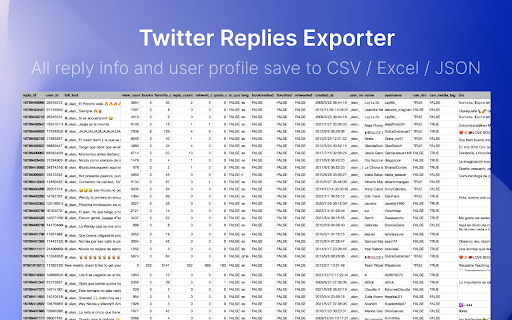
Scrape and Extract replies & comment list of any tweet, Save reply content and user info list to CSV / Excel / JSON. HOW TO USE? 1. Enter a Tweet link 2. Click the start button v2.6.0 CHANGE LOG - Add realtime check if a user can receive DM from your account. - Fix the init issue. v2.4.0 - Fix the fetch data not working issue. - Add auto continue when show more hidden replies tips. v2.3.0 - Fix can_dm, location fields issue. - Fix the user info stuck issue. v2.1.0 - Fix the 404 issue. 🔥 Upgrade ✔︎ Support X.com and Twitter.com link ✔︎ Save export history to local storage ✔︎ Continue task progress from history ✔︎ Add websites, first name and last name fields. You can find emails with domain and name by some email hunters. TwReplyExport uses the Twitter website to load tweet replies. There is some limit on websites, Twitter does not always show all replies on the website. More info: https://twrepliesexport.extensionsfox.com/#faq If you have any questions, please keep in touch via help@extensionsfox.com. 🔒 DATA PRIVACY All data is processed in your local computer, never passing through our web server, and no one knows what you save.

Export Tweet From Any Account
TwExtract is a Chrome extension for Twitter that allows you to export & download tweets from any account into a CSV file. TwExtract - Export Tweets allows you to quickly extract and export tweets from any account as a CSV file with one click. 🏆 Advantage Our extension can export more data, as we comply with Twitter's rate limits. 👨🏻💻 Features ✓ Extract and export tweets from a user to CSV ✓ Extract and export tweets from a user to CSV within a selected date range ✓ Supports exporting longer tweets ✓ Automatically managing Twitter's rate limits 🟢 indicates the normal time interval for requests 🟠 indicates the cooldown period's time interval 🔴 indicates the time interval for request errors 🗂️ What You Get? - ID - Text - Tweet URL - Language - Type - Author Name - Author Username - View Count - Bookmark Count - Favorite Count - Retweet Count - Reply Count - Quote Count - Created At - Source - Hashtags - URLs - Media Type - Media URLs 📃 How to Start Exporting? - Enter the Twitter username or open the extension on the Twitter user’s profile, and the extension will automatically fill in the username. - Click the Start Exporting Button. ❓FAQ How Can I Export All the Tweets From a Specific User? - By default, if the date option is not selected, all of the user's tweets will be exported. In theory, this extension can export all of a user's tweets, but when exporting a large amount of data, it may trigger Twitter's limits, causing the export to be interrupted. If this happens, you can use the date option to resume exporting tweets from where the last export was interrupted. ⚠️ Caution To avoid being flagged by Twitter's risk control for frequent data exports, we suggest creating a dedicated Twitter account for exporting data. 📬 Contact If you have any questions or suggestions to improve the extension, please feel free to contact us at jfl913@gmail.com. 📃 Terms Each time, you are entitled to export up to 150 data entries for free. To export more, you need to upgrade to Pro. 🔒 Data Privacy All the data you process stays on your local computer and never goes through our servers. ℹ️ Disclaimer Twitter is a trademark of Twitter, LLC. TwExtract - Export Tweets is not affiliated with, endorsed, sponsored, or otherwise related to Twitter, Inc. or any of its affiliates or subsidiaries.

Twitter/X Exporter - Export Tweets, Followers, Bookmarks to CSV
Twitter Exporter: The Ultimate Tool to Export X / Twitter Data Twitter Exporter is a professional browser extension designed for data analysts, marketers, and content creators. It allows you to scrape and export public data from any Twitter / X account into usable file formats with just one click. Whether you need to analyze competitor strategies, backup your own tweets, or monitor brand sentiment, this tool makes it easy to "Export Twitter / X Data" securely and efficiently. 🔥 CORE FEATURES We support comprehensive data extraction for all major X / Twitter modules: ✅ Export X / Twitter Replies Download user replies and comments to analyze interaction patterns and engagement. ✅ Export X / Twitter Followers Quickly export the followers list of any account to identify potential leads and analyze audience demographics. ✅ Export X / Twitter Following Export the list of people a user is following to understand their network and interests. ✅ Export X / Twitter Bookmarks Batch export and backup your saved bookmarks so you never lose valuable content. ✅ Export X / Twitter Search Results Enter any keyword or hashtag and bulk export the search results. Perfect for trend analysis and brand monitoring. 📂 EXPORT FORMATS We offer flexible export options to fit your workflow: • Export X / Twitter Data to Excel (xlsx) Formatted specifically for Microsoft Excel. Data is organized into columns for immediate analysis. • Export X / Twitter Data to CSV Universal comma-separated format. Perfect for importing into databases or processing with Python/Pandas. • Export X / Twitter Data to JSON Includes full metadata structure. Ideal for developers who need raw data for custom applications. ⚡ WHY CHOOSE TWITTER EXPORTER? Privacy First & Secure All data processing happens locally in your browser. We do not require your password, and your data is never uploaded to third-party servers. Rich Data Fields Our export files are packed with details, including: Tweet Content, Creation Date, Like Count, Retweet Count, Reply Count, Permalink, User ID, and more. Easy to Use Clean and intuitive interface. No coding skills required—simply click "Export" to start. Always Updated We actively maintain the extension to ensure compatibility with the latest Twitter (X.com) interface changes. 🎯 USE CASES Marketers: Lead generation and competitor analysis. Researchers: Social media data mining and sentiment analysis. Content Creators: Backup personal archives and track engagement. Install Twitter Exporter now to unlock the power of X / Twitter data! Disclaimer: Twitter Exporter is a third-party extension and is not affiliated with Twitter, Inc. or X Corp.

Twitter Comments Exporter
Easily export and download Tweets & Replies from any user to XLSX/CSV. Effortlessly export tweets from a Twitter user with one-click. Seamlessly download and archive tweets for social media analysis, comprehensive reporting, personal records, or digital marketing strategies. Our tool provides an easy and efficient way to export Twitter data, ensuring you never lose important tweets. Try our Twitter export feature today and simplify your social media data management. ⚙️ Get Started 1.Enter Username. 2.Choose export type. 3.Click the 'Export' button. 🔒 Data Privacy Your data privacy is paramount. All data processing occurs on your local machine; it never transits through our servers, ensuring no one else has access to your collected data. 👋 Contact For support or inquiries, reach out to us at lazytechofficial@gmail.com ⚠️ Disclaimer TWITTER is a trademark of X Corp. Twitter Comments Exporter is an independent tool and is not affiliated with, endorsed, sponsored, or otherwise connected to X Corp., Twitter, Inc., or any of their affiliates or subsidiaries.

Twitter Comment Export Tool
Easily export and download Tweets & Replies from any users to XLSX/CSV. Effortlessly export tweets from a Twitter user with one-click. Seamlessly download and archive tweets for social media analysis, comprehensive reporting, personal records, or digital marketing strategies. Our tool provides an easy and efficient way to export Twitter data, ensuring you never lose important tweets. Try our Twitter export feature today and simplify your social media data management. ⚙️ Get Started 1.Enter Username. 2.Choose export type. 3.Click the 'Export' button. 🔒 Data Privacy Your data privacy is paramount. All data processing occurs on your local machine; it never transits through our servers, ensuring no one else has access to your collected data. 👋 Contact For support or inquiries, reach out to us at lazytechofficial@gmail.com ⚠️ Disclaimer TWITTER and X are trademarks of X Corp. Twitter Comment Export Tool is an independent tool and is not affiliated with, endorsed, sponsored, or otherwise connected to X Corp., Twitter, Inc., or any of their affiliates or subsidiaries.
