
nodnmpgjlnclahkmgjiinfjklgbbgecg
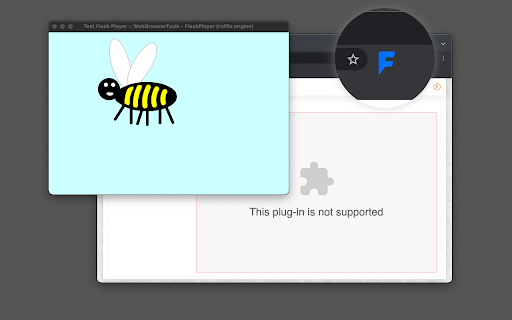
This extension plays SWF objects of Adobe Animate (Flash) in a pure JS emulator without the need to have a native Flash plug-in like Adobe FlashPlayer. The extension uses two open-source Flash to JS libraries (Ruffle and SWF2JS) as its emulation engine. By default, the extension does not play Flash objects instead, the user presses the toolbar button for the extension to find all available Flash objects or links in the current webpage. It will offer the user to select the proper SWF object and then send the link to a stand-alone emulator window. This way Flash objects are only functioning when there is a request. For Flash links, the extension adds a context menu item to these links so you can directly emulate an SWF link. Since this extension does not run Flash by default, it is lighter than other similar extensions. It only runs Flash on demand. Features: Runs a pure JavaScript-based Flash emulator Does not require any native plug-ins Run in a private sandboxed window to protect the user privacy Use two different engines: Ruffle (https://ruffle.rs/) and SWF2JS (https://swf2js.com/) Optionally emulate all embedded flash objects inside the page (use action's right-click context menu) Notes: 1. This extension uses two open-source emulator engines. The SWF2JS library still does not support all methods available so some SWF objects may crash the engine. The extension always tries to open the emulation window the same size as the actual Flash object, however, you can resize the window to the proper size anytime.

Flash Forwarder Tools Extension
Run Flash content from the web with Newgrounds.io integration on your desktop. Ever wanted to play Newgrounds games on your desktop? Now you can! Flash Forwarder Tools is a powerful extension that detects and retrieves .swf files from Newgrounds and other websites, letting you enjoy your favorite Flash games seamlessly on your computer. With the help of a dedicated desktop Flash Player, you can relive the classic Newgrounds experience anytime. What’s more? Newgrounds.io features are fully supported! Unlock medals, post scores, and engage with the community just like you would on the website. Plus, the extension isn’t limited to Newgrounds—you can load .swf files from other websites too. Note: This extension requires the Flash Forwarder Tools standalone application installed on your computer.

Flash Player Emulator
Flash player emulator runs flash files in the browser. Play your favorite flash games online! Puts Flash back on the web. Bring your favorite Flash games back to life with the Flash Player Emulator Chrome extension! This powerful tool allows you to run SWF files directly in your browser, letting you enjoy classic content online once again. The extension is powered by two open-source emulator engines: Ruffle and swf2js. - Ruffle is a high-performance Flash Player emulator designed to work seamlessly across all modern web browsers. It offers a safe and secure way to run Flash content without the need for outdated plugins. - swf2j is another powerful engine that provides accurate emulation of SWF content, particularly focusing on ActionScript, making it ideal for running more complex SWF files. With the Flash Player Emulator, you can: - Play Classic Games Dive back into your favorite games with a single click. - View Flash Animations Experience nostalgic animations and interactive content as it was meant to be seen. - Seamless Integration The extension works in the background, automatically detecting and running SWF files on websites. - Open Source and Continuously Updated Benefit from continuous improvements and updates thanks to the open-source nature of Ruffle and swf2js. Whether you’re a gamer, an animator, or simply a fan of Flash, the our emulator is the perfect solution for bringing SWF content back to life in a post-Flash world. Install now and put Flash back on the web where it belongs! Download now and start playing! Note: Flash Player is a helper tool for Google Chrome users. Our extension is not officially affiliated with products Adobe Player or any other Adobe products.

Flash Player for the Web
Easily play flash content across the web! Flash Player for the Web is an extension that lets you play flash content across the web via a JavaScript flash emulator. Toolbar popup has an ON|OFF switch to enable or disable the addon. This extension uses the Ruffle emulator (https://github.com/ruffle-rs/ruffle) to compile and play flash. Toolbar popup has an ON|OFF switch to quickly enable or disable the addon. By default, the addon is disabled. Please navigate to a webpage with flash content, then, open the toolbar popup and press on the - ON - button (with red F symbol). All the flash content should start to play. Please note that there might be some bugs in playing flash as this addon is still a work in progress. To turn off the addon, please press the - OFF - button via the toolbar popup. To report bugs, please open the addon's homepage and fill out the bug report form: https://mybrowseraddon.com/flash-player-for-the-web.html

Flash Player Extension For Web
Any flash content for web can be run using a Flash Player. E.g. flash games. Original flash player is nowadays disabled in the browser. Don't worry, just install this simple flash player. The flash player automatically recognises any flash content on a webpage and replaces it with "play" button. In a word, you can install this extension to unlock old flash games or other flash content. Automatically detects the flash content of a website and generates a "play" button. Play flash games, watch flash videos and more. Easy to use, one click to play flash content.
