
nndjakbllljidligkiacmijcdlmooblb
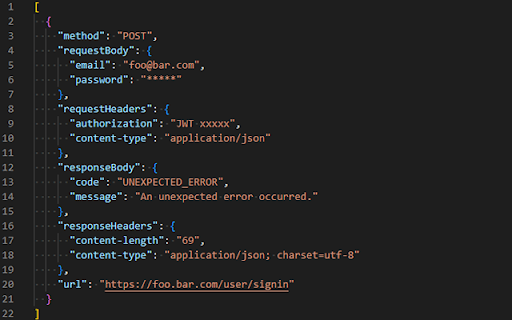
Request Interceptor extension for Chrome. This extension intercepts the Ajax requests made on a web page and then allows to save… Request Interceptor extension for Chrome. This extension intercepts the Ajax requests made on a web page and then allows to save them in JSON format. Just click on "Start recording" and wait for the requests to be sent, then click on "Stop recording" and you can click on "Export data" to export the request data.

ModResponse - Mock and replay API
Mock, modify, and replay API. Easy setup. No proxy needed. No code change required. ModResponse is a powerful and easy-to-use tool for web developers that simplifies the process of modifying, stubbing, and replaying HTTP responses. It requires no extra proxy or code change to be made, allowing you to quickly and conveniently test different scenarios and debug edge cases. With ModResponse, you can modify the API response, return different HTTP status code, add delay to your request, etc. You can also reroute your HTTP request to a different server, allowing you to test your local changes in production domain within seconds, without the risk of breaking production. ModResponse does not require extra proxy or making any code change. It can modify pretty much any HTTP request, not just XHR requests. Simply install it and you are ready to go! ** What can ModResponse do?** - Record and replay HTTP response - Stub HTTP response - Reroute request to a different URLs - Change HTTP response body, status code, and headers - Delay HTTP requests to simulate slow network - Simulate network errors - Advanced filtering by tab, tab group, window, or time - Demo with fake data Want to create perfect data for your product demo? With ModResponse, you can replace the actual API response with a fake one that contains the data you want. No need to change your real data or make code change. - Speed up slow requests Do you have API requests that are taking a long time to finish, and every time you make a small UI tweak you need to wait >10 seconds for the API request to finish to visualize your change? Using replay response, you can record and replay the slow API request. That way, you will only need to wait on the slow API request once. All subsequent requests to be served from the cached response within a few milliseconds. - Develop against edge cases Need to handle a 4XX or 5XX status code from an XHR request, or try out how your UI will behave with a very long string? Using replay response or stub response, you can modify the response body, status code, or response headers to simulate different scenarios that you need to handle. - Develop against unimplemented APIs Are you a web developer who is blocked because an endpoint you depend on is not yet implemented? Using stub response, you can mock the API response so you can start developing against that endpoint. That way, you can develop the frontend while others implement the endpoint (as long as the actual implementation return the response in the same format). - Testing on production domains Do you need to integrate with a third party platform that only works on your production domain? Using proxy request, you can reroute the request from your production domain to localhost or a dev domain, allowing you to test your changes on your production domain without the risk of breaking it. - Debug edge cases Need to test how your app behaves when some resources takes too long to load, or when they fail to load due to network errors? With ModResponse, you can add artificial delay and simulate different network error conditions so you can debug and handle edge cases with ease. ** Other ModResponse features ** - Support having multiple profiles with quick switching between profiles - Export and import profile - Easily share your profiles with others - Dark mode support - Customizable profile badge - Clone profile ...and more!!! "debugger" is required in order for response modification to work. "tabs" permission is required for prefilling the URLs, and for tab filter, tab group filter, and window filter to work. "storage" and "unlimitedStorage" are required to store the response modification. "contextMenus" is used to enable quick pause/unpause by right-clicking on the icon. ** Known issues ** 1, You will see ["ModResponse" started debugging this browser] banner when ModResponse is activated. This is because it uses the debugger API, which is needed for response modification. Due to Chrome's security policy (https://crbug.com/1096262), that banner would show up on all tabs even when a tab is not being modified, and it may still for a few more seconds after ModResponse is paused or disabled. To hide it, you can run chrome with --silent-debugger-extension-api command line switch. 2, Clicking on the "Cancel" button on the ["ModResponse" started debugging this browser] banner will not deactivate ModResponse. To deactivate it, please open ModResponse and click on the "Pause" button. Once paused, the banner should disappear in a few seconds.

Ajax Interceptor Tools
Modify the response text of Ajax requests An extension plugin for Chrome that modifies the response of AJAX requests. 🧰 Main features: 1. Intercept and modify the response of XMLHttpRequest and fetch requests, including 404 status requests. 2. Match requests based on regular expressions and HTTP request methods. 3. Edit response results in JSON or JavaScript format, with support for Mock.js syntax. 4. Easily create mock scenarios in JavaScript programming by accessing original request information from the arguments parameter. 5. New U-Network panel in DevTools for quickly intercepting requests and modifying response results. 6. Support change the request URL, request headers and body. 7. Support importing/exporting rule configurations. 8. Support adjusting the order of groups and rules. 9. Support picture-in-picture option for opening the configuration page. 10. Support intercepting network configuration pages using declarativeNetRequest. ⚠️ Notes: 1. After installing the plugin, restart the browser or refresh the relevant pages to ensure normal use. 2. The plugin only modifies the response at the JS level and cannot display the modified result in the Network panel. The plugin prints the modified results to the console, which can be viewed there. 🌟GitHub repository (please star if you find it helpful): https://github.com/PengChen96/ajax-tools

RequestNinja
Replay HTTP network requests with ease, modify form parameters and save requests for future testing. What is RequestNinja? RequestNinja helps you test and debug HTTP requests with ease, which is particularly useful for Developers, QA Engineers, System Admins, AdOps and anyone involved in web testing or development. How can RequestNinja be helpful? Developers: Debug APIs and web services faster. QA Engineers: Automate and streamline request testing. System Admins: Monitor and troubleshoot web applications and APIs. AdOps: Validate tags, monitor requests and debug tracking pixels. Tech Writers and PMs: Understand and document app behaviour. Key features: Replay requests with ease: Re-run saved HTTP requests with a click. Save requests: Keep a log for future testing or team sharing. Create collections: Coming soon! Whether you are building, testing or managing web applications, RequestNinja makes handling HTTP requests faster and easier!

Relay – Intercept, Modify & Run HTTP Requests in Your Browser
Intercept, edit, and run HTTP requests directly in your browser. No account needed. Relay is an open-source Chrome extension that lets you capture, edit, and test HTTP requests directly in your browser. No account needed—just install and start using. Key Features 🔧 Capture HTTP Traffic in Real Time 📡 Relay intercepts HTTP and HTTPS requests as you browse, making it easy to filter by method (GET, POST, etc.) or URL so you only see the requests that matter. Modify Requests Instantly ✏️ Edit every aspect of a captured request, from the base URL and HTTP method to headers, query parameters, and body content. You can even adjust response details for flexible testing. Run API Requests in the Browser ⚡ Send and test API requests directly in your browser with immediate feedback—no need for external tools. You can also export requests as cURL commands if you need them for other uses. Save Your Sessions 📂 Organize and revisit your sessions, so you can easily review and analyze past requests when needed.
