
nnacidecdiejnlgehdpbmgffdbfcnpie
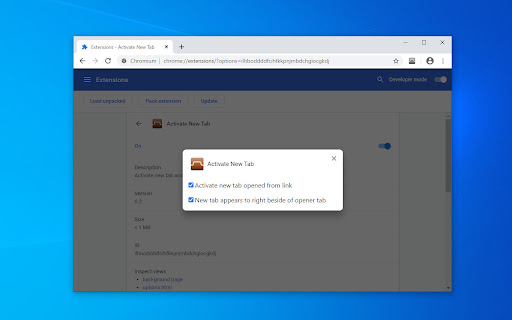
Activate new tab and move it to beside of opener tab. Activate new tab opened from link (context menu 'Open link in new tab' or click middle mouse button on link) and move to right beside of opener tab. Simple and lightweight extension. No permissions required.

Tabs to Front v2
Brings newly created tabs to the foreground. New tabs open immediately instead of in the background. Update of original "Tabs to the Front!" by Abarth (2010). Chrome opens new tabs in the background and provides no option to switch to them immediately. This extension forces new tabs to open immediately. Basic, no frills, no extra features.

Open Tab Next Right to Current
This extension affects the behavior of opening new tabs. The following behaviors are affected: + New tab created from current tab open next right to current tab. + Second and subsequent new tab also open next right to current tab. + New tab created from pinned tab open next right to last pinned tab. The following behaviors are controlled so that they are not affected: + New tab created from Window open to right edge the window. + New tab created from Shortcut open to right edge the window. + New tab created from Bookmark open to right edge the window. + New tab created from Tab Contextmenu open next right to current tab. + Restore closed tab/window to original state. *This does not apply if it interferes with other extensions or settings.

Open Links in New Tab
Modern Web Extension to Open Links in New Tabs for Specified Domains or Temporarily on Any Tab. Modern Web Extension to Easily Open Links in New Tabs for Specified Domains or Temporarily on Any Site or Tab. - Toggle Sites to Always Open Links in New Tabs - Temporarily Open All Links in New Tabs for Current Site - Option to Open Links in the Background - Update on Scroll Option to Always Update Links - Update on Any Attributes Changes and New Links - Options Page to View and Edit Toggled Sites and More - Automatic Dark/Light Mode based on Browser Setting - Activate from Icon, Context Menu, or Keyboard Shortcuts

Tab Position Manager
Take control of your browsing experience with Tab Position Manager! This extension allows you to easily manage the positions of your tabs when a new tab is created or when an active tab is removed. No more frustration with unpredictable tab placements – Tab Position Manager ensures that your tabs stay organized the way you want them. Whether you’re a multitasker or just prefer order, this extension gives you the flexibility to customize tab positioning and streamline your workflow.
