
nmkelbcciejibomjfdhaifcdkknoieii
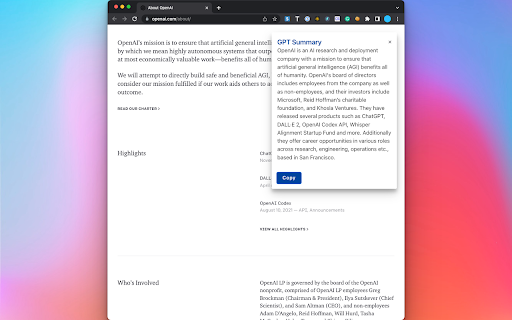
Summarizes webpages with `Alt+S`. Default to selected text, otherwise summarizes entire page.

GPT+ (GPT Plus)
Uses the power of OpenAI gpt-turbo-3.5 to generate queries from you, without hassle and leaving your website. THIS EXTENSION REQUIRES OPENAI KEY! OPENAI CAN AND PROB. WILL CHARGE YOU FOR USAGE AFTER FREE TRIAL IS USED - BEFORE USING PLEASE CHECK OPENAI'S gpt3,5-turbo PRICING The GPT+ extension is a powerful tool that allows users to harness the power of ChatGPT directly from their browser. With just a few simple clicks, users can select any text and have the extension automatically process it through OpenAI's powerful algorithms. Additionally, users have the ability to input their own custom extensions to further personalize their experience. PLEASE NOTE THAT AN OPENAI KEY IS REQUIRED TO USE THIS EXTENSION. Users must obtain their own OpenAI API key and enter it into the extension before being able to utilize its full potential. Furthermore, users should be aware that they are responsible for any charges incurred from using OpenAI's services. For those interested in learning more about the GPT+ extension and how to use it, there is a helpful video overview available on YouTube. This video provides an in-depth look at the extension's features and functionality, making it an excellent resource for both new and experienced users alike. If you want to see it in action, check out this video: https://www.youtube.com/watch?v=qVOMSnMDrqc If you find the GPT+ extension to be useful, we highly recommend leaving a positive review and sharing it with others. Not only does this help support the developer and encourage future updates, but it also helps spread awareness of this powerful tool to others who may benefit from it.

Hey ChatGPT Explain This
Highlight unknown sentence, and let's ChatGPT explain to you A Chrome extension (manifest v3) that uses ChatGPT to explain highlighted text. The usage is same as google translation extension This extension is open source: https://gitlab.com/warren30815/hey_chatgpt_explain_this

Bullet Points: summarize Web pages with GPT-3
Extract three key points from every Web page to quickly understand its contents. Reduce the time needed to read news and articles. Bullet Points is a browser extension that allows you to quickly summarize any Web page you are browsing into three bullet points. With Bullet Points, you no longer have to read long articles or news pieces. Instead, the extension will extract the three main points from the text and provide them in an easy-to-read format, allowing you to quickly gain an understanding of the overall content without having to read through it in its entirety. Bullet Point uses a powerful GPT-3 artificial intelligence model to scan each page, extracting the most relevant information and condensing it into these three points. The result is a concise summary of what’s on the page that can be consumed quickly and easily. This makes it especially useful for busy professionals who need to stay up-to-date with their industry but don't have time to read every article they come across. It also works great as a research tool for students who need quick summaries of articles or other texts for their studies. By using Bullet Points, they can get an overview of what's contained within each page without having to spend time reading through all of it. This can save them valuable time when doing research projects or studying for exams. Using this extension couldn't be easier - just install it onto your browser browser and click the Bullet Points icon when you're on a page that you want to summarize. It will then do its magic, automating the summarization process so that you get three bullet points in seconds. You can also summarize any linked page by right-clicking on the link and choosing the "Summarize" option. After reading the page summary you can decide whether you want to follow the link to read the full page. Finally, you can also select any amount of text on the page and let the extension summarize just the text you've selected. Bullet Points can also be a great help for those who have trouble understanding long texts due to language barriers or reading difficulties. The extension simplifies complex information into an easy-to-understand format, allowing anyone to quickly understand what’s being presented on the page without having to read through it all themselves. In addition to this, Bullet Points also makes it easier for people who are short on time but still want to stay up-to-date with their industry by providing them with quick summaries of articles or news pieces. By having longer texts condensed into three concise bullet points, they can gain an understanding of the content without having to read through it all in detail. Overall, Bullet Points is an excellent browser extension for anyone who wants a quick summary of any Web page. It’s very easy to use and requires no manual input, making it a great choice for busy professionals, students, or those with language barriers or reading difficulties. With just one click, Bullet Points will provide you with three concise bullet points that summarize the content of any page.

Muse GPT Page
Muse GPT Page Get instant summaries, highlight timestamps, user comments and automatic classification of the website you’re currently browsing including Youtube, Bilibili videos through OpenAI ChatGPT with a single click. With another click, you can save these summaries and website information to your own Notion tables! Efficiently and effectively obtain and organize valuable and interesting content from the internet! The existing features are permanently free, try it now! 🌟 I know your time and knowledge are valuable, and I want to create a more effective way to organize the valuable and interesting content you gain from the web. And with AI, we can better integrate these together. That’s why I developed this extension to help you do all of this with AI, without lifting a finger. 🎉 With the AI built into Notion, you can now benefit even more from the content you obtain from the internet. ## More features included in ❇️ Get a summary and classification of the currently open website through ChatGPT with a single click ❇️ One-click to save the current page summary and classification to Notion ❇️ Summarize video site content, including YouTube, Bilibili, etc. ❇️ Support for extracting and analyzing YouTube and Bilibili video subtitles (Bilibili does not currently support series) ❇️ AI automatically refines the highlight timestamps of YouTube and Bilibili videos ❇️ Download extracted YouTube or Bilibili subtitles as srt files (only supports default language temporarily) ❇️ Quickly extract key content from news websites ❇️ Supports translating any page language into your language ❇️ Supports Command+Shift+X shortcut to call out the panel for extraction (Ctrl+Shift+X for Windows) ❇️ Supports Markdown formatted display ❇️ Comes with prompts for YouTube, Bilibili and Github ❇️ Customizable prompts ❇️ Supports adapting prompts to domain names, to automatically enable different prompts for different websites ❇️ Editable generated webpage summaries ❇️ Google Material UI ❇️ The summary panel can be dragged anywhere on the page ❇️ Supports automatic popup summary panel on YouTube and Bilibili video pages ❇️ Supports light and dark skin ❇️ Multi-language support ## New features coming soon * Deep analysis of key content automatically connected to the internet * Embedding the highlight timestamps display function in video pages * Summary and translation of copied content * One-click save copied content to Notion * Prompt engineering guide * Connect to Prmpt engineering community * AutoGPT * Analysis and summary of Instagram content and user comments * Analysis and summary of Twitter content and user comments * Summary of Reddit community content After installing this extension, a clear and easy-to-understand usage guide will pop up immediately, just follow the guide to start using it right away. After finishing the guide, click the icon in Chrome, or the shortcut Command+Shift+X (Ctrl+Shift+X for Windows) to start using it immediately ## Please support me on my GitHub page https://github.com/feynmandj/MuseGPT-Page If you find this extension helpful, please give me a Star. Thank you.
