
nmjpcgghblmjcpmbihcbmknkboehnabi
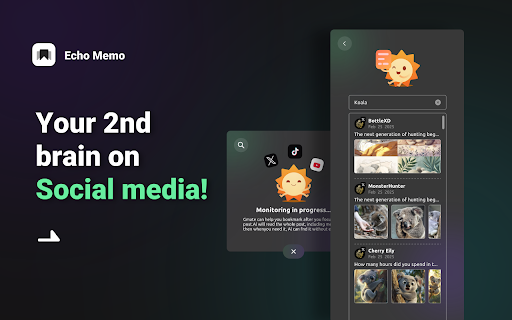


Echo Memo extension is for managing social media links. With ai powered multi-media understanding and semantic search. ≡Features -📺 Bookmark: Save links from tweets, TikTok, and YouTube (more platforms coming soon!). 📚 Manage: AI will analyzes and memorizes text, images, and videos to help organize content in a multimodal way. 🔍 Search: Easily retrieve saved content using AI-powered semantic search—describe an image, topic, or keyword, and find what you need. 📤 Export: Download your saved links for easy access and backup. ≡Usage Stop juggling bookmarks across different platforms! Enhance your social media content collection with Gmate Bookmark, making it effortless to organize and retrieve! ≡Contact Us 💌 Have feedback or suggestions? Drop us an email—we’d love to hear from you! 😊 The extension will only collect anonymous usage data to help us understand how you use the extension and what features we should work on first.

TimeTrace - Navigate Your Browser History
View your history in a timeline format that shows time spent. Search through website contents as well as title and URL. The only history manager that makes life easier, not harder. Tired of spending hours scrolling through Chrome history trying to find that one website you browsed two weeks ago? Getting frustrated sorting through endless irrelevant websites and irrelevant pop-up sites just to find that one article you viewed roughly two weeks ago? Introducing TimeTrace — your personalized database designed to help you navigate your browsing history like never before. TimeTrace is a web extension that presents all of your browser history as an intuitive and informative timeline. Our extension not only allows you to see exactly how much time you’ve spent on each website and better understand your browsing habits, but it also allows you to search for the content of any site you've browsed. Features include: - A powerful search bar that allows you to search browsed website content in addition to site title and URL. - A continuous timeline that shows all browser activity and time spent on each website. - Timeline automatically folds URLs from the same domain together, with the option of hiding irrelevant browsing activity (hide sites visited for less than 5s). - Easily go to any day that has browsing history and view your timeline. We are currently working on automatic AI summaries for timeline events. In the near future, we will be offering an AI co-pilot that helps you find any content on any website you’ve ever browsed using TimeTrace. TimeTrace does not store any user personal information. All user data are stored locally. For more information, please view our privacy policy: https://docs.google.com/document/d/12rHAdt82dFMD0kItUu2Y1aHOkg0b7LzJzEfgLlY5SIo/edit?usp=sharing

Ask Bar: AI Actions on Every Page
AI that understands the page. Summarize, explain, analyze screenshots, and turn insights into actions. From Any Page to a Finished Outcome—Without Switching Tabs Ask Bar turns your browser into an always-available AI companion. It lives in a small, fast panel and understands what you’re looking at in real time. Instead of copying text into another tab, Ask Bar reads the page with you, answers in context, and helps you turn information into outcomes—right where you’re working. Whether you’re scanning a product page, reading a long article, reviewing a design, or debugging in technical documentation, Ask Bar helps you move from “What does this mean?” to “What should I do next?” without breaking focus. Page Context Ask Bar understands the structure of the page you’re on: headings, sections, and on-page content. Ask questions like: * “Summarize this page in bullet points.” * “What are the key claims and what evidence supports them?” * “Compare these options and recommend one based on my criteria.” * “Explain this code block and point out possible issues.” Snap Screen (Visual Intelligence) Capture any chart, table, UI, or design element and Ask Bar will interpret it. This is ideal for content that isn’t easily copyable: screenshots, graphs, dashboards, and complex layouts. Ask things like: * “What does this chart imply over time?” * “Extract the key numbers and trends.” * “What is the main difference between these two UI states?” * “Turn this table into a clean summary.” Powerful capabilities, right where you browse * PDF Mastery: Open a PDF and talk to it like a conversation. Get summaries, key findings, and quick explanations from dense manuals, reports, and papers. * Live Web Research with citations: Verify facts using up-to-date sources and get citations when reliability matters. * Model Freedom: Switch between leading AI models (Gemini, Claude, ChatGPT, Grok, DeepSeek) to match the job—fast answers, deeper reasoning, or different writing styles. * Seamless Continuity: Your conversation follows you across tabs and sites, so you can keep momentum while researching, comparing, and drafting. Agentic by design (integrations coming soon) Ask Bar is not meant to stop at “here’s the answer.” The goal is to help you finish the task. Upcoming integrations are designed to make Ask Bar an agentic layer across your workflow: With these integrations, Ask Bar is built to help you do things like: * Turn what you’re reading into an email draft and prepare it for Gmail * Convert meeting notes or a page summary into tasks in Asana/Jira * Summarize a Slack thread and generate a clean recap for your team * Convert key data into a Google Sheets-ready format * Turn a bug report into a GitHub issue or a PR checklist * Create structured project notes in Notion * Draft customer updates and support responses for HubSpot/Zendesk/Intercom Who Ask Bar is for * Developers: Understand and debug code in place on GitHub, StackOverflow, and technical docs. * Researchers & Students: Summarize papers and PDFs, verify claims with citations, and organize findings faster. * Content Creators: Turn any page into output—threads, posts, scripts, briefs, and email summaries. * Analysts: Extract insights from charts and tables trapped in screenshots and dashboards. * Smart Shoppers: Compare specs, summarize negative reviews, and make faster decisions on product pages. Privacy & security Ask Bar is built with privacy-first principles. * Zero Data Logging: Your chat messages and page context are not processed, stored, or logged on our servers. * API keys stay local: Stored in chrome.storage.local and never synced to any server. * Secure architecture: Content scripts never access your secret keys. API calls run in the browser’s secure background (service worker) layer. Note: Ask Bar requires your own API key from OpenAI, Anthropic, or Google. We do not provide paid models for free.

Notion TreeView
Visualize Notion tasks as tree hierarchies with progress tracking Provide Linux/Xmind/Git/Markdown view to help monitor and track progress

Pincone
Share links and knowledge, privately or with a team. The Pincone extension allows you to easily grab any link in your browser and add it to your Pincone, without visiting the Pincone website, so you can easily get back to it later. The extension requires having a Pincone account, which you can create on pincone.com.
